Key Terms — Clustering
Clustering Key
A user-defined set of columns (or expressions) used by Snowflake to co-locate related data in the same micro-partitions for better pruning.
Cluster Depth
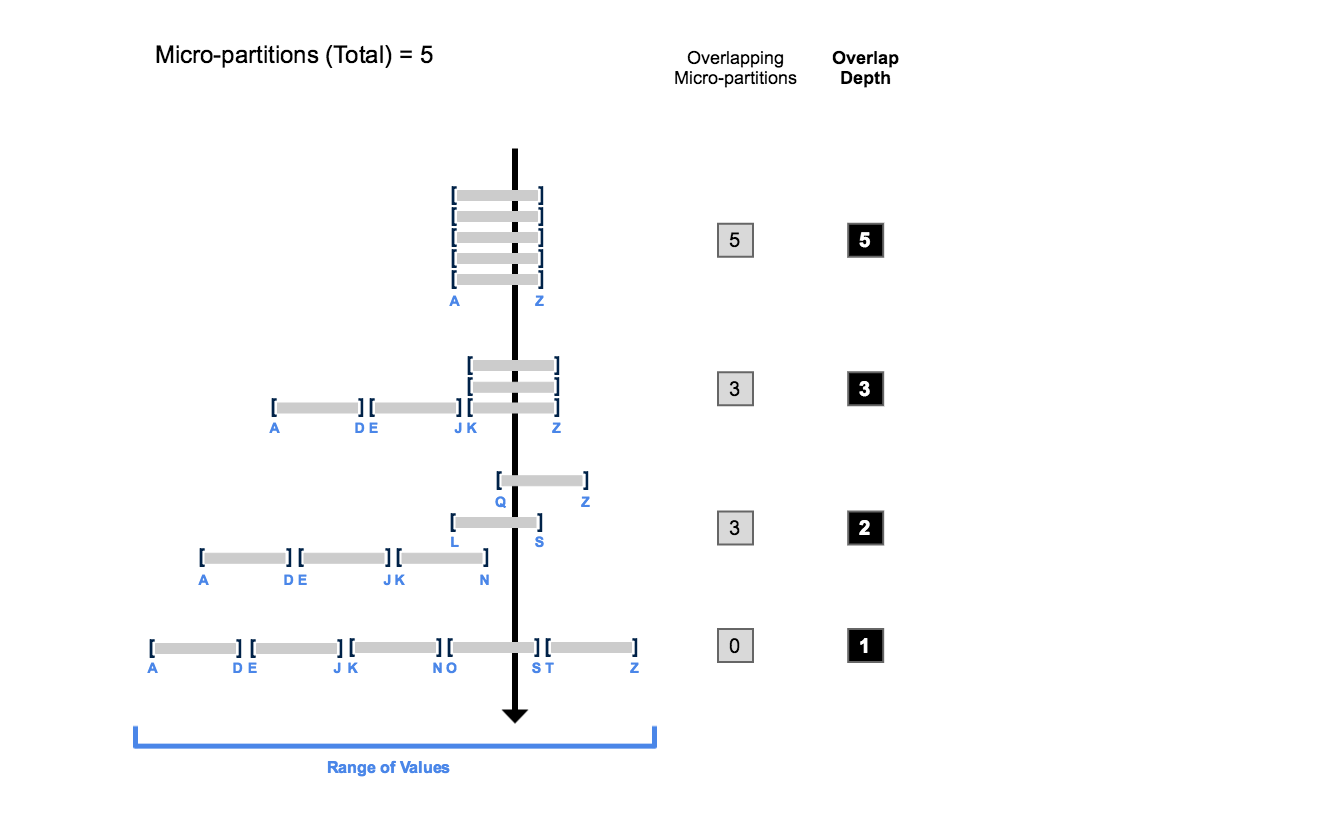
A metric that measures how many overlapping micro-partitions exist for a clustering key's values. Lower depth = better clustering.
Automatic Clustering
A serverless Snowflake service that continuously re-clusters data in the background. Credits charged per TB reclustered.
Natural Clustering
Data is naturally ordered by insertion order. Tables loaded chronologically are naturally clustered on timestamp columns.
SYSTEM$CLUSTERING_INFORMATION
Built-in function that returns clustering metadata including cluster depth, total partitions, and partition overlap for a table.
Why Clustering Matters
Micro-partition pruning is Snowflake’s most impactful optimisation. When data is well-clustered on the columns you filter most often, Snowflake can skip the vast majority of partitions — resulting in faster queries and lower credit consumption.
Well-Clustered vs Poorly-Clustered Data
Two diagrams side by side. Left: Well-clustered table where micro-partitions MP1-MP4 each contain a distinct date range (Jan, Feb, Mar, Apr). A WHERE clause for February scans only MP2 — 75% pruning. Right: Poorly-clustered table where each partition MP1-MP4 contains a mix of all months. The same WHERE clause must scan all 4 partitions — 0% pruning. Both have the same data, but clustering makes the difference.
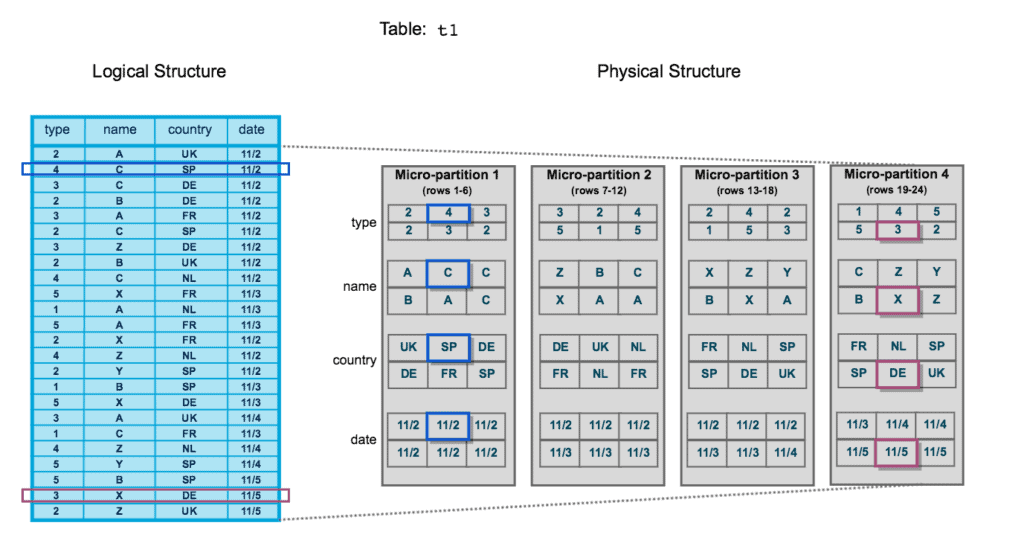
Clustering keys are most valuable on large tables (hundreds of GB to multi-TB) where queries consistently filter on the same column(s). If the Query Profile shows most partitions being scanned despite selective WHERE clauses, clustering is the solution.
Natural Clustering
Data inserted into a Snowflake table is naturally sorted by insertion order. For tables loaded chronologically (e.g., daily batch loads of events), data is naturally clustered on timestamp columns.
If your queries predominantly filter by date/time and your data is loaded in chronological order, you may not need an explicit clustering key at all. Snowflake’s natural ordering already provides good pruning. Check pruning stats in the Query Profile before adding keys.
Cluster Depth
Cluster depth measures how overlapping micro-partitions are for a given column’s value range. Lower depth = better clustering.
1-- Check clustering information for a table and column2SELECT SYSTEM$CLUSTERING_INFORMATION('sales.orders', '(order_date)');34-- Returns JSON with:5-- cluster_depth: average overlap depth (lower = better)6-- total_partition_count: total micro-partitions7-- total_constant_partition_count: partitions with single distinct value8-- average_overlaps: average number of overlapping partitions910-- Check depth for multi-column key11SELECT SYSTEM$CLUSTERING_INFORMATION('sales.orders', '(region, order_date)');1213-- Quick numeric depth check14SELECT SYSTEM$CLUSTERING_DEPTH('sales.orders', '(order_date)');Cluster Depth Visualisation
Diagram showing micro-partitions as horizontal bars on a number line representing column values. Well-clustered: bars are non-overlapping or minimally overlapping — cluster depth = 1. Poorly-clustered: bars heavily overlap, requiring scans of 4-5 partitions for any single value range — cluster depth = 4-5. Arrow showing that Automatic Clustering moves from high depth to low depth over time.
When to Add a Clustering Key
Should You Add a Clustering Key?
Small tables: Snowflake already scans them efficiently without clustering. Frequently updated tables: constant DML causes continuous reclustering, incurring high serverless credit costs. Very low cardinality columns (booleans, small enums): not enough distinct values to benefit from clustering.
CLUSTER BY Syntax
1-- Add clustering key at table creation2CREATE TABLE sales.orders (3order_id INT,4customer_id INT,5order_date DATE,6region VARCHAR,7total DECIMAL(12,2)8) CLUSTER BY (order_date, region);910-- Add clustering key to existing table11ALTER TABLE sales.orders CLUSTER BY (order_date, region);1213-- Use an expression as clustering key14ALTER TABLE events CLUSTER BY (TO_DATE(event_timestamp));1516-- View current clustering key17SHOW TABLES LIKE 'ORDERS' IN SCHEMA sales;1819-- Drop clustering key20ALTER TABLE sales.orders DROP CLUSTERING KEY;2122-- Manual recluster (prefer Automatic Clustering instead)23ALTER TABLE sales.orders RECLUSTER;In CLUSTER BY (col1, col2), col1 is the primary sort dimension and col2 is secondary. Choose the column used most frequently in WHERE clauses as the first column. A common pattern is CLUSTER BY (date_col, high_cardinality_col).
Automatic Clustering
When you define a clustering key, Snowflake’s Automatic Clustering service continuously re-organises data in the background to maintain optimal clustering.
Setting Up Automatic Clustering
Identify the target table
Choose a large table with poor pruning on frequently filtered columns. Check current cluster depth with SYSTEM$CLUSTERING_INFORMATION.
SELECT SYSTEM$CLUSTERING_INFORMATION('sales.orders', '(order_date)');Add the clustering key
This automatically enables Automatic Clustering. Snowflake begins reclustering in the background using serverless compute.
ALTER TABLE sales.orders CLUSTER BY (order_date, region);Monitor credit consumption
Check how many credits Automatic Clustering is consuming. If costs are excessive, consider whether the clustering key is appropriate.
SELECT * FROM SNOWFLAKE.ACCOUNT_USAGE.AUTOMATIC_CLUSTERING_HISTORY
WHERE start_time >= DATEADD('day', -7, CURRENT_TIMESTAMP())
ORDER BY credits_used DESC;Verify improvement
Re-check cluster depth and run your typical queries. Confirm improved pruning in the Query Profile.
SELECT SYSTEM$CLUSTERING_DEPTH('sales.orders', '(order_date)');Clustering Keys vs Search Optimisation Service
Clustering Keys vs SOS
Cheat Sheet
Clustering Keys Quick Reference
Key Commands
AddDropCheckDepthManualHistoryBest Practices
SizeColumnsExpressionsAvoidPractice Quiz
A 5 TB table filtered on region and order_date shows 95% of partitions scanned in Query Profile. What is the BEST first action?
Which Snowflake service continuously maintains clustering in the background without a user warehouse?
A table has CLUSTER BY (region). The region column has only 4 distinct values. Is this an effective clustering key?
Flashcards
What does cluster depth measure?
Cluster depth measures how many overlapping micro-partitions exist for a clustering key's values. Lower depth = better clustering = better pruning. Check with SYSTEM$CLUSTERING_INFORMATION or SYSTEM$CLUSTERING_DEPTH.
What is the difference between natural clustering and explicit clustering keys?
Natural clustering: data ordered by insertion time automatically. Free. Explicit clustering keys: user-defined columns for Snowflake to sort data by — enables Automatic Clustering (serverless credit cost). Natural clustering works well for time-series; explicit keys needed when queries filter on non-time columns.
What are the credit implications of Automatic Clustering?
Automatic Clustering runs as a serverless service — no user warehouse needed. Credits are consumed per TB of data reclustered. Initial reclustering of a large table can be expensive. Monitor with AUTOMATIC_CLUSTERING_HISTORY view.
Can you use expressions in a CLUSTER BY definition?
Yes. CLUSTER BY (TO_DATE(timestamp_col)) is valid. Expressions are evaluated and the result is used for clustering. Useful for clustering high-precision timestamps by date only.
What is the relationship between clustering and the Search Optimisation Service?
They are complementary, not alternatives. Clustering improves range query pruning (WHERE date BETWEEN x AND y). SOS accelerates point lookups (WHERE id = 123, ILIKE). Both can be active on the same table. SOS requires Enterprise+.
Resources
Next Steps
Reinforce what you just read
Study the All flashcards with spaced repetition to lock it in.