Caching Mechanisms
Snowflake’s caching architecture is one of the most frequently tested topics on the COF-C02 exam. Unlike traditional databases that rely on a single buffer pool, Snowflake operates three independent caching layers, each serving a different purpose, persisting for a different duration, and carrying different cost implications. Mastering all three — and understanding exactly when each fires and when it does not — is essential for both the exam and real-world performance optimisation.
Key Terms — Caching Mechanisms
Result Cache
A centralised, Cloud Services-layer store that holds the complete result set of every successfully executed query for up to 24 hours. Served at zero credit cost when a cache hit occurs.
Local Disk Cache
Per-virtual-warehouse SSD storage that caches raw columnar micro-partition data fetched from cloud object storage. Persists only while the warehouse is running.
Metadata Cache
A persistent, Snowflake-managed store in the Cloud Services layer that holds table and column statistics — row counts, min/max values, null counts, and distinct value estimates — used for query planning and pruning.
Cache Hit
The condition where a query or data request is satisfied entirely from a cache layer without accessing underlying cloud storage or re-executing compute.
Cache Invalidation
The process by which a cached entry is marked stale or removed. For the result cache, invalidation occurs when underlying table data changes via DML or DDL.
Cache Warming
The process of populating the local disk cache by executing queries that bring micro-partition data from cloud storage into warehouse SSD storage.
Non-Deterministic Function
A SQL function that can return different results on successive calls with identical inputs — for example, CURRENT_TIMESTAMP(), RANDOM(), and UUID_STRING(). Queries containing these functions cannot be served from the result cache.
Micro-Partition
Snowflake's internal storage unit. Each micro-partition is a contiguous, columnar, compressed file of approximately 50–500 MB of uncompressed data. Caching operates at this granularity.
Cloud Services Layer
Snowflake's always-on control plane responsible for authentication, query parsing and optimisation, metadata management, and hosting the result cache and metadata cache.
Serverless Credits
A credit-consumption model for Snowflake background services (such as Automatic Clustering and Snowpipe) that do not require a user-managed virtual warehouse.
Why Caching Matters on the Exam
The COF-C02 exam regularly presents scenarios where a candidate must identify which cache layer is responsible for a performance outcome, or explain why a cache did not fire. Common question patterns include:
- A query returns instantly the second time — which cache is responsible?
- A warehouse is suspended overnight — what happens to cached data?
- Two different warehouses run the same query — do they share a cache?
- A query uses
CURRENT_TIMESTAMP()— will the result cache help?
Understanding the answers to these questions requires a thorough grasp of all three layers.
The COF-C02 exam tests each of the three cache layers separately. You must be able to distinguish between them by: where they live (Cloud Services vs warehouse SSD), how long they persist, what they store, and what invalidates them. Confusing the result cache with the local disk cache is one of the most common candidate errors.
The Three-Layer Caching Architecture
Snowflake Three-Layer Caching Architecture
A layered architectural diagram showing the three independent caching mechanisms in Snowflake. At the top sits the Cloud Services Layer, which houses two of the three caches: the Result Cache (Query Result Cache) shown as a large repository storing complete result sets from every executed query, retained for up to 24 hours, and the Metadata Cache shown as a database of table statistics including row counts, min/max values, null counts, and distinct value estimates. Below the Cloud Services layer sits the Compute Layer containing multiple independent Virtual Warehouses (depicted as separate server clusters). Each virtual warehouse has its own Local Disk Cache (SSD) shown as a fast storage layer attached to the warehouse. Arrows show the flow: a client query first checks the Result Cache in Cloud Services. On a miss, the Cloud Services layer routes the query to a Virtual Warehouse. The Virtual Warehouse checks its Local Disk Cache (SSD). On a miss at the SSD layer, the warehouse fetches micro-partition files from the Remote Cloud Storage (shown at the bottom as an object store — S3, Azure Blob, or GCS). The fetched data is written into the Local Disk Cache for future reuse. The Metadata Cache feeds into the query optimiser in Cloud Services to enable partition pruning before any data is read. A key annotation indicates that the Result Cache and Metadata Cache are centralised and shared across the account, while Local Disk Cache is strictly per-warehouse and is lost on suspension.
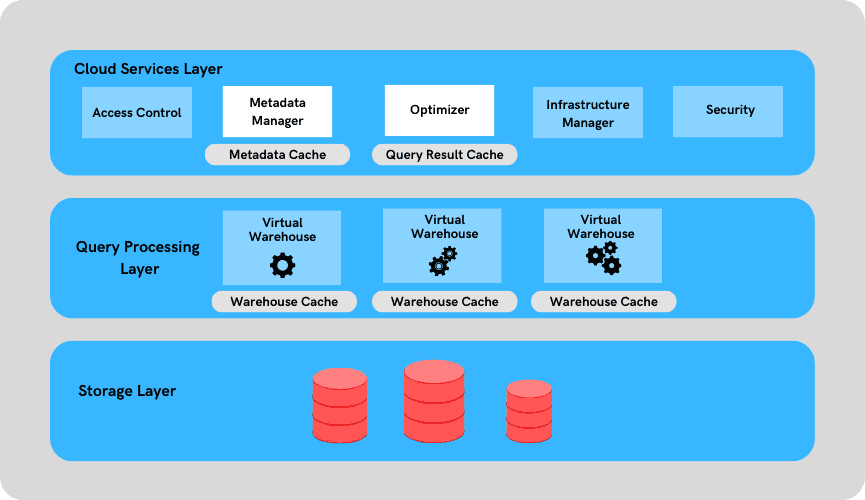
The three layers operate independently and serve different stages of query execution:
| Cache Layer | Location | What Is Stored | Duration | Cost When Hit |
|---|---|---|---|---|
| Result Cache | Cloud Services | Complete result sets | Up to 24 hours | Zero credits |
| Local Disk Cache | Virtual Warehouse SSD | Raw micro-partition data | While warehouse is running | Reduced credits vs cloud read |
| Metadata Cache | Cloud Services | Table/column statistics | Persistent (Snowflake managed) | Zero credits |
Layer 1 — Result Cache (Query Result Cache)
The result cache is the first cache layer checked for any incoming query. When Snowflake receives a SQL statement, the Cloud Services layer computes a fingerprint of the query text and checks whether an identical result set already exists in the result cache.
How the Result Cache Works
- The user submits a SQL query.
- Cloud Services parses the query and computes a cache key from the exact SQL text (including whitespace and case).
- If a matching entry exists in the result cache and is still valid (not invalidated by DML/DDL on the underlying tables), the result set is returned immediately.
- No virtual warehouse is activated. Zero compute credits are consumed.
- If no cache hit, the query proceeds to compute execution and the result is stored in the result cache upon completion.
Result Cache Hit vs Miss Decision Flow
A detailed decision-tree flowchart illustrating the result cache lookup process for every incoming Snowflake query. The flow starts with a client submitting a SQL query to Snowflake Cloud Services. The first decision diamond asks: 'Is the SQL text byte-for-byte identical to a previously cached query, including case and whitespace?' If No, the flow branches to 'Cache Miss — Route to Virtual Warehouse for execution.' If Yes, a second decision diamond asks: 'Has the result cache entry been invalidated by DML or DDL on the underlying tables since the result was cached?' If Yes (i.e., data has changed), the flow branches to Cache Miss. If No, a third decision diamond asks: 'Is the cached result less than 24 hours old?' If No, Cache Miss. If Yes, a fourth decision diamond asks: 'Does the query contain non-deterministic functions such as CURRENT_TIMESTAMP, RANDOM, UUID_STRING, or SEQ?' If Yes, Cache Miss. A fifth decision diamond asks: 'Is the user executing the query operating under the same role context as when the result was originally cached?' If No, Cache Miss. If all checks pass, the flow reaches 'Cache Hit — Return result set immediately, zero compute credits consumed.' The Cache Miss path shows the query going to a virtual warehouse, executing against micro-partitions, and storing the new result in the result cache for future reuse, with a timestamp and table change-detection token saved alongside it.
Result Cache Rules — Exam Critical
All five of the following conditions must be true for a result cache hit to occur:
- The SQL text must be byte-for-byte identical — same case, same whitespace, same schema qualification.
- The cached result must be less than 24 hours old.
- The underlying tables must not have been modified by DML or DDL since the result was cached.
- The query must not contain non-deterministic functions (CURRENT_TIMESTAMP, RANDOM, UUID_STRING, SEQ, etc.).
- The executing user must have the same role context as the original query. If any one of these conditions fails, Snowflake falls through to full query execution.
What the Result Cache Stores and Where
The result cache lives in the Cloud Services layer, meaning it is:
- Centralised — shared across all virtual warehouses in the account
- Account-scoped — multiple warehouses or users can benefit from a result cached by any warehouse
- Transparent — no user configuration is required; it is always active
The cache entry stores the complete result set. For very large result sets, this can consume significant Cloud Services storage, but this is managed entirely by Snowflake and has no user-visible cost impact.
Non-Deterministic Functions — Why They Block Caching
A non-deterministic function is one whose output can differ between calls even when given the same inputs. Because Snowflake cannot guarantee that re-serving a cached result would be correct (the function might produce a different value today), any query containing such a function is ineligible for result caching.
1-- These queries CANNOT be served from the result cache2-- because they contain non-deterministic functions.34-- CURRENT_TIMESTAMP returns a different value every second5SELECT order_id, CURRENT_TIMESTAMP() AS run_time6FROM orders7WHERE order_date = '2024-01-15';89-- RANDOM() produces a new random value on every execution10SELECT TOP 100 customer_id, RANDOM() AS sample_weight11FROM customers;1213-- UUID_STRING generates a unique identifier each call14SELECT UUID_STRING() AS batch_id, COUNT(*) AS row_count15FROM transactions;1617-- SEQ (sequence objects) advance the sequence each call18SELECT MY_SEQ.NEXTVAL, product_name19FROM products;2021-- -------------------------------------------------------22-- These queries CAN be served from the result cache23-- (deterministic, no DML on underlying tables since last run)2425SELECT COUNT(*) FROM orders WHERE order_date = '2024-01-15';2627SELECT region, SUM(revenue) AS total_revenue28FROM sales29GROUP BY region30ORDER BY total_revenue DESC;3132SELECT customer_id, first_name, last_name33FROM customers34WHERE country = 'GB';SHOW Commands and the Result Cache
SHOW commands (e.g., SHOW TABLES, SHOW SCHEMAS, SHOW WAREHOUSES) retrieve metadata from the Cloud Services layer. These commands can benefit from the result cache in a similar fashion to standard queries, and they do not require a running virtual warehouse because they operate entirely within the Cloud Services layer.
Layer 2 — Local Disk Cache (Data Cache / Warehouse Cache)
The local disk cache is fundamentally different from the result cache. Rather than storing final query results, it stores raw columnar micro-partition data — the actual files fetched from cloud object storage (S3, Azure Blob, or GCS). This cache lives on the SSD storage attached to each virtual warehouse’s compute nodes.
How the Local Disk Cache Works
When a virtual warehouse executes a query, it must fetch the relevant micro-partition files from cloud object storage. These fetches are slower than reading from local SSD. Snowflake automatically caches the fetched micro-partition data on the warehouse’s SSD. On the next query that requires the same micro-partitions, Snowflake reads from SSD rather than cloud storage — significantly faster.
Local Disk Cache — Warm vs Cold Warehouse Behaviour
A side-by-side comparison diagram illustrating the difference between a cold warehouse (no local disk cache) and a warm warehouse (populated local disk cache). On the left side, labelled 'Cold Warehouse — First Query After Resume', a timeline shows a client query arriving at a virtual warehouse. The warehouse has an empty SSD cache (shown as a grey empty box). The warehouse sends fetch requests to Remote Cloud Storage (S3/Azure/GCS). Multiple micro-partition files (shown as coloured blocks P1, P2, P3, P4, P5) are transferred over the network from cloud storage to the warehouse's SSD. The query then reads from the freshly populated SSD. An annotation shows 'High latency — cloud storage network fetch required for every micro-partition'. On the right side, labelled 'Warm Warehouse — Subsequent Query on Same Data', the same client query arrives. The warehouse SSD is now shown as populated with the same micro-partition blocks P1-P5 (coloured green to indicate they are cached). The query reads directly from SSD without touching cloud storage. An annotation shows 'Low latency — data served from local SSD, no cloud storage fetch'. At the bottom of both sides, a critical note states: 'Local Disk Cache is LOST when the warehouse is suspended or terminated. The next resume starts with a cold cache.' A separate annotation in the centre highlights: 'Two different warehouses NEVER share local disk cache — each warehouse has its own independent SSD layer.'
Key Characteristics of the Local Disk Cache
The local disk cache is strictly per-virtual-warehouse. Two warehouses running the same query against the same table do not share local disk cache. Each warehouse must independently warm its own cache. Additionally, the local disk cache is entirely lost when a warehouse is suspended or terminated — the next resume starts with a completely cold cache.
Cache persistence:
- Persists as long as the warehouse remains in a Running state
- Lost immediately on Suspend or Terminate
- Multi-cluster warehouses: each compute cluster within a multi-cluster warehouse maintains its own SSD cache
Cache size:
- Determined by the warehouse size (larger warehouses have more nodes with more aggregate SSD capacity)
- Not user-configurable directly; scales with warehouse size selection
Cache eviction:
- Uses an LRU (Least Recently Used) eviction policy when SSD capacity is reached
- Older, less-frequently-accessed micro-partition data is evicted first
Cache Warming Strategies
Because the local disk cache is lost on suspension, workload patterns and auto-suspend settings have a direct impact on cache effectiveness:
Optimising Local Disk Cache Warming for Repeated Workloads
Identify Repeated Query Patterns
Use QUERY_HISTORY in the ACCOUNT_USAGE schema to identify which tables and columns are queried most frequently by your workload. Tables that are queried many times per hour benefit most from cache warming.
SELECT
  query_text,
  COUNT(*) AS execution_count,
  AVG(bytes_scanned) AS avg_bytes_scanned,
  AVG(percentage_scanned_from_cache) AS avg_cache_pct
FROM SNOWFLAKE.ACCOUNT_USAGE.QUERY_HISTORY
WHERE start_time >= DATEADD('day', -7, CURRENT_TIMESTAMP())
GROUP BY query_text
ORDER BY execution_count DESC
LIMIT 50;Tune Auto-Suspend to Match Workload Patterns
For bursty workloads where queries arrive in waves, increase the auto-suspend delay to keep the warehouse running (and its cache warm) between query bursts. For overnight batch jobs that run once, a shorter auto-suspend is acceptable.
-- Keep warehouse alive for 10 minutes of idle time
-- to preserve the warm cache between query bursts
ALTER WAREHOUSE my_analytics_wh
SET AUTO_SUSPEND = 600; -- 600 seconds = 10 minutesUse Dedicated Warehouses for Hot Datasets
Assign a dedicated virtual warehouse to workloads that repeatedly query the same set of tables (e.g., a reporting warehouse for a specific data mart). This ensures cache warming efforts are not diluted by unrelated queries from other teams.
Monitor Cache Hit Rates in Query Profile
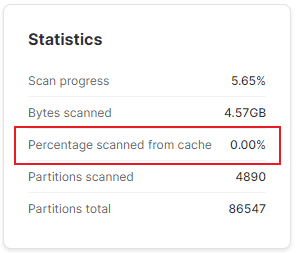
Open the Query Profile for any query in Snowsight. The 'Bytes Scanned from Cache' metric shows what percentage of data was read from local SSD vs cloud storage. A high cache percentage indicates a warm warehouse and efficient cache utilisation.
-- Alternatively, query QUERY_HISTORY for cache statistics
SELECT
  query_id,
  query_text,
  bytes_scanned,
  bytes_written,
  ROUND(
    (bytes_scanned - bytes_written_to_result) /
    NULLIF(bytes_scanned, 0) * 100, 2
  ) AS estimated_cache_pct
FROM SNOWFLAKE.ACCOUNT_USAGE.QUERY_HISTORY
WHERE start_time >= DATEADD('hour', -24, CURRENT_TIMESTAMP())
ORDER BY bytes_scanned DESC
LIMIT 20;Consider Warehouse Sizing for Cache Capacity
Larger warehouse sizes have more compute nodes and therefore more aggregate SSD storage. If your dataset is very large and cache misses are frequent despite a warm warehouse, consider scaling up the warehouse size to increase total SSD cache capacity.
Layer 3 — Metadata Cache (Cloud Services Layer)
The metadata cache is the most fundamental and persistent of the three layers. It is maintained entirely by Snowflake in the Cloud Services layer and stores statistical metadata about every table and its micro-partitions.
What the Metadata Cache Stores
For every table in Snowflake, the metadata cache maintains:
- Row count — total number of rows in the table
- Min / Max values — minimum and maximum values per column per micro-partition (used for pruning)
- Null count — number of null values per column per micro-partition
- Distinct value estimates — approximate cardinality per column
- Micro-partition file references — locations of all micro-partition files in cloud storage
How Queries Use the Metadata Cache
Certain query patterns can be answered entirely from the metadata cache, requiring no virtual warehouse activation and consuming zero compute credits:
SELECT COUNT(*) FROM table_namewith no WHERE clause — the row count is in metadataSELECT MIN(clustering_key_col), MAX(clustering_key_col) FROM table_name— min/max from metadataSHOW TABLES,SHOW SCHEMAS,SHOW COLUMNS— entirely metadata-servedDESCRIBE TABLE table_name— metadata only
These are common exam distractors: candidates may assume a warehouse is needed, but these queries bypass compute entirely.
Metadata Cache and Query Pruning
The metadata cache is what enables micro-partition pruning — Snowflake’s most impactful performance optimisation. Before a virtual warehouse reads a single byte of data, the Cloud Services optimiser consults the metadata cache to determine which micro-partitions cannot possibly contain rows matching the WHERE clause.
For example, if a query filters on order_date = '2024-03-15' and a particular micro-partition’s metadata shows min_date = '2024-05-01' and max_date = '2024-07-31', that micro-partition is pruned (skipped) without being read. This happens at the Cloud Services layer before the warehouse executes.
Metadata cache persistence: The metadata cache is persistent and managed by Snowflake. It is updated automatically whenever DML (INSERT, UPDATE, DELETE, MERGE) or DDL operations occur on a table. Unlike the result cache and local disk cache, users have no mechanism to invalidate or manage the metadata cache — Snowflake handles this entirely.
Cache Comparison — Side by Side
Result Cache vs Local Disk Cache
Cache Invalidation Rules
A frequently tested scenario: a query runs, returns results in 100ms (result cache hit). Then someone runs an INSERT on the underlying table. The very next identical query will NOT hit the result cache — the DML has invalidated it. This catches candidates who assume the 24-hour window is absolute.
Result Cache Invalidation
The result cache is invalidated for a specific query when:
- Any DML (INSERT, UPDATE, DELETE, MERGE, COPY INTO) is executed on any table referenced by the query
- DDL changes to the table (ALTER TABLE, DROP COLUMN, etc.)
- 24 hours have elapsed since the result was cached (even without any data changes)
Local Disk Cache Invalidation
The local disk cache is lost when:
- The virtual warehouse is suspended (even briefly)
- The virtual warehouse is terminated
- For multi-cluster warehouses: when an individual cluster scales down
Metadata Cache Invalidation
The metadata cache is not invalidated by users — Snowflake updates it automatically and continuously. When DML occurs, the metadata for affected micro-partitions is updated immediately. The metadata cache is never “stale” from a correctness standpoint.
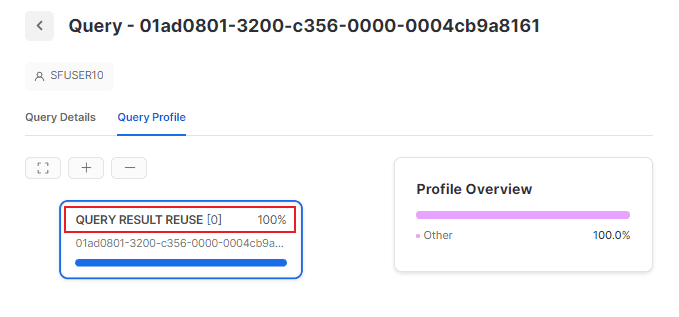
1-- ============================================================2-- RESULT CACHE TESTING3-- ============================================================45-- Run this query first — it executes against the warehouse6SELECT region, SUM(sales_amount) AS total_sales7FROM fact_sales8WHERE sale_date BETWEEN '2024-01-01' AND '2024-03-31'9GROUP BY region10ORDER BY total_sales DESC;1112-- Run the EXACT same query again — should hit result cache13-- Check Query Profile: "Query Result Reuse" indicator14SELECT region, SUM(sales_amount) AS total_sales15FROM fact_sales16WHERE sale_date BETWEEN '2024-01-01' AND '2024-03-31'17GROUP BY region18ORDER BY total_sales DESC;1920-- Inserting data invalidates the result cache for fact_sales21INSERT INTO fact_sales VALUES (DEFAULT, 'NORTH', 99999, '2024-01-01');2223-- Now the same query will NOT hit result cache — cache invalidated24SELECT region, SUM(sales_amount) AS total_sales25FROM fact_sales26WHERE sale_date BETWEEN '2024-01-01' AND '2024-03-31'27GROUP BY region28ORDER BY total_sales DESC;2930-- ============================================================31-- METADATA CACHE EXAMPLES — NO WAREHOUSE NEEDED32-- ============================================================3334-- COUNT(*) on large table — served from metadata cache35-- No warehouse credit consumption36SELECT COUNT(*) FROM fact_sales;3738-- MIN/MAX on well-clustered column — from metadata39SELECT MIN(sale_date), MAX(sale_date) FROM fact_sales;4041-- ============================================================42-- CHECKING CACHE USAGE IN QUERY HISTORY43-- ============================================================4445SELECT46query_id,47query_text,48execution_status,49-- This column indicates result cache reuse50-- 'true' means the result was served from the result cache51query_tag,52start_time,53end_time,54total_elapsed_time / 1000 AS elapsed_seconds55FROM SNOWFLAKE.ACCOUNT_USAGE.QUERY_HISTORY56WHERE start_time >= DATEADD('hour', -1, CURRENT_TIMESTAMP())57ORDER BY start_time DESC58LIMIT 20;Practical Cache Strategies
Because the result cache requires byte-for-byte identical SQL, teams that generate queries programmatically (via BI tools, dbt, application code) should standardise SQL formatting: consistent capitalisation, whitespace, and schema qualification. Even a trailing space or different alias can prevent a cache hit. Many BI tools have a “SQL normalisation” or “cache key” setting for this purpose.
When to Rely on Each Cache
| Scenario | Best Cache | Strategy |
|---|---|---|
| Dashboard with fixed date-range queries | Result Cache | Standardise SQL; same role for all dashboard users |
| Large fact table scanned repeatedly in one session | Local Disk Cache | Keep warehouse running; increase auto-suspend delay |
| COUNT(*) and simple aggregations | Metadata Cache | No action needed — automatic |
| Ad-hoc analytical queries (different every time) | Local Disk Cache | Warm warehouse; consider dedicated warehouse per team |
| Queries with CURRENT_DATE in WHERE clause | Local Disk Cache | Result cache won’t fire (date changes daily) |
Cheat Sheet — Caching for the Exam
Snowflake Caching — COF-C02 Quick Reference
Result Cache
LocationDurationCredit costSQL matchRole requiredBlocked byShared across warehousesUser config neededLocal Disk Cache
LocationDurationWhat is storedCredit costShared across warehousesInvalidationWarming strategyMulti-clusterMetadata Cache
LocationDurationWhat is storedCredit costUpdatesUsed forCOUNT(*) queriesUser managementKnowledge Check — Quizzes
A BI dashboard runs the same SQL query every 5 minutes using the same Snowflake role. After the first run, subsequent executions return results in under 100 milliseconds. No one has modified the underlying tables. Which cache is responsible?
A virtual warehouse processes a large query that scans 500 GB of data from cloud storage. The warehouse then auto-suspends due to inactivity. Two hours later, the warehouse resumes and runs the same query again. What is the expected behaviour?
Which of the following SQL queries will ALWAYS be ineligible for the result cache, regardless of when it runs or whether the underlying data has changed?
Flashcards — Caching
What are the three caching layers in Snowflake?
1. Result Cache (Query Result Cache) — stores complete result sets in Cloud Services for up to 24 hours, zero credits on hit. 2. Local Disk Cache — stores raw micro-partition data on each warehouse's SSD, persists while warehouse runs. 3. Metadata Cache — stores table/column statistics (row counts, min/max, nulls) in Cloud Services, persistent and Snowflake-managed.
What five conditions must ALL be true for a result cache hit to occur?
1. SQL text must be byte-for-byte identical (case and whitespace sensitive). 2. Cached result must be less than 24 hours old. 3. Underlying tables must not have been modified by DML or DDL since caching. 4. Query must not contain non-deterministic functions (CURRENT_TIMESTAMP, RANDOM, etc.). 5. Executing user must be operating under the same role context as the original query.
What happens to the local disk cache when a virtual warehouse is suspended?
The local disk cache is completely lost. All micro-partition data cached on the warehouse's SSD is discarded. When the warehouse resumes, it starts with a cold cache and must re-fetch all required micro-partitions from cloud object storage on the next query execution.
Do two different virtual warehouses share the local disk cache?
No. The local disk cache is strictly per-warehouse. Each virtual warehouse has its own independent SSD layer. If Warehouse A caches micro-partitions for Table X, Warehouse B cannot access those cached partitions — it must fetch and cache them independently from cloud storage.
Which types of queries can be answered entirely from the metadata cache without activating a virtual warehouse?
Queries answered from metadata with no warehouse needed: SELECT COUNT(*) FROM table with no WHERE clause (row count in metadata), SELECT MIN(col), MAX(col) on clustering key columns (min/max in metadata per partition), SHOW TABLES / SHOW SCHEMAS / SHOW COLUMNS (metadata only), and DESCRIBE TABLE. All of these consume zero compute credits.
Summary
Snowflake’s three caching layers form a tiered defence against unnecessary computation and cloud storage reads:
- Result Cache — the most powerful, serving entire result sets at zero cost, but requiring strict conditions (identical SQL, same role, no DML, no non-deterministic functions, within 24 hours)
- Local Disk Cache — reduces cloud storage I/O by keeping frequently accessed micro-partitions on warehouse SSD, but is per-warehouse and ephemeral (lost on suspend)
- Metadata Cache — always-on, Snowflake-managed statistics that power pruning and answer simple aggregate queries without a warehouse
For the exam, the most critical distinctions are: the result cache is centralised and zero cost; the local disk cache is per-warehouse and ephemeral; and the metadata cache is persistent and automatic. Understanding exactly what invalidates each cache — and when each will NOT fire — is the key to answering exam scenario questions correctly.
Reinforce what you just read
Study the All flashcards with spaced repetition to lock it in.