Search Optimisation Service
The Search Optimisation Service (SOS) is a Snowflake Enterprise-tier feature designed to dramatically accelerate point lookup queries on large tables. Unlike clustering keys — which help range-based scans — SOS is purpose-built for queries that search for specific values in large datasets, such as finding a customer by ID or filtering on a phone number.
Understanding the distinction between SOS, clustering keys, and the result cache is a frequent topic on the SnowPro Core COF-C02 exam.
Key Terms: Search Optimisation Service
Search Optimisation Service
A Snowflake Enterprise feature that builds and maintains a persistent search access path (similar to an index) on table columns to accelerate point lookup queries.
Search Access Path
A persistent structure maintained by Snowflake alongside table data that allows SOS to short-circuit standard partition scanning for qualifying queries.
Point Lookup Query
A query that searches for one or more specific values — e.g. WHERE user_id = 99 or WHERE email IN (...) — rather than scanning a range of rows.
Micro-partition Pruning
Snowflake's default mechanism for skipping irrelevant micro-partitions based on metadata (min/max column values). SOS operates independently of this.
Automatic Clustering
A Snowflake service that keeps micro-partitions sorted on specified cluster keys, improving range-based query pruning. Separate from and complementary to SOS.
Serverless Credits
A compute model where Snowflake manages resources on your behalf. SOS maintenance is billed via serverless credits, not your virtual warehouse.
Equality Predicate
A WHERE clause condition using = or IN operators. This is the primary query type that SOS is optimised to accelerate.
ILIKE
Snowflake's case-insensitive pattern matching operator. SOS supports substring and pattern search using ILIKE and LIKE predicates on configured columns.
Why SOS Exists: The Problem It Solves
Standard Snowflake query performance relies on micro-partition pruning — Snowflake reads the min/max metadata for each micro-partition and skips those that cannot contain the desired values. This works exceptionally well for range queries and sorted data, but breaks down for random point lookups.
Consider a table of 500 million customer records. If you query WHERE customer_id = 'C-00019284', Snowflake must scan potentially thousands of micro-partitions because customer IDs are randomly distributed — no pruning is possible without a sort order on that column.
The Search Optimisation Service solves this by building a persistent search access path — effectively a specialised index structure — that allows Snowflake to identify precisely which micro-partitions contain the target value, skipping the rest entirely.
How SOS Works Internally
Search Optimisation Service Architecture
Files arrive in a stage. Snowflake builds a persistent Search Access Path alongside table micro-partitions. When a point lookup query runs, SOS identifies qualifying micro-partitions, short-circuiting the standard full-partition scan. The warehouse then reads only the identified partitions.
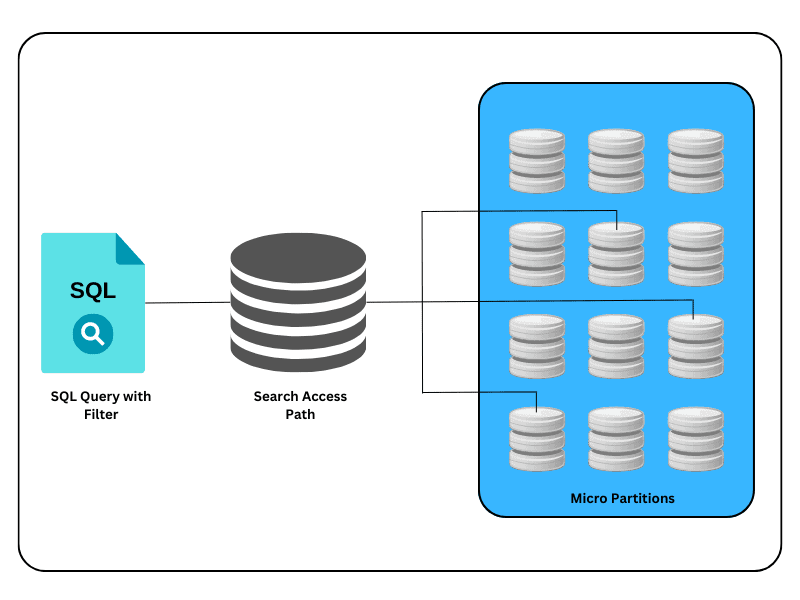
The process works as follows:
- Build Phase — When SOS is enabled on a table, Snowflake’s serverless background compute builds the initial search access path. This is a one-time build cost charged in serverless credits.
- Maintenance Phase — As DML operations (INSERT, UPDATE, DELETE, MERGE) change the table, Snowflake continuously and automatically updates the access path. Each update consumes additional serverless credits.
- Query Phase — When a qualifying query arrives (e.g. a
WHERE id = ?predicate on an SOS-configured column), the query optimiser consults the access path to determine which micro-partitions are relevant. Only those partitions are read by the virtual warehouse.
The search access path is stored separately from the table’s micro-partitions. It consumes additional storage, which is billed at Snowflake’s standard storage rates. Factor this into cost modelling alongside the serverless compute credits for maintenance.
Supported Predicate Types
SOS does not help every query type. The exam tests whether you know exactly which predicates benefit.
SOS Supported vs Unsupported Predicates
SOS accelerates: equality predicates (=), IN lists, ILIKE/LIKE substring search, and geospatial predicates (ST_WITHIN, ST_INTERSECTS). SOS does NOT help: range predicates alone (>, <, BETWEEN), full table scans, JOIN performance, aggregations, or queries already pruning well via clustering keys.
What SOS Accelerates
| Predicate Type | Example | Notes |
|---|---|---|
| Equality | WHERE id = 'ABC123' | Most common use case |
| IN list | WHERE id IN ('A', 'B', 'C') | Can include large IN lists |
| Substring / pattern | WHERE name ILIKE '%john%' | Case-insensitive supported |
| LIKE | WHERE code LIKE 'UK-%' | Prefix and wildcard patterns |
| Geospatial | ST_WITHIN(point, region) | Requires GEOGRAPHY columns |
What SOS Does NOT Help
- Range predicates alone:
WHERE created_at > '2024-01-01'— clustering keys are better here - Full table scans with no selective predicate
- JOIN performance — SOS does not accelerate join operations
- Aggregate queries:
COUNT(*),SUM(),AVG()without selective filters - Queries that already prune well via clustering keys (SOS adds cost without benefit)
The exam may present a scenario with a date range filter — e.g. WHERE order_date BETWEEN '2024-01-01' AND '2024-03-31' — and ask which feature helps most. The answer is clustering keys, not SOS. SOS is for point lookups, not ranges.
Enabling Search Optimisation Service
SOS requires Snowflake Enterprise Edition or higher. It cannot be used on Standard Edition accounts.
Method 1: Enable on All Columns (Full Table)
1-- Enable Search Optimisation Service on all columns2-- Snowflake determines which column types are supported3ALTER TABLE customer_events4ADD SEARCH OPTIMIZATION;56-- Verify configuration7DESCRIBE SEARCH OPTIMIZATION ON TABLE customer_events;Method 2: Enable on Specific Columns and Predicate Types
1-- Enable equality search on specific columns only2ALTER TABLE customer_events3ADD SEARCH OPTIMIZATION ON4 EQUALITY(customer_id, session_id, email)5 SUBSTRING(full_name, description)6 GEO(location_point);78-- Remove SOS from specific columns without disabling entirely9ALTER TABLE customer_events10DROP SEARCH OPTIMIZATION ON11 EQUALITY(session_id);1213-- Remove SOS entirely from the table14ALTER TABLE customer_events15DROP SEARCH OPTIMIZATION;Monitoring SOS
1-- Check SOS configuration and optimised columns2DESCRIBE SEARCH OPTIMIZATION ON TABLE customer_events;34-- View SOS build and maintenance history (serverless credit usage)5SELECT *6FROM TABLE(7INFORMATION_SCHEMA.SEARCH_OPTIMIZATION_HISTORY(8 DATE_RANGE_START => DATEADD('day', -7, CURRENT_DATE()),9 DATE_RANGE_END => CURRENT_DATE()10)11)12ORDER BY start_time DESC;1314-- Confirm SOS is active on a table via SHOW TABLES15SHOW TABLES LIKE 'customer_events';16-- Look for the search_optimization_progress column (100 = fully built)Enabling SOS on the entire table (ADD SEARCH OPTIMIZATION with no column list) can result in unnecessary storage and maintenance costs for columns that are never used in point lookups. Always prefer ADD SEARCH OPTIMIZATION ON EQUALITY(col1, col2) to target only the columns your queries actually filter on.
Step-by-Step: Implementing SOS
Enabling Search Optimisation Service on a Table
Confirm Enterprise Edition
SOS is only available on Enterprise Edition and above. Check your account edition before proceeding.
SELECT SYSTEM$BOOTSTRAP_DATA_REQUEST('ACCOUNT');Identify High-Cardinality Point Lookup Columns
Analyse your query patterns. SOS benefits columns used in equality filters where data is not naturally clustered — e.g. UUID-based IDs, email addresses, phone numbers. Run EXPLAIN on slow queries to confirm full partition scans.
EXPLAIN SELECT * FROM orders WHERE order_uuid = '550e8400-e29b-41d4-a716-446655440000';Enable SOS on Target Columns
Use targeted column-level enablement to control costs. Specify the predicate types you actually use.
ALTER TABLE orders
  ADD SEARCH OPTIMIZATION ON
    EQUALITY(order_uuid, customer_id)
SUBSTRING(customer_name);Monitor the Build Progress
The initial build runs in the background via serverless compute. Track progress using SHOW TABLES.
SHOW TABLES LIKE 'orders';
-- Check search_optimization_progress column (0-100)Validate Query Improvement
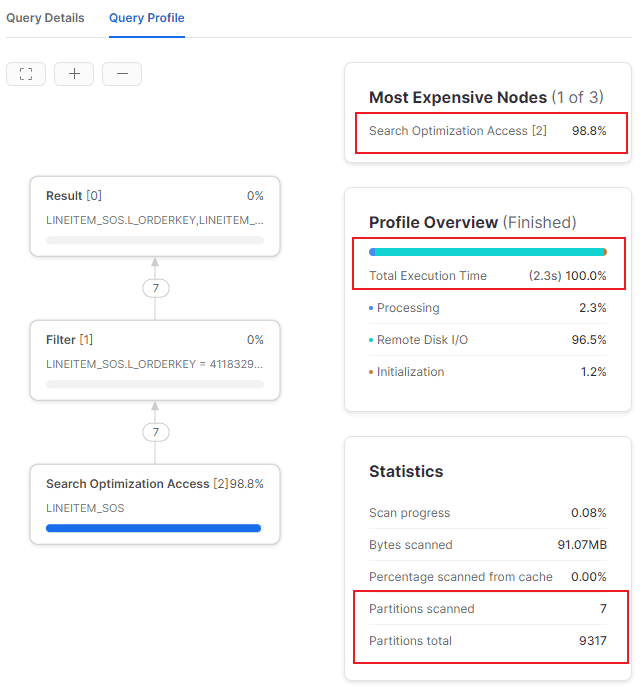
Run your point lookup queries and compare query profiles before and after SOS enablement. Look for reduced 'Partitions scanned' in the Query Profile.
Monitor Ongoing Costs
Query SEARCH_OPTIMIZATION_HISTORY regularly to track serverless credit consumption from maintenance operations as data changes.
SELECT SUM(credits_used) AS total_sos_credits
FROM TABLE(
  INFORMATION_SCHEMA.SEARCH_OPTIMIZATION_HISTORY(
    DATE_RANGE_START => DATEADD('month', -1, CURRENT_DATE()),
    DATE_RANGE_END   => CURRENT_DATE()
  )
);
SOS vs Clustering Keys vs Result Cache
These three features are frequently compared on the exam. They are not mutually exclusive — tables can have both SOS and clustering keys simultaneously.
SOS vs Clustering Keys vs Result Cache
The result cache serves identical query results instantly (free, 24-hour TTL). It helps when the exact same query text is repeated. SOS helps when query structure is the same but values differ — e.g. looking up a different customer ID each time. These two features solve different problems and complement each other.
Cost Breakdown
Many candidates overlook one of the two SOS cost components. The exam may test both:
- Build cost — A one-time serverless credit charge when SOS is first enabled and the initial access path is constructed.
- Maintenance cost — Ongoing serverless credits consumed each time the access path is updated due to DML changes (INSERTs, UPDATEs, DELETEs, MERGEs).
Additionally, the search access path consumes storage, billed at standard Snowflake storage rates.
Query execution itself still uses your virtual warehouse — SOS reduces the data scanned but does not eliminate warehouse usage entirely.
CheatSheet: Search Optimisation Service
Search Optimisation Service — COF-C02 Cheat Sheet
Edition & Requirements
Minimum editionSetup commandTargeted setupRemove SOSSupported Predicates
EqualityIN listSubstringGeospatialNOT Supported
Range predicates aloneFull table scansJOINsAggregationsCost Components
Build costMaintenance costStorageQuery costMonitoring Commands
View configCredit historyBuild progressSOS vs Other Features
SOS vs ClusteringSOS vs Result CacheSOS vs PruningFlashcards: Search Optimisation Service
Which Snowflake edition is required to use the Search Optimisation Service?
Enterprise Edition or higher. SOS is not available on Standard Edition accounts.
What are the two cost components of the Search Optimisation Service?
1. Build cost — one-time serverless credits to construct the initial search access path. 2. Maintenance cost — ongoing serverless credits consumed each time DML changes (INSERTs, UPDATEs, DELETEs) update the access path. Storage for the access path is also billed separately.
A query uses WHERE order_date BETWEEN '2024-01-01' AND '2024-03-31'. Will SOS help this query?
No. SOS does not accelerate range predicates. For date range queries, clustering keys (or Automatic Clustering) are the appropriate feature. SOS is designed for equality predicates, IN lists, and substring pattern matching.
What SQL command removes SOS from a specific column without disabling it on the whole table?
ALTER TABLE t DROP SEARCH OPTIMIZATION ON EQUALITY(column_name); — This removes the access path for the specified predicate type and column while leaving SOS active on other columns.
Can a table have both Search Optimisation Service and Clustering Keys enabled at the same time?
Yes. SOS and clustering keys are complementary and can coexist on the same table. Clustering helps range queries; SOS helps point lookups. Using both together allows the table to efficiently serve both query patterns.
Knowledge Check: Quiz
A data analyst frequently runs queries like: SELECT * FROM users WHERE email = 'user@example.com'; The users table has 800 million rows and email values are randomly distributed. Which feature would most improve this query's performance?
Which of the following queries would NOT benefit from Search Optimisation Service?
A Snowflake architect enables Search Optimisation Service on a large table that receives millions of INSERT and DELETE operations per day. Which cost concern should they flag with stakeholders?
Summary
The Search Optimisation Service fills a specific gap in Snowflake’s performance toolkit. When your workload includes frequent point lookups on high-cardinality, randomly distributed columns — and clustering keys cannot help — SOS delivers dramatic performance improvements by short-circuiting partition scanning.
The key exam takeaways are:
- Edition: Enterprise Edition or higher required
- Use case: Point lookups — equality, IN lists, ILIKE, geospatial
- Not for: Range predicates, JOINs, aggregations, or full table scans
- Costs: Build cost (one-time) + maintenance cost (ongoing, per DML) + storage
- Monitoring:
DESCRIBE SEARCH OPTIMIZATION ON TABLE tandSEARCH_OPTIMIZATION_HISTORY - SOS vs Clustering: Complementary, not competitive — can use both simultaneously
- SOS vs Result Cache: Different problems — varied values vs identical queries
Remember the three-way comparison: Result Cache (identical queries, free, 24h TTL) vs Clustering Keys (range scans, any edition) vs SOS (point lookups, Enterprise+, serverless credit cost). If you see a scenario asking which feature helps a WHERE id = ? query on a 500-million row table with no natural sort order — the answer is SOS.
Reinforce what you just read
Study the All flashcards with spaced repetition to lock it in.