Key Terms — Introduction to Snowflake
SaaS
Software as a Service. Snowflake is a fully managed SaaS platform — no hardware to provision, no software to install or upgrade.
Credit
Snowflake's unit of compute consumption. Credits are consumed based on virtual warehouse size and run time, billed per second with a 60-second minimum.
Virtual Warehouse
An independent compute cluster (MPP) that executes SQL queries. Warehouses scale independently from storage.
Data Cloud
Snowflake's vision: a global network connecting organisations, data providers, and data consumers through a single platform.
Edition
The Snowflake service tier — Standard, Enterprise, Business Critical, or Virtual Private Snowflake (VPS) — each unlocking additional features.
Snowsight
Snowflake's modern web-based UI for writing SQL, visualising data, and managing objects. Replaced the Classic Console.
Organisation
The highest-level container in Snowflake, grouping multiple Accounts. Used for cross-account governance and replication.
Account Identifier
The unique address for a Snowflake account. Format: <org_name>-<account_name> or legacy <locator>.<region>.<cloud>.
What is Snowflake — and Why Does It Exist?
Before Snowflake, data teams faced a painful choice: traditional on-premise warehouses (Oracle, Teradata) that were expensive, inflexible, and slow to scale — or early cloud warehouses (Amazon Redshift, Azure Synapse) that moved to the cloud but still required significant infrastructure management.
Snowflake was founded in 2012 by three data warehouse engineers — Benoit Dageville, Thierry Cruanes, and Marcin Zukowski — who asked a simple question: what if you built a data warehouse from scratch, designed purely for the cloud, with no legacy constraints?
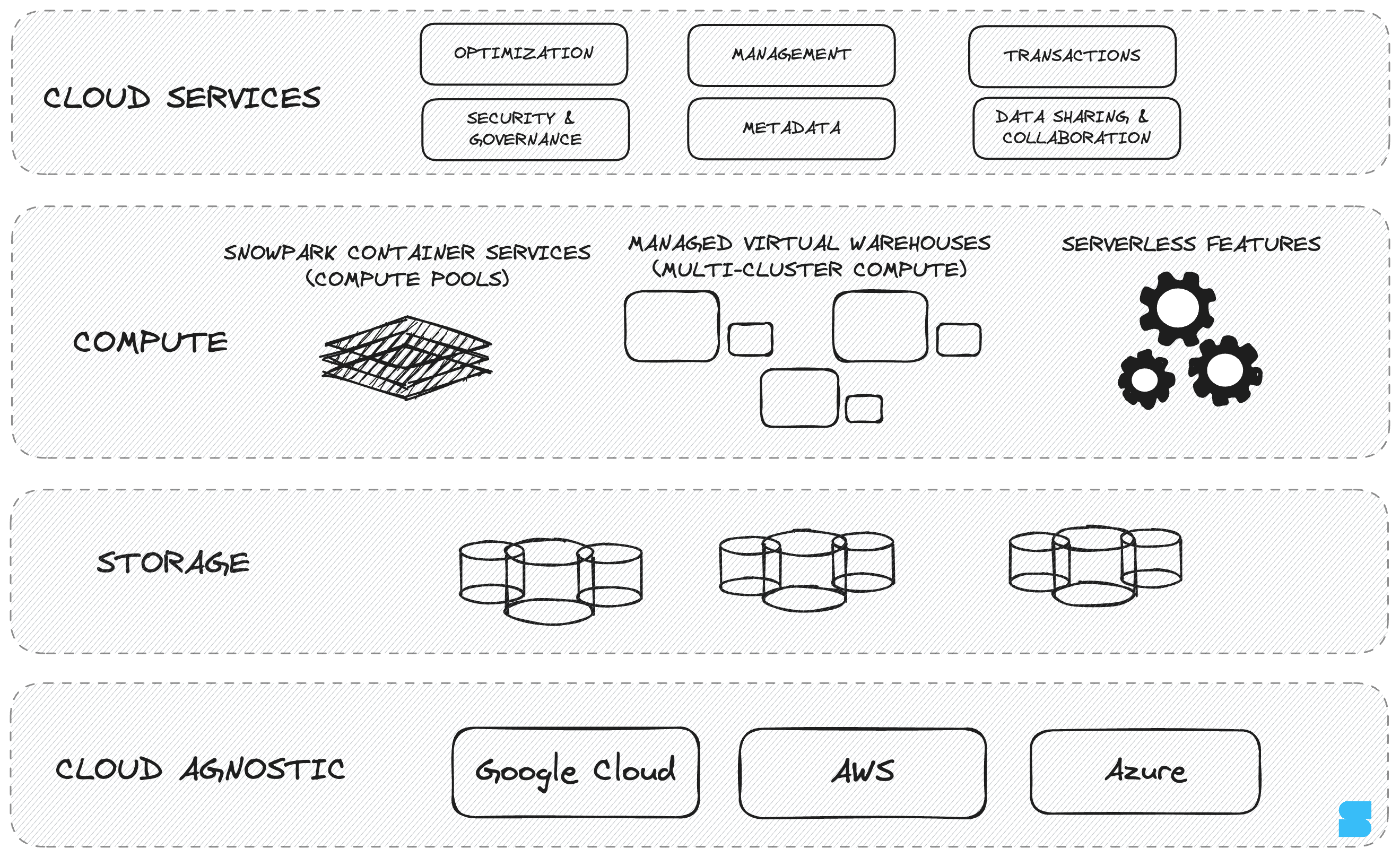
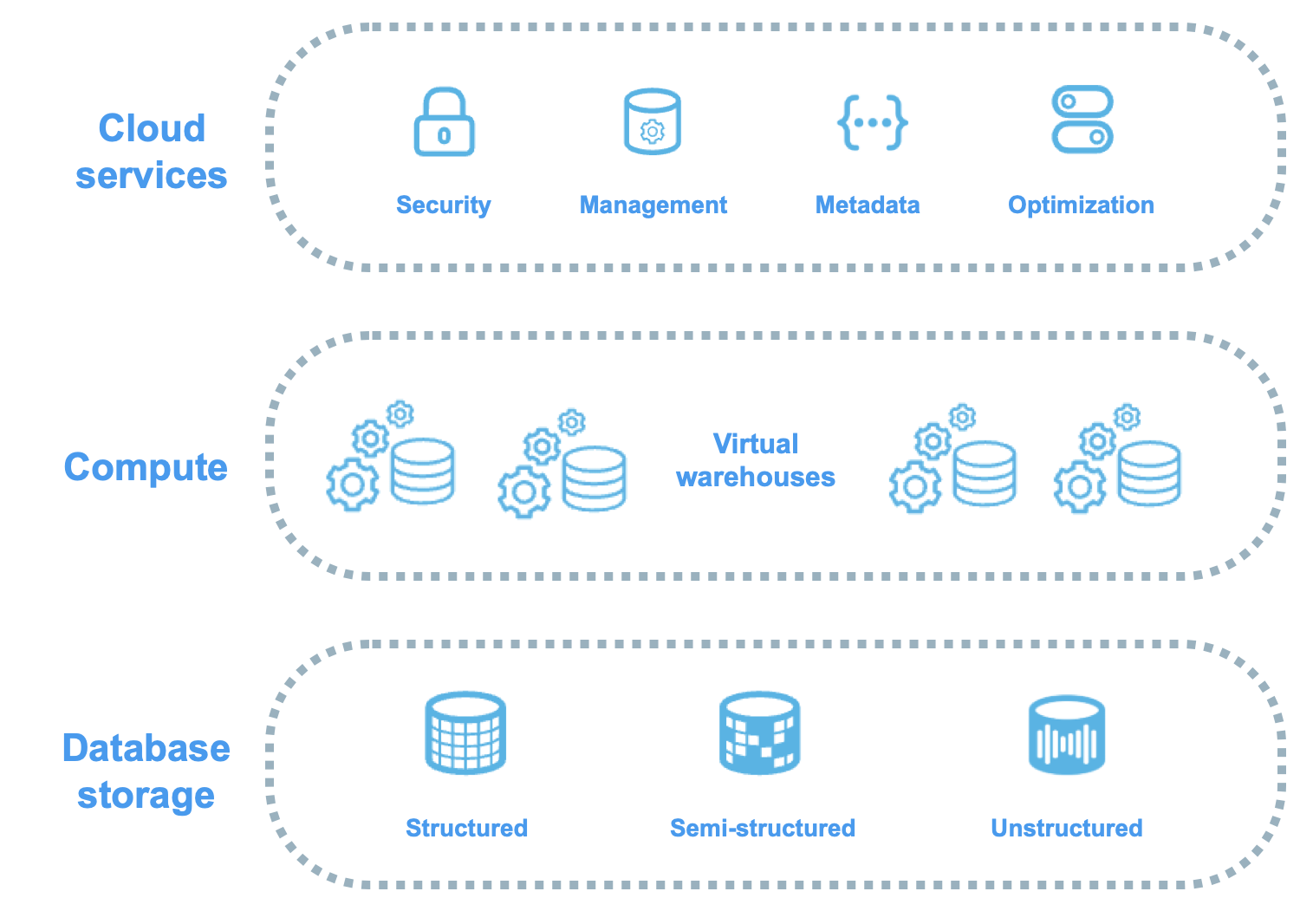
The result was a cloud-native, fully managed SaaS platform that separates storage from compute, handles all infrastructure automatically, and delivers features that were previously impossible or impractical.
Snowflake is a SaaS (Software as a Service) offering — not IaaS or PaaS. Snowflake manages everything: hardware, software, updates, optimisation, and backups. You bring data and queries; Snowflake handles the rest. This distinction is tested in the COF-C02 exam.
The Problem Snowflake Solves
Traditional Warehouses vs. Snowflake
Unlike shared-everything systems (Oracle, SQL Server) or shared-nothing MPP systems (Teradata, Redshift), Snowflake uses a hybrid architecture — shared centralised storage with independent compute clusters. This is the key to its elasticity and multi-user isolation. The full architecture is covered in the next module.
Traditional vs. Snowflake Architecture
Side-by-side comparison: traditional shared-nothing MPP (storage coupled to compute nodes) versus Snowflake's decoupled model with shared centralised storage and independent virtual warehouses
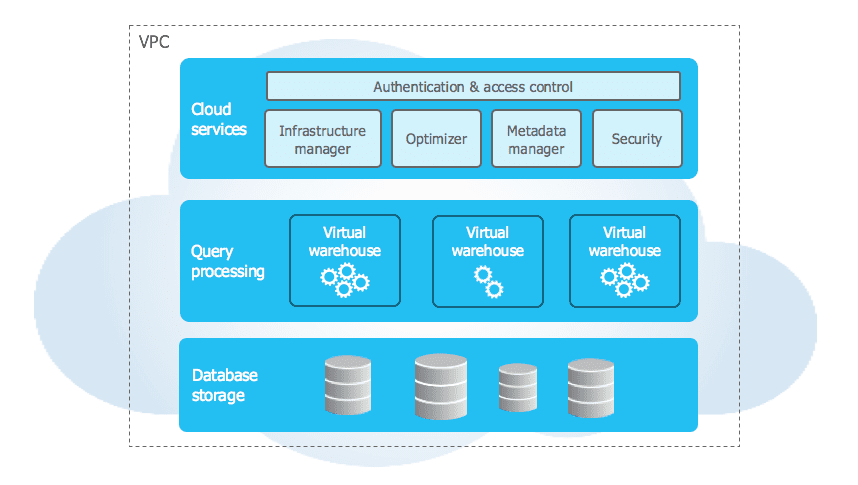
What three things does Snowflake's SaaS model mean you do NOT need to manage?
1. Hardware — no servers to provision or maintain. 2. Software — no installation, patching, or upgrades required. 3. Optimisation — no manual index creation, statistics updates, or VACUUM operations. Snowflake handles all of this automatically.
Snowflake: A Data Platform, Not Just a Warehouse
Snowflake positions itself as the Data Cloud — a unified platform that supports multiple workloads beyond traditional data warehousing:
The Five Pillars of the Snowflake Data Cloud
Snowflake's platform supporting Data Warehousing, Data Lake, Data Engineering, Data Science, and Data Sharing & Marketplace — all on one unified platform with shared governance
| Pillar | What it means | Key features |
|---|---|---|
| Data Warehouse | Structured analytics and BI reporting | SQL, views, materialized views, clustering |
| Data Lake | Store raw data in native formats | Semi-structured (VARIANT), external tables, stages |
| Data Engineering | Build and orchestrate pipelines | Streams, Tasks, Pipes, Stored Procedures |
| Data Science | ML and Python workloads | Snowpark (Python/Java/Scala), Streamlit, ML functions |
| Data Sharing | Share live data with partners | Secure data sharing, Snowflake Marketplace, listings |
The exam may ask about Snowflake’s use cases beyond traditional warehousing. Know that Snowflake supports semi-structured data natively (no ETL into relational columns required), and that the Snowflake Marketplace enables accessing third-party live datasets without data movement.
Supported Cloud Platforms
Snowflake runs on three major cloud providers. Each Snowflake account is deployed to a single cloud provider in a single region.
Snowflake Multi-Cloud Deployment
World map showing Snowflake's deployment regions across AWS, Azure, and GCP, with arrows showing cross-cloud replication capability between accounts in different regions/clouds
Cloud Platform Reference
Supported Clouds
AWSAzureGCPAccount & Region Facts
1 cloudReplicateID formatA single Snowflake account cannot span multiple cloud providers or regions. If you need data in multiple regions, you use Database Replication (Enterprise Edition+) to replicate objects to accounts in other regions or clouds. Each replica account is its own Snowflake account.
Can a single Snowflake account span multiple cloud providers (e.g. AWS and Azure simultaneously)?
No. Each Snowflake account is tied to exactly one cloud provider and one region. Cross-cloud/cross-region data requires Database Replication, which creates separate accounts in each target cloud/region. Replication requires Enterprise Edition or higher.
Snowflake Editions
Snowflake offers four editions, each building on the previous. This is one of the most heavily tested topics in the COF-C02 exam.
Snowflake Editions Overview
Pyramid diagram showing the four Snowflake editions from Standard at the base to VPS at the top, with each tier adding features for security, compliance, and isolation
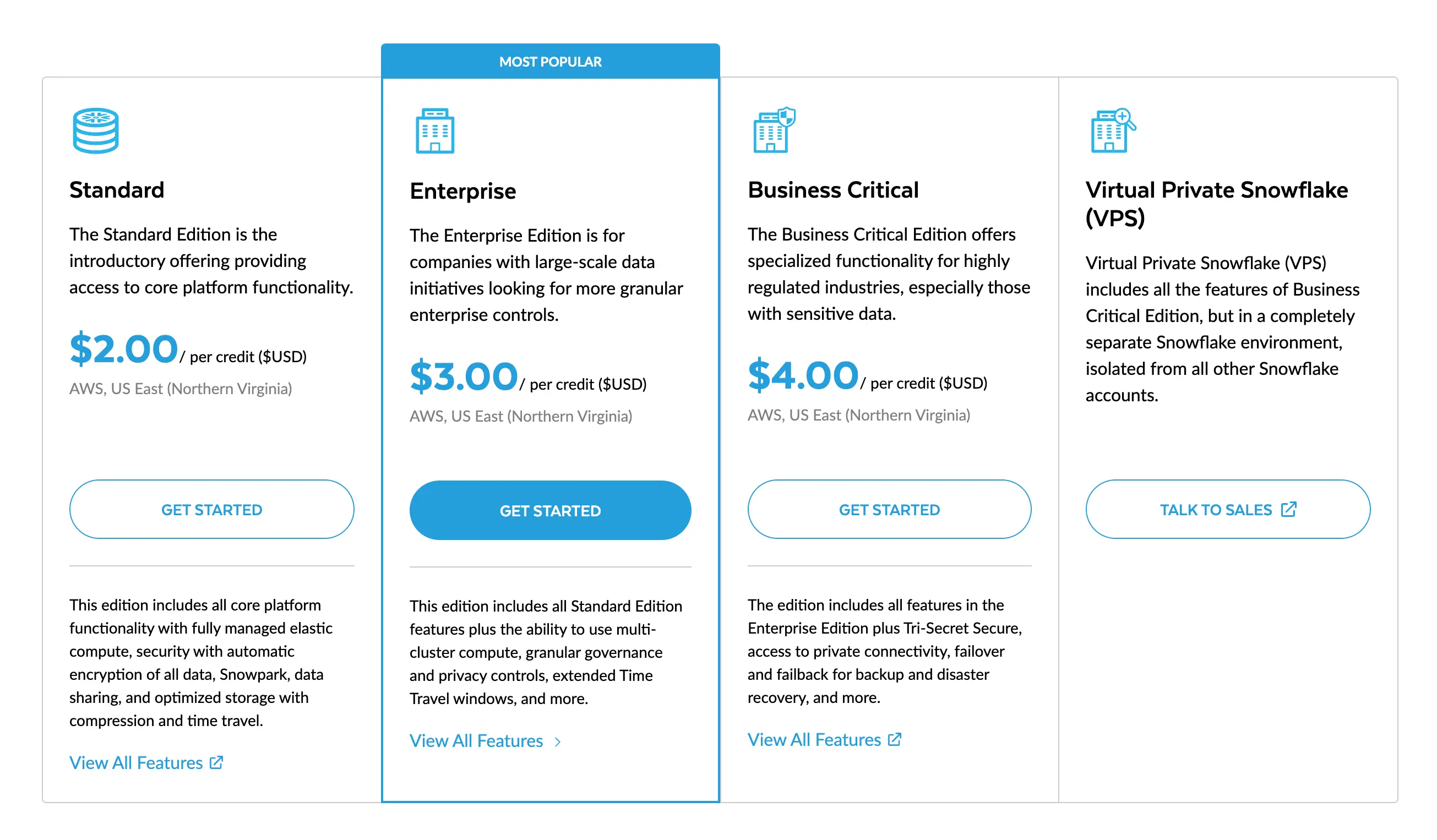
Snowflake Editions — Feature Breakdown
Standard (Entry Level)
Time TravelWarehousesSecurityComplianceEnterprise (Most Common for COF-C02 Scenarios)
Time TravelWarehousesSecurityOtherBusiness Critical (Regulated Industries)
ComplianceEncryptionNetworkDisasterVirtual Private Snowflake (VPS — Highest Security)
IsolationNetworkUse caseCostEdition Feature Matrix — Exam Quick Reference
Common exam patterns: “A company processes PHI (Protected Health Information) — which edition is required?” → Business Critical. “A warehouse is queuing queries — which edition enables multi-cluster warehouses?” → Enterprise. “A company wants 60-day Time Travel on a table — which edition is required?” → Enterprise.
Which Snowflake edition is the minimum required for HIPAA compliance?
Business Critical Edition (formerly called Enterprise for Sensitive Data). It includes HIPAA, PCI DSS, SOC 1 & 2 compliance, Tri-Secret Secure encryption, and Private Link support for regulated industries.
A company needs multi-cluster warehouses to handle concurrency spikes. What is the minimum Snowflake edition required?
Enterprise Edition. Multi-cluster warehouses (also called multi-cluster, or scale-out warehouses) are NOT available in Standard Edition. Enterprise adds multi-cluster, 90-day Time Travel, column/row-level security, and more.
Snowflake Object Hierarchy
Every object in Snowflake lives within a strict hierarchy. Understanding this is fundamental to both working with Snowflake and passing the exam.
Snowflake Object Hierarchy
Complete tree diagram of Snowflake objects from Organisation at the top, through Account, Database, and Schema, down to Tables, Views, Stages, Pipes, Tasks, Streams, Functions, Procedures, File Formats, and Sequences
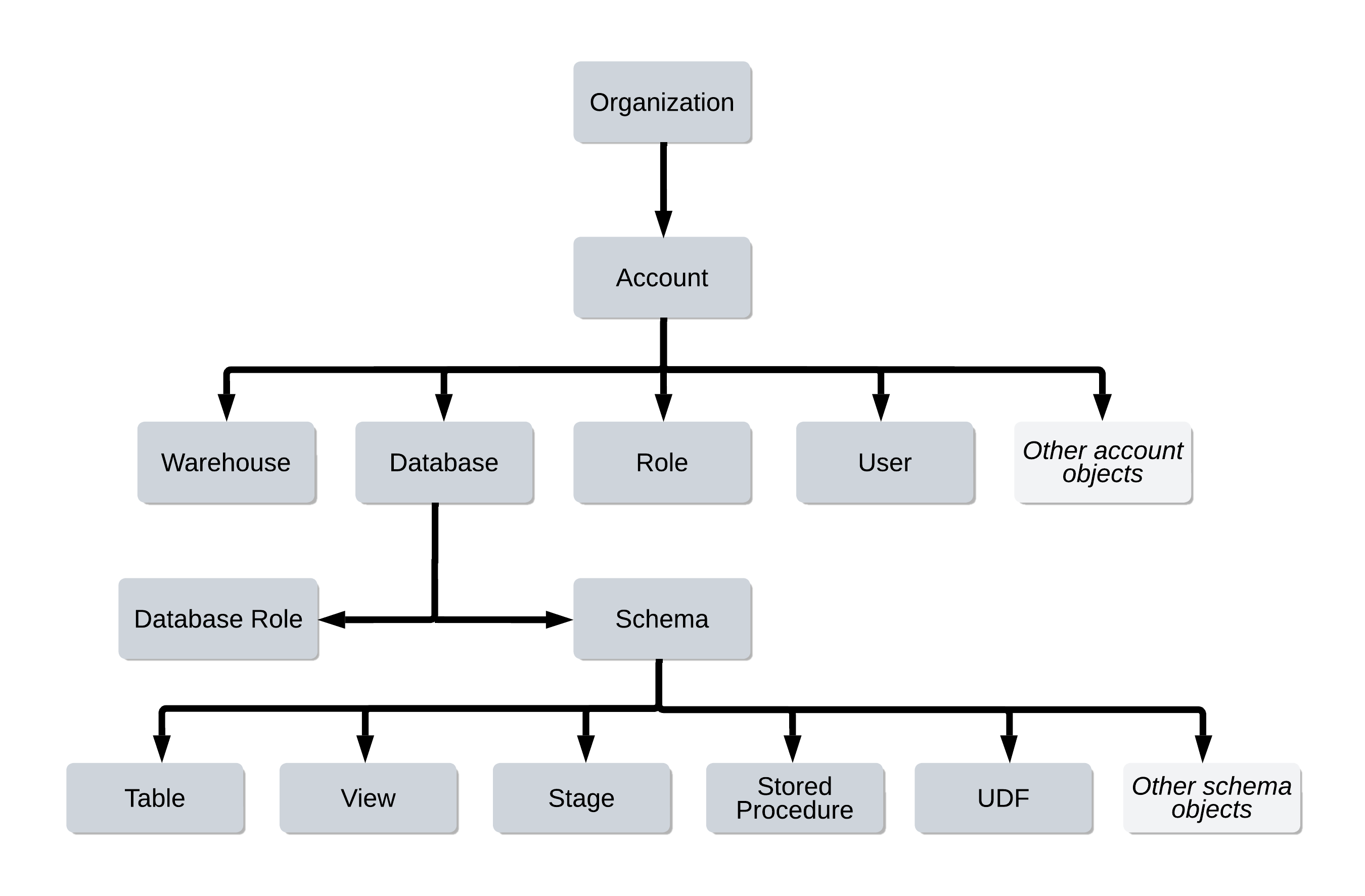
Organisation (optional grouping of multiple accounts)
└── Account (tied to one cloud + one region)
    └── Database
        └── Schema
            ├── Table           (permanent, transient, temporary, external)
            ├── View            (standard, secure, materialized)
            ├── Stage           (user @~, table @%, named)
            ├── File Format     (CSV, JSON, Parquet, Avro, ORC, XML)
            ├── Pipe            (Snowpipe continuous loading)
            ├── Stream          (change data capture)
            ├── Task            (scheduled SQL execution)
            ├── Stored Procedure
            ├── User-Defined Function (UDF / UDTF)
└── Sequence (auto-increment counter)Notice that stages, pipes, streams, tasks, and file formats all live inside a schema, not directly under the database. This is an important detail tested in the exam — these are schema-level objects, accessed with the three-part naming convention database.schema.object_name.
Naming Objects: Three-Part Convention
Snowflake uses dot notation to reference objects:
1-- Full three-part name: database.schema.object2SELECT * FROM my_database.my_schema.my_table;34-- When a database is in use (set by USE DATABASE)5USE DATABASE my_database;6SELECT * FROM my_schema.my_table;78-- When both database and schema are in use9USE DATABASE my_database;10USE SCHEMA my_schema;11SELECT * FROM my_table;1213-- Show all objects in a schema14SHOW TABLES IN SCHEMA my_database.my_schema;15SHOW VIEWS IN DATABASE my_database;16SHOW SCHEMAS IN ACCOUNT;17SHOW DATABASES;Where in the Snowflake hierarchy does a Stage live — at the Account, Database, or Schema level?
Schema level. Stages (both named internal and named external) are schema-level objects. User stages (@~) are account-level and table stages (@%) are table-level, but named stages require a schema. Reference them as database.schema.stage_name.
Snowflake Pricing Model
Snowflake separates billing into three components. Understanding each is important for the exam.
Snowflake Pricing Components
Three-part pricing diagram: Compute (credit-based, per-second), Storage (per TB compressed per month), and Data Transfer (outbound charges) — shown as separate meters feeding into a single bill
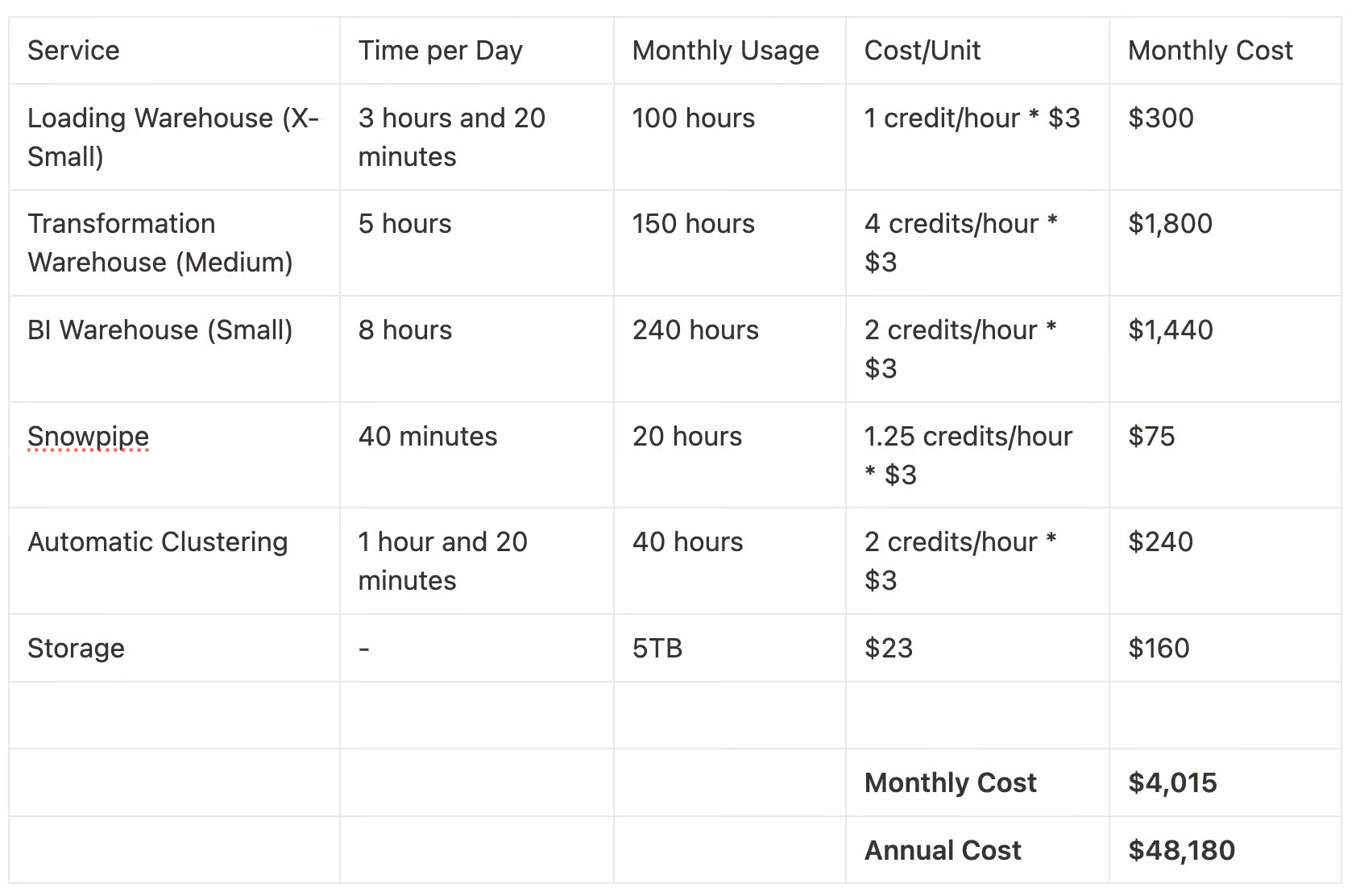
Snowflake Pricing — Quick Reference
Compute (Virtual Warehouse Credits)
BillingX-SmallSmallMediumLargeX-Large2X-Large3X-Large4X-LargeStorage
ActiveTime TravelFail-safeStagesCloud Services (10% Rule)
Free tierExcessData Transfer
Same regionCross-regionEgressVirtual Warehouses are billed per second with a 60-second minimum each time the warehouse resumes. If you run a query in 5 seconds, you are billed for 60 seconds. If you run another query while the warehouse is already running (before auto-suspend), there is no additional minimum — the clock is already running.
A suspended virtual warehouse consumes zero credits. Only running time is billed. Auto-suspend (default: 600 seconds) is your most effective tool for cost control. A warehouse that auto-suspends and auto-resumes only costs when queries are actually being executed.
A virtual warehouse runs a query that completes in 15 seconds. How many seconds of compute are you billed for?
60 seconds — the 60-second minimum applies each time a warehouse resumes. You are billed for at least 60 seconds per resume event, regardless of how short the actual query was.
Getting Started with Snowflake
Your First Snowflake Session
Sign in to Snowsight
Access your Snowflake account at <account-identifier>.snowflakecomputing.com or via the Snowsight web UI. You can also connect via the SnowSQL CLI, Python Connector, JDBC, ODBC, or partner tools like dbt and Tableau.
Explore Your Account Context
Before running any query, you need a Warehouse (compute), Database, and Schema in context. Check what's available and set your context.
-- Check current context
SELECT CURRENT_USER(), CURRENT_ROLE(), CURRENT_WAREHOUSE(),
     CURRENT_DATABASE(), CURRENT_SCHEMA();

-- See available warehouses
SHOW WAREHOUSES;

-- See available databases
SHOW DATABASES;Set Your Working Context
Use USE commands to set the active warehouse, database, and schema. This avoids needing to type three-part names for every object reference.
-- Set compute, database, and schema
USE WAREHOUSE COMPUTE_WH;
USE DATABASE SNOWFLAKE_SAMPLE_DATA;
USE SCHEMA TPCH_SF1;Run Your First Query
Query the sample data to confirm everything is working. Snowflake automatically manages query optimisation — no indexes, no ANALYZE, no VACUUM needed.
-- Count rows in the Orders table
SELECT COUNT(*) AS total_orders FROM orders;

-- Simple aggregation
SELECT o_orderstatus, COUNT(*) AS order_count,
     SUM(o_totalprice) AS total_revenue
FROM orders
GROUP BY o_orderstatus
ORDER BY total_revenue DESC;Create Your Own Database
Create a database and schema to start building with your own data. These are instant operations — no provisioning required.
-- Create a database
CREATE DATABASE my_first_db;

-- Create a schema within it
CREATE SCHEMA my_first_db.raw;

-- Verify the objects were created
SHOW DATABASES LIKE 'MY_FIRST_DB';
SHOW SCHEMAS IN DATABASE my_first_db;Snowflake vs. Cloud Competitors
It’s worth understanding how Snowflake positions against other cloud data platforms — the exam may test your understanding of Snowflake’s unique characteristics.
Cloud Data Platform Comparison
Snowflake runs on AWS, Azure, and GCP — unlike Redshift (AWS only), BigQuery (GCP only), or Synapse (Azure only). However, a single Snowflake account is still deployed to one cloud and region. The multi-cloud advantage means you can choose your preferred cloud and replicate data across clouds if needed.
Practice Quiz
Which of the following BEST describes Snowflake's deployment model?
A healthcare company needs to store patient records (PHI) in Snowflake and requires HIPAA compliance. What is the minimum Snowflake edition they must use?
A Large virtual warehouse has been running for exactly 45 seconds when the query completes and auto-suspend kicks in. How many seconds of credits are charged?
Flashcard Review
In what year was Snowflake founded, and by whom?
Snowflake was founded in 2012 by Benoit Dageville, Thierry Cruanes, and Marcin Zukowski — three data warehouse engineers who previously worked at Oracle and other database companies. Snowflake's IPO was in September 2020.
What is the Snowflake Data Cloud Marketplace?
A platform within Snowflake where data providers list live datasets, data services, and Snowflake Native Apps. Consumers can access these directly within their Snowflake account — no data movement, no ETL, no copies. Examples include financial data, weather data, and demographic data from third-party providers.
What is an Organisation in Snowflake and when is it used?
An Organisation is the highest-level Snowflake container, grouping multiple Accounts under a single entity. It enables cross-account features like account replication, failover groups, and centralised usage reporting. Organisations must be enabled by Snowflake Support — they are not created by default.
Cloud Services are free up to what percentage of daily compute credits?
Cloud Services are free up to 10% of daily compute credit consumption. Services above this threshold are billed. Cloud Services include authentication, metadata management, query parsing, query optimisation, and access control enforcement.
True or False: A Snowflake account can be deployed across multiple cloud providers simultaneously.
FALSE. Each Snowflake account is tied to exactly one cloud provider (AWS, Azure, or GCP) and one region. To have Snowflake in multiple clouds or regions, you need separate accounts and use Database Replication (Enterprise Edition+) to synchronise data between them.
What is Snowsight?
Snowsight is Snowflake's modern web-based user interface for writing SQL queries, visualising data, managing worksheets, and administering objects. It replaced the Classic Console (the older green/blue UI). Snowsight supports dashboards, query profiling, and collaborative worksheets.
Additional Resources
Official Snowflake Documentation
- Snowflake Overview — Key Concepts & Architecture
- Snowflake Editions
- Snowflake Pricing
- Snowflake Object Hierarchy
COF-C02 Exam Resources
Next Steps
Now that you understand what Snowflake is and its core concepts, continue to:
Reinforce what you just read
Study the All flashcards with spaced repetition to lock it in.