Key Terms — Virtual Warehouses
Virtual Warehouse
A named cluster of compute resources (CPU, memory, local SSD cache) in Snowflake that executes SQL queries, DML statements, and data loading operations. Completely independent from storage; can be started and stopped without affecting data.
Credit
Snowflake's unit of compute consumption. Credits are consumed only when a virtual warehouse is in the STARTED state and actively processing queries or maintaining a warm cache. An X-Small warehouse consumes 1 credit per hour.
Auto-Suspend
A warehouse property (AUTO_SUSPEND, measured in seconds) that causes the warehouse to automatically suspend after a specified period of inactivity. Suspended warehouses consume zero credits.
Auto-Resume
A warehouse property (AUTO_RESUME = TRUE) that causes a suspended warehouse to automatically resume when a query is submitted to it. Enables pay-per-use without manual intervention.
Multi-Cluster Warehouse
An Enterprise edition feature where a single warehouse can span multiple compute clusters. Clusters are automatically added or removed based on query queue depth, eliminating concurrency bottlenecks.
Scaling Policy
Controls how a multi-cluster warehouse adds and removes clusters. STANDARD policy adds clusters aggressively when queues form; ECONOMY policy waits longer before adding clusters to optimise credit usage.
Resource Monitor
An account-level or warehouse-level object that tracks credit usage and can trigger notifications or warehouse suspensions when a defined credit quota is reached within a specified time window.
Query Profile
A visual execution plan available in Snowsight that shows how a query was processed across operator nodes, enabling identification of performance bottlenecks such as expensive joins, large spills, or partition pruning inefficiency.
Warehouse Queuing
When a single-cluster warehouse is processing the maximum number of concurrent queries, additional queries are placed in a queue and wait for resources. Multi-cluster warehouses eliminate queuing by adding clusters.
Maximum Concurrency Level
The MAX_CONCURRENCY_LEVEL parameter controls the maximum number of SQL statements a single warehouse cluster will execute concurrently before additional queries are queued.
Why This Topic Matters for the Exam
Virtual warehouses are Snowflake’s compute engine — understanding them thoroughly is essential for the COF-C02 exam. Questions on warehouses span multiple exam domains: Architecture (what they are and how they work), Performance Concepts (sizing, scaling, caching), and Account & Security (resource monitors, access control). The exam frequently tests auto-suspend/resume behaviour, the 60-second minimum billing rule, multi-cluster warehouse scaling policies, and the distinction between Standard and ECONOMY scaling policies.
Candidates who understand warehouses deeply can also answer questions on credit consumption, concurrency management, and cost optimisation strategies — areas that account for a significant portion of the exam.
Virtual warehouses appear in questions across at least three exam domains. Expect 10–15 questions on warehouse sizing, credits, auto-suspend/resume, multi-cluster behaviour, scaling policies, resource monitors, and warehouse monitoring views. This is the single highest-weight topic on the COF-C02 exam.
What is a Virtual Warehouse?
A Virtual Warehouse is an MPP (Massively Parallel Processing) cluster of compute nodes that executes SQL queries in Snowflake. It is the compute layer of Snowflake’s three-layer architecture, sitting between the cloud services layer (query parsing, optimisation, metadata) and the storage layer (data in cloud object storage).
Snowflake Three-Layer Architecture: Warehouse Position
A three-tier architecture diagram showing Snowflake's separation of storage, compute, and services. The top layer is labelled 'Cloud Services Layer' and contains boxes for: Query Parser, Query Optimiser, Metadata Manager, Access Control, Transaction Manager, and Security. A two-headed arrow points downward to the middle layer labelled 'Compute Layer (Virtual Warehouses)'. This layer shows three separate warehouse icons — Warehouse A (X-Large, for ETL), Warehouse B (Small, for BI), and Warehouse C (Medium, for Data Science). Each warehouse is completely isolated from the others, indicated by thick borders. A second two-headed arrow points down to the bottom layer labelled 'Storage Layer', which shows columnar data files in compressed micro-partitions stored in cloud object storage (S3, Azure Blob, or GCS). Critically, there are no arrows between the three warehouse boxes — they share storage but do not share compute. A callout bubble reads: 'Warehouses can be started, stopped, and resized independently without affecting stored data.'

Core Properties of Virtual Warehouses
- Completely independent from storage: Starting, stopping, or resizing a warehouse has zero impact on the data stored in Snowflake
- Multiple warehouses can read the same data simultaneously: Because storage is separate, different teams can run different warehouses against the same tables without interference
- Credits are only consumed when running: A suspended warehouse costs nothing; you pay only for active compute time
- Local SSD cache per warehouse: Each warehouse maintains a local cache of recently accessed micro-partitions, which is lost when the warehouse is suspended
Each virtual warehouse maintains its own local SSD data cache. If Warehouse A warms up its cache by scanning a large table, Warehouse B querying the same table will scan from cloud storage and build its own cache independently. This is why consistent warehouse usage improves performance — repeated queries benefit from the warm cache.
Warehouse States
A virtual warehouse transitions between four states throughout its lifecycle:
| State | Description | Credits Consumed |
|---|---|---|
STARTED | Running and ready to process queries | Yes — per-second billing |
SUSPENDED | Inactive; no compute resources allocated | No — zero credits |
STARTING | Transitioning from SUSPENDED to STARTED | No — brief transition (typically seconds) |
RESIZING | Cluster is scaling up or down to a new size | Yes — billed at the new size once complete |
When you resize a warehouse to a larger size, Snowflake provisions new nodes and begins routing queries to the expanded cluster almost immediately. Scaling down is also fast. Neither operation requires data movement or impacts running queries.
Warehouse Sizes and Credit Consumption
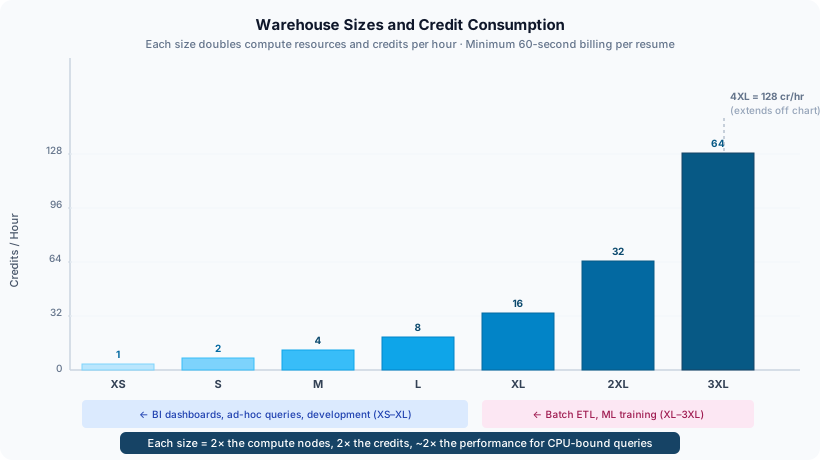
Snowflake offers a range of warehouse sizes, each doubling compute resources (and credit consumption) compared to the previous size. Understanding the credit-per-hour rates is essential for both the exam and real-world cost management.
Warehouse Sizes and Credit Consumption
A bar chart showing all Snowflake warehouse sizes on the X-axis from left to right: X-Small, Small, Medium, Large, X-Large, 2X-Large, 3X-Large, 4X-Large. The Y-axis shows credits per hour. Each bar doubles the previous: X-Small=1, Small=2, Medium=4, Large=8, X-Large=16, 2X-Large=32, 3X-Large=64, 4X-Large=128. A second overlaid line shows approximate query performance scaling — labelled 'relative performance' — which rises steeply at first and then flattens, illustrating diminishing returns from very large warehouses for most workloads. A callout box notes that per-second billing applies after the first 60 seconds. A shaded region on the right side of the chart is labelled 'Typically used for batch ETL, ML training, or very large data transformations' covering 2X-Large through 4X-Large. The region covering X-Small through Medium is labelled 'Typical for BI dashboards and ad-hoc analysis'.
| Warehouse Size | Credits / Hour | Typical Use Case |
|---|---|---|
| X-Small | 1 | Development, testing, low-concurrency dashboards |
| Small | 2 | Small team BI, light ETL |
| Medium | 4 | Mid-size ETL, moderate concurrency BI |
| Large | 8 | Heavy ETL, data science workloads |
| X-Large | 16 | Large batch transformations |
| 2X-Large | 32 | Very large transformations, ML feature engineering |
| 3X-Large | 64 | Massive batch processing |
| 4X-Large | 128 | Extreme batch workloads, maximum parallelism |
The exam expects you to know that X-Small = 1 credit/hour and that each size doubles the credits. You do not need to memorise every size, but knowing the X-Small baseline and the doubling pattern lets you calculate any size: Small=2, Medium=4, Large=8, X-Large=16, 2X-Large=32, 3X-Large=64, 4X-Large=128.
Auto-Suspend and Auto-Resume
These two parameters together enable the serverless pricing model that makes Snowflake cost-effective: you pay only when queries are running.
Auto-Suspend
The AUTO_SUSPEND parameter specifies the number of seconds of inactivity after which the warehouse automatically suspends itself.
- Default value: 600 seconds (10 minutes)
- Minimum value: 60 seconds
- Set to
NULLor0to disable auto-suspend (warehouse runs indefinitely until manually suspended) - When suspended, the warehouse’s local SSD cache is lost
Auto-Resume
The AUTO_RESUME parameter (boolean) determines whether the warehouse automatically resumes when a query is submitted to it.
- Default value:
TRUE - When
TRUE: warehouse resumes automatically on query submission with no manual intervention - When
FALSE: warehouse must be manually resumed withALTER WAREHOUSE ... RESUMEbefore queries will run
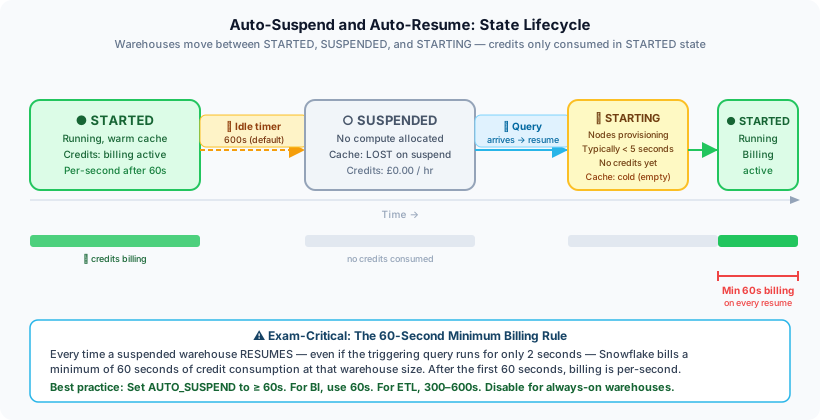
Every time a virtual warehouse resumes from a SUSPENDED state, Snowflake charges a minimum of 60 seconds of credit consumption, regardless of how quickly the query completes. If a query takes 5 seconds and the warehouse was suspended, you are still billed for 60 seconds. This is one of the most frequently tested facts about virtual warehouses on the COF-C02 exam. After the initial 60 seconds, billing is per-second.
Auto-Suspend and Auto-Resume Timeline
A horizontal timeline diagram illustrating warehouse state transitions. At the far left, a warehouse is shown in the STARTED state (green). A clock icon shows the AUTO_SUSPEND timer counting down from 600 seconds during a period of no query activity. When the timer reaches zero, the warehouse transitions to SUSPENDED state (grey icon, zero credits label). Time continues on the timeline. Then, a new query arrives (represented by a lightning bolt icon), triggering AUTO_RESUME. The warehouse transitions through STARTING state (yellow, brief) to STARTED state (green) again. A red rectangle underneath the STARTED state segment beginning at the resume point is labelled '60-second minimum billing window'. A callout explains: even if the query finishes in 10 seconds, the full 60-second minimum is billed. After the 60-second window, billing becomes per-second. A second scenario shows a short query (5 seconds) versus a long query (300 seconds), both billed at least 60 seconds on resume.
Creating and Configuring Warehouses
1-- Full CREATE WAREHOUSE with all key parameters2CREATE WAREHOUSE etl_warehouse3WAREHOUSE_SIZE = 'LARGE' -- compute size4WAREHOUSE_TYPE = 'STANDARD' -- STANDARD or SNOWPARK-OPTIMIZED5AUTO_SUSPEND = 300 -- suspend after 5 minutes idle6AUTO_RESUME = TRUE -- auto-resume on query submission7INITIALLY_SUSPENDED = TRUE -- start in suspended state8MAX_CONCURRENCY_LEVEL = 8 -- max concurrent queries before queuing9STATEMENT_TIMEOUT_IN_SECONDS = 3600 -- kill queries running > 1 hour10STATEMENT_QUEUED_TIMEOUT_IN_SECONDS = 600 -- timeout queued queries after 10 min11COMMENT = 'Nightly ETL warehouse — Large, auto-suspended';1213-- Create a minimal warehouse with sensible defaults14CREATE WAREHOUSE reporting_wh15WAREHOUSE_SIZE = 'SMALL'16AUTO_SUSPEND = 12017AUTO_RESUME = TRUE18INITIALLY_SUSPENDED = TRUE;1920-- Verify warehouse was created21SHOW WAREHOUSES LIKE 'etl_warehouse';1-- Set the active warehouse for the current session2USE WAREHOUSE reporting_wh;34-- Resize a warehouse (takes effect near-instantly)5ALTER WAREHOUSE etl_warehouse6SET WAREHOUSE_SIZE = 'X-LARGE';78-- Change auto-suspend interval9ALTER WAREHOUSE reporting_wh10SET AUTO_SUSPEND = 60;1112-- Disable auto-suspend (warehouse runs until manually stopped)13ALTER WAREHOUSE etl_warehouse14SET AUTO_SUSPEND = NULL;1516-- Manually suspend a warehouse immediately17ALTER WAREHOUSE reporting_wh SUSPEND;1819-- Manually resume a suspended warehouse20ALTER WAREHOUSE reporting_wh RESUME;2122-- Resize and change multiple settings in one ALTER23ALTER WAREHOUSE etl_warehouse SET24WAREHOUSE_SIZE = 'MEDIUM'25AUTO_SUSPEND = 30026MAX_CONCURRENCY_LEVEL = 4;2728-- Change the statement timeout29ALTER WAREHOUSE reporting_wh30SET STATEMENT_TIMEOUT_IN_SECONDS = 1800; -- 30 minutes3132-- Show current warehouse status33SHOW WAREHOUSES;Multi-Cluster Warehouses (Enterprise Edition)
Multi-cluster warehouses are an Enterprise edition feature that allows a single logical warehouse to span multiple independent compute clusters. This is the primary solution to concurrency bottlenecks in Snowflake.
When to Use Multi-Cluster Warehouses
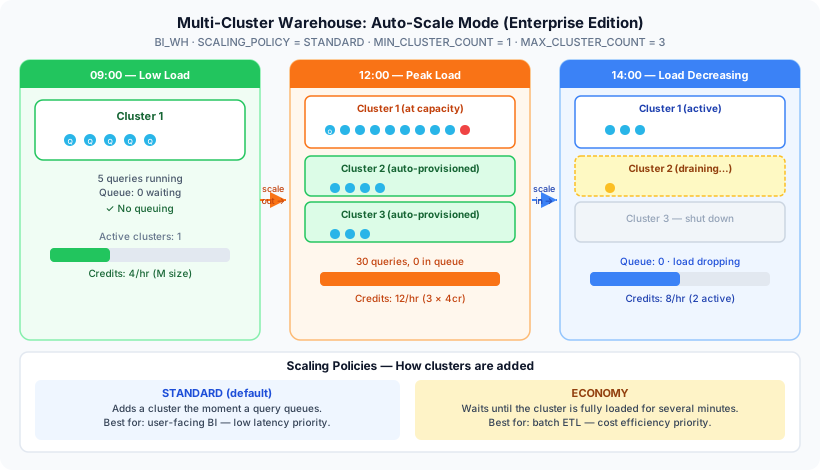
A single warehouse cluster has a limited number of concurrent query slots. When that limit is reached, additional queries are queued and wait for resources. Multi-cluster warehouses automatically add clusters when queues form and remove them when load decreases.
Multi-Cluster Warehouse: Auto-Scale Mode
A dynamic diagram showing a multi-cluster warehouse operating in auto-scale mode. At the top is a label showing 'Warehouse: BI_WAREHOUSE — MIN_CLUSTER_COUNT=1, MAX_CLUSTER_COUNT=4, SCALING_POLICY=STANDARD'. Three time periods are shown left to right. Period 1 (Low load, 9am): A single cluster (Cluster 1) processes 8 queries shown as small arrows. No queue. Period 2 (Peak load, 12pm): Cluster 1 is at capacity with 8 queries. A queue of 12 additional queries forms to the right, shown as stacked icons. Snowflake's cloud services layer detects the queue and provisions Cluster 2 (shown appearing below Cluster 1) and Cluster 3. The queue drains as queries are distributed across all three clusters. Period 3 (Load decreasing, 2pm): Query volume drops. Cluster 3 finishes its current queries and idles for the consecutive-successful-queries threshold, then is shut down. Cluster 2 also shuts down. Only Cluster 1 remains active. The transition arrows between periods are labelled 'Scale Out' and 'Scale In'. A credit counter in the corner shows increasing credit consumption during peak and decreasing during scale-in.
Key Multi-Cluster Parameters
1-- Multi-cluster warehouse in Auto-scale mode (Enterprise edition required)2CREATE WAREHOUSE bi_warehouse3WAREHOUSE_SIZE = 'MEDIUM'4MIN_CLUSTER_COUNT = 1 -- minimum clusters always running5MAX_CLUSTER_COUNT = 4 -- maximum clusters allowed6SCALING_POLICY = 'STANDARD' -- STANDARD or ECONOMY7AUTO_SUSPEND = 3008AUTO_RESUME = TRUE9INITIALLY_SUSPENDED = FALSE10COMMENT = 'BI warehouse — scales from 1 to 4 clusters automatically';1112-- Maximized mode: all clusters always running (fixed concurrency)13-- Use when you have predictably high, sustained concurrency14CREATE WAREHOUSE high_concurrency_wh15WAREHOUSE_SIZE = 'SMALL'16MIN_CLUSTER_COUNT = 3 -- always run exactly 3 clusters17MAX_CLUSTER_COUNT = 3 -- same as min = Maximized mode18SCALING_POLICY = 'STANDARD'19AUTO_SUSPEND = 60020AUTO_RESUME = TRUE;2122-- Convert existing single-cluster to multi-cluster23ALTER WAREHOUSE reporting_wh SET24MIN_CLUSTER_COUNT = 125MAX_CLUSTER_COUNT = 326SCALING_POLICY = 'ECONOMY';2728-- Check multi-cluster warehouse status29SHOW WAREHOUSES LIKE 'bi_warehouse';Scaling Policies: STANDARD vs ECONOMY
Multi-Cluster Scaling Policy: STANDARD vs ECONOMY
The exam distinguishes STANDARD from ECONOMY by their primary goal. STANDARD prioritises query performance (minimise wait time) by adding clusters quickly. ECONOMY prioritises cost (minimise credits) by waiting longer before adding clusters. If the exam asks which policy to choose to reduce costs at the risk of slightly higher latency, the answer is ECONOMY.
Maximized Mode vs Auto-Scale Mode
- Auto-scale mode:
MIN_CLUSTER_COUNT < MAX_CLUSTER_COUNT. Snowflake dynamically adds and removes clusters between the min and max. The default and most common mode. - Maximized mode:
MIN_CLUSTER_COUNT = MAX_CLUSTER_COUNT. All clusters are always running. No dynamic scaling — provides fixed, predictable concurrency. Best for steady-state, very high concurrency environments.
Query Queuing and Concurrency
Understanding how Snowflake handles query concurrency is critical for both the exam and real-world troubleshooting.
When a warehouse is processing the maximum number of concurrent queries (MAX_CONCURRENCY_LEVEL), additional queries are placed in a queue. Queued queries wait until a slot opens up (when a running query completes) or until the queue timeout is reached.
1-- Set the maximum concurrent queries before queuing begins2ALTER WAREHOUSE reporting_wh3SET MAX_CONCURRENCY_LEVEL = 8;45-- Set timeout for queued queries (seconds)6-- If a query waits longer than this in the queue, it fails with an error7ALTER WAREHOUSE reporting_wh8SET STATEMENT_QUEUED_TIMEOUT_IN_SECONDS = 300; -- 5 minutes910-- Set timeout for running statements11-- Queries running longer than this are automatically killed12ALTER WAREHOUSE reporting_wh13SET STATEMENT_TIMEOUT_IN_SECONDS = 7200; -- 2 hours1415-- Check current queue depth and active queries16SELECT *17FROM TABLE(INFORMATION_SCHEMA.WAREHOUSE_LOAD_HISTORY(18DATE_RANGE_START => DATEADD('hour', -1, CURRENT_TIMESTAMP()),19DATE_RANGE_END => CURRENT_TIMESTAMP(),20WAREHOUSE_NAME => 'REPORTING_WH'21));2223-- View current and recently queued queries24SELECT25query_id,26user_name,27warehouse_name,28execution_status,29queued_provisioning_time / 1000 AS queued_seconds,30execution_time / 1000 AS execution_seconds,31LEFT(query_text, 100) AS query_preview32FROM snowflake.account_usage.query_history33WHERE warehouse_name = 'REPORTING_WH'34AND start_time >= DATEADD('hour', -1, CURRENT_TIMESTAMP())35ORDER BY start_time DESC;If users are experiencing query queuing, the correct solution is to enable multi-cluster mode (Enterprise edition) rather than simply resizing the warehouse. Resizing improves individual query performance but does not increase concurrency. Multi-cluster warehouses add entire clusters to handle more concurrent queries simultaneously.
Warehouse Monitoring
Snowflake provides multiple views for monitoring warehouse performance and credit consumption.
1-- 1. Credit consumption by warehouse over the last 7 days (ACCOUNT_USAGE)2SELECT3warehouse_name,4SUM(credits_used) AS total_credits,5SUM(credits_used_compute) AS compute_credits,6SUM(credits_used_cloud_services) AS cloud_service_credits,7COUNT(*) AS billing_periods8FROM snowflake.account_usage.warehouse_metering_history9WHERE start_time >= DATEADD('day', -7, CURRENT_TIMESTAMP())10GROUP BY warehouse_name11ORDER BY total_credits DESC;1213-- 2. Warehouse load over time (INFORMATION_SCHEMA — current DB, near real-time)14SELECT15start_time,16end_time,17warehouse_name,18avg_running, -- average concurrent queries running19avg_queued_load -- average queries in the queue20FROM TABLE(INFORMATION_SCHEMA.WAREHOUSE_LOAD_HISTORY(21DATE_RANGE_START => DATEADD('hour', -4, CURRENT_TIMESTAMP()),22WAREHOUSE_NAME => 'REPORTING_WH'23))24ORDER BY start_time DESC;2526-- 3. Recent query performance on a specific warehouse27SELECT28query_id,29user_name,30query_type,31execution_status,32ROUND(execution_time / 1000, 2) AS exec_seconds,33ROUND(bytes_scanned / POWER(1024,3), 4) AS gb_scanned,34partitions_scanned,35partitions_total,36ROUND(partitions_scanned / NULLIF(partitions_total, 0) * 100, 1) AS pct_scanned,37LEFT(query_text, 200) AS query_preview38FROM snowflake.account_usage.query_history39WHERE warehouse_name = 'ETL_WAREHOUSE'40AND start_time >= DATEADD('day', -1, CURRENT_TIMESTAMP())41AND execution_status = 'SUCCESS'42ORDER BY execution_time DESC43LIMIT 50;4445-- 4. Identify warehouses with high queuing46SELECT47warehouse_name,48AVG(avg_queued_load) AS avg_queue_depth,49MAX(avg_queued_load) AS max_queue_depth50FROM snowflake.account_usage.warehouse_load_history51WHERE start_time >= DATEADD('day', -7, CURRENT_TIMESTAMP())52GROUP BY warehouse_name53HAVING avg_queue_depth > 0.554ORDER BY avg_queue_depth DESC;Resource Monitors
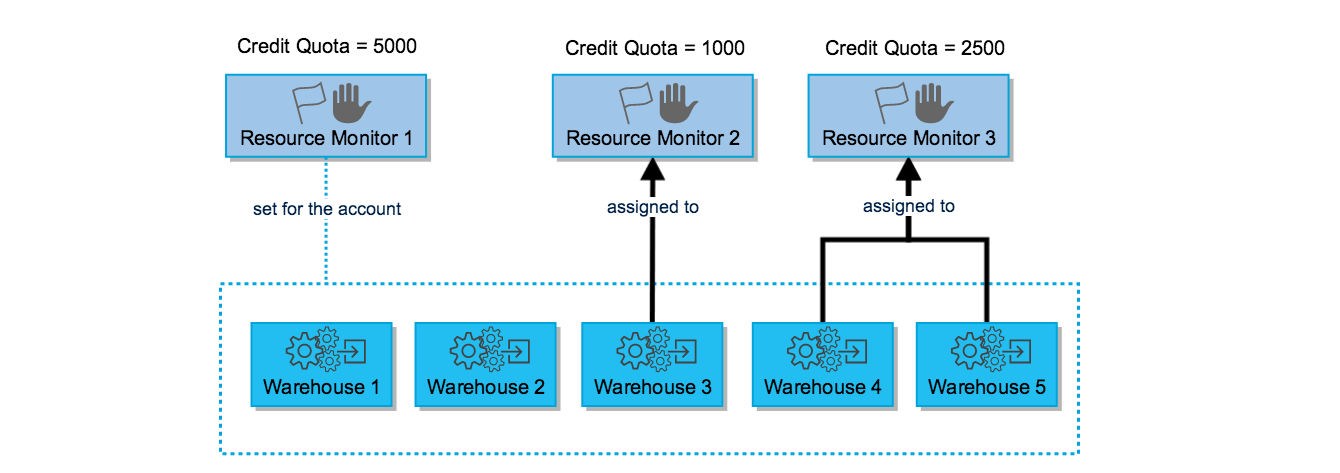
Resource monitors allow administrators to track credit usage and automatically take action (notify, suspend, or force-suspend warehouses) when a defined credit quota is reached within a specified time window.
Resource Monitor Architecture
A layered diagram showing the resource monitor architecture. At the top is an 'Account Resource Monitor' box labelled 'Account-level — controls all warehouses'. Below it are three 'Warehouse Resource Monitor' boxes, each labelled with a warehouse name: ETL_WAREHOUSE, REPORTING_WH, BI_WAREHOUSE. Each warehouse monitor box has a credit quota dial showing a percentage used. On the right side is an 'Actions' panel showing four possible triggers: 1) NOTIFY — sends an email alert at the specified threshold (e.g., 75% of quota); 2) NOTIFY & SUSPEND — sends alert and suspends the warehouse after current queries finish (at e.g., 90%); 3) NOTIFY & SUSPEND_IMMEDIATE — sends alert and kills all running queries immediately (at e.g., 100%); 4) Multiple thresholds can be set — shown as a graduated scale from 75% to 100%. A callout explains that resource monitors reset at the start of each time window (DAILY, WEEKLY, MONTHLY, YEARLY, or NEVER). Arrows show that account-level monitors affect all warehouses unless overridden by a warehouse-level monitor.
1-- Create an account-level resource monitor2-- Monitors all credit usage in the account per month3CREATE RESOURCE MONITOR account_monthly_monitor4WITH CREDIT_QUOTA = 5000 -- 5,000 credits per period5FREQUENCY = MONTHLY -- reset at start of each month6START_TIMESTAMP = IMMEDIATELY7TRIGGERS8 ON 75 PERCENT DO NOTIFY -- email alert at 75%9 ON 90 PERCENT DO NOTIFY -- email alert at 90%10 ON 100 PERCENT DO SUSPEND -- suspend warehouses gracefully at 100%11 ON 110 PERCENT DO SUSPEND_IMMEDIATE; -- force-kill at 110% (overage protection)1213-- Apply the resource monitor at the account level14ALTER ACCOUNT SET RESOURCE_MONITOR = account_monthly_monitor;1516-- Create a warehouse-specific resource monitor17CREATE RESOURCE MONITOR etl_weekly_monitor18WITH CREDIT_QUOTA = 200 -- 200 credits per week19FREQUENCY = WEEKLY20START_TIMESTAMP = IMMEDIATELY21TRIGGERS22 ON 80 PERCENT DO NOTIFY23 ON 100 PERCENT DO SUSPEND_IMMEDIATE;2425-- Assign resource monitor to a specific warehouse26ALTER WAREHOUSE etl_warehouse27SET RESOURCE_MONITOR = etl_weekly_monitor;2829-- View all resource monitors and their current usage30SHOW RESOURCE MONITORS;3132-- View credit usage for resource monitors33SELECT *34FROM snowflake.account_usage.resource_monitors35ORDER BY created_on DESC;The SUSPEND action waits for currently running queries to finish before suspending the warehouse. SUSPEND_IMMEDIATE kills all running queries immediately and suspends the warehouse. Using SUSPEND_IMMEDIATE at 100% prevents any additional credits from being consumed but will abort in-flight queries — use it carefully in production environments.
Step-by-Step: Configuring a Cost-Optimised Warehouse Setup
Setting Up a Multi-Warehouse Architecture with Resource Monitors
Design the Warehouse Topology
Separate workloads onto dedicated warehouses to prevent ETL from competing with BI queries. This is a fundamental Snowflake best practice and a common exam topic.
Create the ETL Warehouse
Create a large warehouse for nightly ETL runs. It should auto-suspend quickly after batch completion to avoid wasting credits during idle hours.
-- ETL warehouse: Large for bulk transforms, quick auto-suspend
CREATE WAREHOUSE etl_nightly_wh
WAREHOUSE_SIZE         = 'LARGE'
AUTO_SUSPEND           = 120           -- suspend 2 minutes after last query
AUTO_RESUME            = TRUE
INITIALLY_SUSPENDED    = TRUE          -- don't charge until first use
MAX_CONCURRENCY_LEVEL  = 4
STATEMENT_TIMEOUT_IN_SECONDS = 14400   -- kill runaway queries after 4hrs
COMMENT = 'Nightly ETL — Large, 2-min auto-suspend';Create the BI Reporting Warehouse with Multi-Cluster
Create a Medium multi-cluster warehouse for BI dashboards. Multiple analysts hit this warehouse simultaneously during business hours, so multi-cluster prevents queuing.
-- BI warehouse: Medium with multi-cluster for concurrent analysts
-- Requires Enterprise edition or higher
CREATE WAREHOUSE bi_reporting_wh
WAREHOUSE_SIZE      = 'MEDIUM'
MIN_CLUSTER_COUNT   = 1
MAX_CLUSTER_COUNT   = 3
SCALING_POLICY      = 'STANDARD'       -- fast scale-out for BI
AUTO_SUSPEND        = 300              -- 5-minute auto-suspend
AUTO_RESUME         = TRUE
INITIALLY_SUSPENDED = TRUE
COMMENT = 'BI reporting — Medium, 1-3 clusters, Standard scaling';Create the Resource Monitor
Protect the account from unexpected credit overruns by creating a monthly resource monitor with tiered notification and suspension triggers.
-- Monthly resource monitor with tiered actions
CREATE RESOURCE MONITOR monthly_cost_guard
WITH CREDIT_QUOTA = 3000
FREQUENCY        = MONTHLY
START_TIMESTAMP  = IMMEDIATELY
TRIGGERS
  ON 50  PERCENT DO NOTIFY
  ON 75  PERCENT DO NOTIFY
  ON 90  PERCENT DO NOTIFY
  ON 100 PERCENT DO SUSPEND
  ON 110 PERCENT DO SUSPEND_IMMEDIATE;

-- Apply to all warehouses at account level
ALTER ACCOUNT SET RESOURCE_MONITOR = monthly_cost_guard;

-- Apply stricter individual monitor to ETL warehouse
CREATE RESOURCE MONITOR etl_weekly_budget
WITH CREDIT_QUOTA = 500
FREQUENCY        = WEEKLY
START_TIMESTAMP  = IMMEDIATELY
TRIGGERS
  ON 80  PERCENT DO NOTIFY
  ON 100 PERCENT DO SUSPEND_IMMEDIATE;

ALTER WAREHOUSE etl_nightly_wh
SET RESOURCE_MONITOR = etl_weekly_budget;Verify the Configuration
Use SHOW commands and account usage views to confirm the warehouse and resource monitor configuration is correct.
-- Confirm warehouse settings
SHOW WAREHOUSES;

-- Confirm resource monitors
SHOW RESOURCE MONITORS;

-- Test auto-resume by submitting a query to the suspended warehouse
USE WAREHOUSE bi_reporting_wh;
SELECT CURRENT_WAREHOUSE(), CURRENT_TIMESTAMP();

-- Monitor credit consumption after a few hours
SELECT
warehouse_name,
SUM(credits_used) AS total_credits
FROM snowflake.account_usage.warehouse_metering_history
WHERE start_time >= CURRENT_DATE()
GROUP BY warehouse_name
ORDER BY total_credits DESC;
Snowpark-Optimised Warehouses
Snowflake also offers a SNOWPARK-OPTIMIZED warehouse type designed for Python, Scala, and Java workloads that require large amounts of memory per node (e.g., ML model training, pandas DataFrames).
1-- Create a Snowpark-Optimized warehouse for ML workloads2-- These warehouses have ~16x more memory per node than STANDARD warehouses3CREATE WAREHOUSE ml_training_wh4WAREHOUSE_SIZE = 'MEDIUM'5WAREHOUSE_TYPE = 'SNOWPARK-OPTIMIZED'6AUTO_SUSPEND = 6007AUTO_RESUME = TRUE8INITIALLY_SUSPENDED = TRUE9COMMENT = 'Snowpark ML training — high memory per node';1011-- Standard warehouses for regular SQL and Python UDFs12CREATE WAREHOUSE analytics_wh13WAREHOUSE_SIZE = 'SMALL'14WAREHOUSE_TYPE = 'STANDARD' -- default type15AUTO_SUSPEND = 18016AUTO_RESUME = TRUE;Use SNOWPARK-OPTIMIZED warehouses when your Python or Scala workloads are memory-intensive — for example, training large machine learning models, working with large pandas DataFrames in Snowpark, or running complex Python UDTFs. For regular SQL and lightweight Python UDFs, a STANDARD warehouse is more cost-effective.
Quick Reference Cheat Sheet
Virtual Warehouses — COF-C02 Cheat Sheet
Credit Consumption by Size
X-SmallSmallMediumLargeX-Large2X-Large3X-Large4X-LargeKey Parameters
AUTO_SUSPENDAUTO_RESUMEINITIALLY_SUSPENDEDMAX_CONCURRENCY_LEVELSTATEMENT_TIMEOUT_IN_SECONDSWAREHOUSE_TYPEMulti-Cluster Parameters
MIN_CLUSTER_COUNTMAX_CLUSTER_COUNTSCALING_POLICYAuto-scale modeMaximized modeEdition requiredResource Monitor Actions
NOTIFYSUSPENDSUSPEND_IMMEDIATEFrequency optionsBilling Rules
Minimum billing on resumeAfter first 60 secondsSuspended stateCloud servicesPractice Quiz
A Snowflake warehouse is suspended. A user submits a query that takes exactly 8 seconds to complete. The warehouse then idles and auto-suspends after 2 minutes. How many seconds of compute credits are charged for this activity?
A company runs Snowflake Standard edition and wants to configure a multi-cluster warehouse with MIN_CLUSTER_COUNT=1 and MAX_CLUSTER_COUNT=4 to handle peak concurrency. What will happen when they attempt to create this warehouse?
A resource monitor is configured with CREDIT_QUOTA=1000, FREQUENCY=MONTHLY, and the following triggers: ON 75 PERCENT DO NOTIFY, ON 100 PERCENT DO SUSPEND, ON 110 PERCENT DO SUSPEND_IMMEDIATE. The warehouse has consumed 1,050 credits this month. What is the current state of the warehouse?
Flashcard Exam Prep
What is the minimum number of seconds billed each time a virtual warehouse resumes from a SUSPENDED state?
60 seconds. Every time a warehouse resumes, Snowflake charges a minimum of 60 seconds of credit consumption regardless of how quickly the query completes. After the first 60 seconds, billing is per-second. This applies even if the query runs for only 1-2 seconds.
What Snowflake edition is required to use multi-cluster warehouses?
Enterprise edition or higher (Business Critical or Virtual Private Snowflake). Multi-cluster warehouses are NOT available on the Standard edition. They are configured with MIN_CLUSTER_COUNT and MAX_CLUSTER_COUNT parameters.
What is the difference between SCALING_POLICY STANDARD and ECONOMY in a multi-cluster warehouse?
STANDARD adds clusters immediately when a query queue forms, prioritising performance and minimising wait times. ECONOMY waits longer before adding clusters to minimise credit consumption, prioritising cost efficiency at the cost of potentially higher query latency during spikes.
What is the default AUTO_SUSPEND value for a newly created Snowflake warehouse?
600 seconds (10 minutes). After 10 minutes of inactivity, the warehouse automatically suspends and stops consuming credits. This value can be changed with ALTER WAREHOUSE ... SET AUTO_SUSPEND = <seconds>. Setting it to NULL or 0 disables auto-suspend.
What is the difference between SUSPEND and SUSPEND_IMMEDIATE actions in a resource monitor?
SUSPEND gracefully suspends the warehouse after all currently running queries have completed — no queries are killed. SUSPEND_IMMEDIATE kills all currently running queries immediately and suspends the warehouse right away. Use SUSPEND_IMMEDIATE for hard cost enforcement; use SUSPEND to avoid disrupting in-flight work.
A single-cluster warehouse is experiencing query queuing at peak times. What is the recommended solution?
Enable multi-cluster mode by setting MAX_CLUSTER_COUNT > MIN_CLUSTER_COUNT (requires Enterprise edition). Multi-cluster warehouses add entire compute clusters when queuing is detected, allowing more queries to run concurrently. Simply resizing the warehouse makes individual queries faster but does NOT increase the number of concurrent queries that can run simultaneously.
Additional Resources
- Snowflake Documentation — Virtual Warehouses
- Snowflake Documentation — Warehouse Sizes
- Snowflake Documentation — Multi-Cluster Warehouses
- Snowflake Documentation — Resource Monitors
- Snowflake Documentation — Warehouse Metering History
- Snowflake Documentation — Query Profile
- Snowflake Documentation — Snowpark-Optimised Warehouses
Next Steps
- Databases, Schemas & Tables — The storage objects that warehouses query
- Performance & Query Optimisation — Use warehouse insights to optimise query performance
- Access Control & Privileges — Grant USAGE and OPERATE privileges on warehouses
- Cost Management — Account-level cost optimisation strategies
Reinforce what you just read
Study the All flashcards with spaced repetition to lock it in.