Introduction to Snowflake Architecture
Snowflake’s architecture is fundamentally different from traditional data warehouses. It uses a hybrid architecture that combines the benefits of both shared-disk and shared-nothing architectures.
Three-Layer Architecture
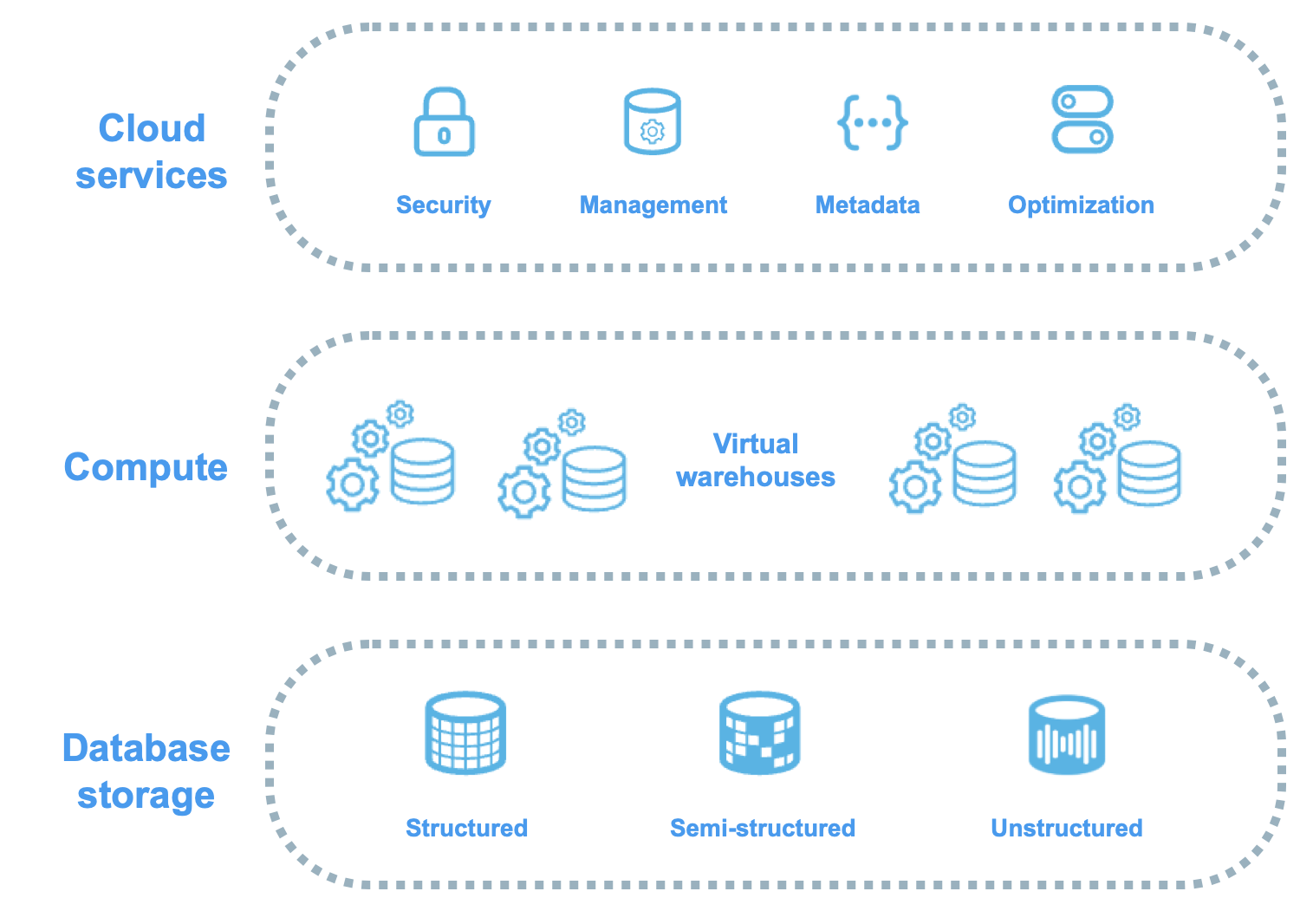
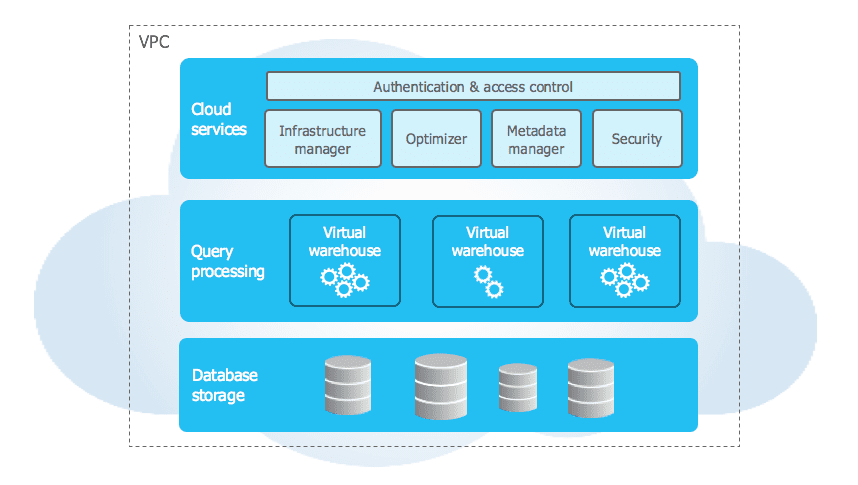
Snowflake’s architecture consists of three distinct layers:
- Database Storage Layer
- Query Processing Layer (Virtual Warehouses)
- Cloud Services Layer
Snowflake Three-Layer Architecture
Visual representation of how Snowflake separates storage, compute, and services into independent, scalable layers
1. Database Storage Layer
The storage layer is where all your data lives. Snowflake automatically manages:
- Compression: Data is automatically compressed
- Organisation: Micro-partitions and metadata
- Optimisation: Columnar storage format
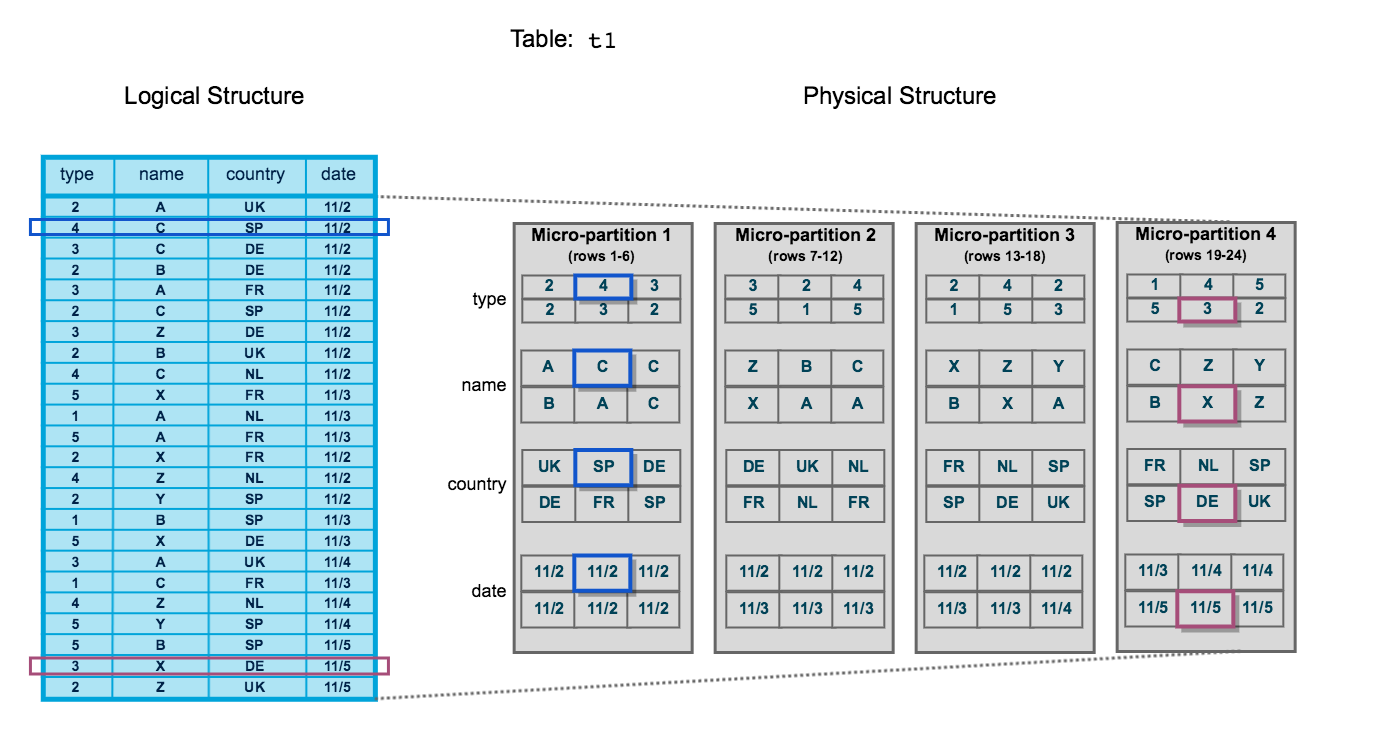
Micro-Partition Structure
Illustration of how Snowflake automatically organises table data into immutable micro-partitions with columnar storage
What is the smallest unit of storage in Snowflake?
Micro-partition. Snowflake automatically divides tables into micro-partitions (50-500 MB compressed) without user intervention.
Key Concepts
Micro-Partitions:
- Automatically created and sized by Snowflake
- Typically 50-500 MB compressed
- Immutable (never updated in place)
- Columnar format for efficient scanning
Metadata:
- Min/max values per column
- Number of distinct values
- Additional optimisation statistics
- Enables automatic query pruning
Are Snowflake micro-partitions mutable or immutable?
Immutable. When data is modified, Snowflake creates new micro-partitions rather than updating existing ones. This enables features like Time Travel and Zero-Copy Cloning.
2. Query Processing Layer (Virtual Warehouses)
Virtual Warehouses are independent compute clusters that execute queries.
Virtual Warehouse Characteristics
- Elastic: Scale up/down instantly
- Isolated: No resource contention between warehouses
- MPP Clusters: Massively Parallel Processing
- Auto-suspend/resume: Cost optimisation
Virtual Warehouse Scaling
Visualisation of how virtual warehouses can scale up (larger size) or scale out (more clusters) independently
1-- Create a virtual warehouse2CREATE WAREHOUSE ANALYTICS_WH3WITH WAREHOUSE_SIZE = 'LARGE'4AUTO_SUSPEND = 3005AUTO_RESUME = TRUE6INITIALLY_SUSPENDED = TRUE;78-- Resize warehouse on-the-fly9ALTER WAREHOUSE ANALYTICS_WH SET WAREHOUSE_SIZE = 'X-LARGE';1011-- Start the warehouse12ALTER WAREHOUSE ANALYTICS_WH RESUME;1314-- Suspend the warehouse15ALTER WAREHOUSE ANALYTICS_WH SUSPEND;What happens to running queries when you resize a virtual warehouse?
Running queries continue on the old warehouse size until completion. New queries use the new warehouse size. This ensures no query interruption during resizing.
Warehouse Sizes
| Size | Credits/Hour | Notes |
|---|---|---|
| X-Small | 1 | Development, testing |
| Small | 2 | Small workloads |
| Medium | 4 | General purpose |
| Large | 8 | Large datasets |
| X-Large | 16 | Very large datasets |
| 2X-Large | 32 | Massive workloads |
| 3X-Large | 64 | Extreme workloads |
| 4X-Large | 128 | Maximum size |
How does Snowflake charge for compute resources?
Snowflake charges credits based on warehouse size and time used (per-second billing with 60-second minimum). A suspended warehouse consumes zero credits.
3. Cloud Services Layer
The brain of Snowflake - coordinates all activities across the platform:
- Authentication: User login and security
- Infrastructure Management: Optimisation and monitoring
- Metadata Management: Query parsing and optimisation
- Query Parsing & Optimisation: Execution planning
- Access Control: Role-based permissions
Complete Architecture Stack
End-to-end view showing how Cloud Services orchestrate compute and storage layers
Key Services
┌─────────────────────────────────────────┐
│       Cloud Services Layer              │
├─────────────────────────────────────────┤
│  • Authentication & Access Control      │
│  • Query Compilation & Optimisation     │
│  • Transaction Management               │
│  • Metadata Management                  │
│  • Security & Encryption                │
└─────────────────────────────────────────┘
              ↓
┌─────────────────────────────────────────┐
│    Virtual Warehouses (Compute)         │
│  [WH1]  [WH2]  [WH3]  ...  [WHn]        │
└─────────────────────────────────────────┘
              ↓
┌─────────────────────────────────────────┐
│    Database Storage (Data)              │
│  Tables | Stages | Micro-partitions     │
└─────────────────────────────────────────┘Is the Cloud Services Layer charged separately?
Generally no. Cloud services are included for free up to 10% of daily compute credit usage. Only usage exceeding 10% is billed.
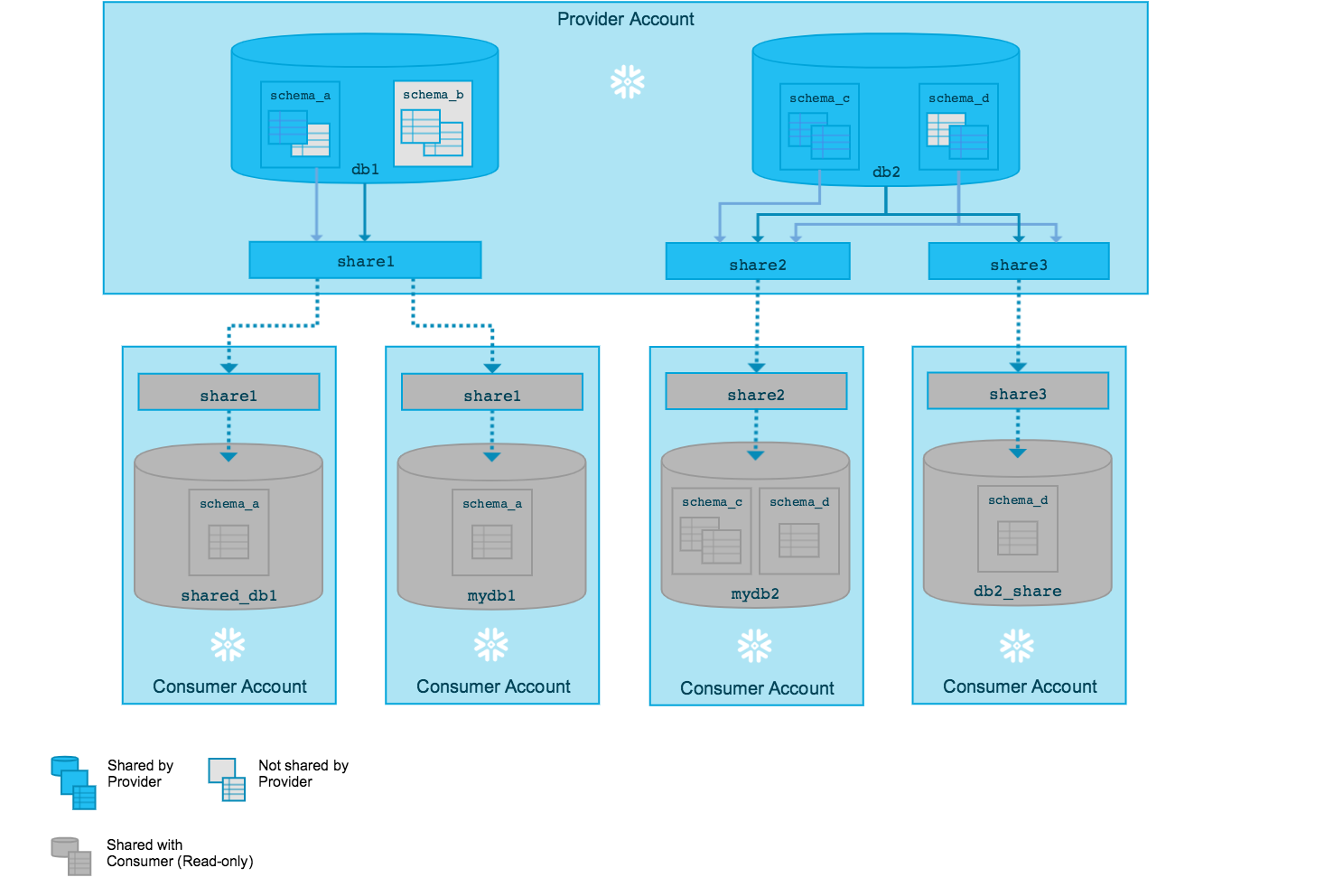
Data Sharing Architecture
Snowflake enables secure data sharing without data copying:
- Live Access: Consumers query provider’s data directly
- Zero-Copy: No data movement required
- Real-Time: Always up-to-date data
- Granular Control: Share specific objects only
Data Sharing Architecture
How data providers share live data with consumers without physical copying, using metadata and access grants
1-- Create a share2CREATE SHARE SALES_SHARE;34-- Grant usage on database5GRANT USAGE ON DATABASE SALES_DB TO SHARE SALES_SHARE;67-- Grant usage on schema8GRANT USAGE ON SCHEMA SALES_DB.PUBLIC TO SHARE SALES_SHARE;910-- Grant select on specific table11GRANT SELECT ON TABLE SALES_DB.PUBLIC.ORDERS TO SHARE SALES_SHARE;1213-- Add account to share14ALTER SHARE SALES_SHARE ADD ACCOUNTS = xy12345;Multi-Cluster Warehouses
For high concurrency scenarios, Snowflake offers Multi-cluster Warehouses:
- Auto-scaling: Add clusters based on load
- Maximized Mode: All clusters run simultaneously
- Auto-scale Mode: Clusters scale based on demand
- Concurrent Query Handling: Distributes queries across clusters
1CREATE WAREHOUSE PRODUCTION_WH2WITH WAREHOUSE_SIZE = 'LARGE'3MIN_CLUSTER_COUNT = 14MAX_CLUSTER_COUNT = 55SCALING_POLICY = 'STANDARD'6AUTO_SUSPEND = 3007AUTO_RESUME = TRUE;What's the difference between scaling UP and scaling OUT in Snowflake?
Scaling UP = Increasing warehouse size (more resources per query). Scaling OUT = Adding more clusters (handles more concurrent queries). Use scaling UP for large queries, scaling OUT for high concurrency.
Key Architecture Benefits
-
Separation of Storage and Compute
- Scale independently
- Pay for what you use
- Multiple warehouses access same data
-
Automatic Optimisation
- No indexes to manage
- No partitioning required
- Automatic statistics
-
Data Sharing Without Copying
- Secure and controlled
- Real-time updates
- No ETL required
-
Zero Maintenance
- No infrastructure management
- Automatic updates
- Built-in disaster recovery
Architecture Benefits Summary
Visual summary comparing traditional data warehouses with Snowflake's modern architecture advantages
Practice Questions
True or False: In Snowflake, you need to define partition keys for tables to optimise query performance.
FALSE. Snowflake automatically creates micro-partitions and maintains metadata. Manual partitioning is not required and not recommended.
What happens to data when you drop a virtual warehouse?
Nothing. Data is stored independently in the storage layer. Dropping a warehouse only removes compute resources, not data.
Can two different virtual warehouses query the same table simultaneously?
YES. Multiple warehouses can access the same data concurrently without any contention, thanks to the separation of storage and compute.
Which layer is responsible for query optimisation and execution planning?
The Cloud Services Layer handles query compilation, optimisation, and execution planning. Virtual Warehouses execute the queries based on these plans.
What is the maximum Time Travel retention period in Snowflake Enterprise Edition?
90 days for permanent tables (requires Enterprise Edition or higher). Standard Edition supports up to 1 day.
Additional Resources
Official Snowflake Documentation
Recommended Reading
- Snowflake Architecture Whitepaper
- Best Practices Guide for COF-C02
- Performance Optimisation Techniques
Next Steps
Now that you understand Snowflake’s architecture, continue to:
Reinforce what you just read
Study the All flashcards with spaced repetition to lock it in.