Key Terms — Databases, Schemas & Tables
Database
A top-level container in Snowflake that holds one or more schemas. Databases provide logical separation and namespace isolation for all objects within them.
Schema
A second-level container within a database that groups related tables, views, procedures, and other objects. Every database automatically includes INFORMATION_SCHEMA and PUBLIC schemas.
Permanent Table
The default table type in Snowflake. Permanent tables persist until explicitly dropped and benefit from full Time Travel (up to 90 days) and Fail-safe (7 days) protection.
Transient Table
A table type that persists across sessions but has no Fail-safe period and a maximum of 1 day of Time Travel. Designed for staging and ETL workloads where cost savings outweigh recovery needs.
Temporary Table
A session-scoped table that is automatically dropped when the session ends. Not visible to other sessions. Has no Fail-safe and a maximum of 1 day of Time Travel.
External Table
A read-only table that references data stored in an external stage (S3, Azure Blob, or GCS). Only metadata is stored in Snowflake; no data is copied into Snowflake storage.
VARIANT
A semi-structured data type that can store JSON, XML, Avro, ORC, and Parquet data. Supports path-based access using colon (:) notation and type casting with double-colon (::) notation.
INFORMATION_SCHEMA
An auto-created schema within every Snowflake database that contains views exposing metadata about objects within that database. Query latency is near real-time but limited to the current database.
ACCOUNT_USAGE
A schema in the shared SNOWFLAKE database that provides account-wide metadata views. Has a latency of 45 minutes to 3 hours but includes historical and deleted objects.
Constraint
Logical rules (NOT NULL, UNIQUE, PRIMARY KEY, FOREIGN KEY) that can be defined on Snowflake tables. Constraints are informational only and are NOT enforced by Snowflake's query engine.
Why This Topic Matters for the Exam
Understanding Snowflake’s object hierarchy is foundational to the SnowPro Core (COF-C02) exam. Every question about storage, data organisation, Time Travel, and data lifecycle ultimately traces back to how databases, schemas, and tables are structured. The exam heavily tests the differences between table types — particularly where Transient and Temporary tables are appropriate versus Permanent tables — and candidates frequently lose marks by confusing Fail-safe availability across these types.
This module will walk you through the complete database object model from the top-level database container down to column-level data types, including the VARIANT semi-structured type that underpins Snowflake’s flexible schema capabilities.
The Snowflake object hierarchy (databases, schemas, tables) appears across multiple exam domains. Expect 8–12 questions touching on table types, DDL syntax, INFORMATION_SCHEMA vs ACCOUNT_USAGE, and constraint behaviour. This is one of the highest-value topics on the COF-C02 exam.
The Snowflake Object Hierarchy
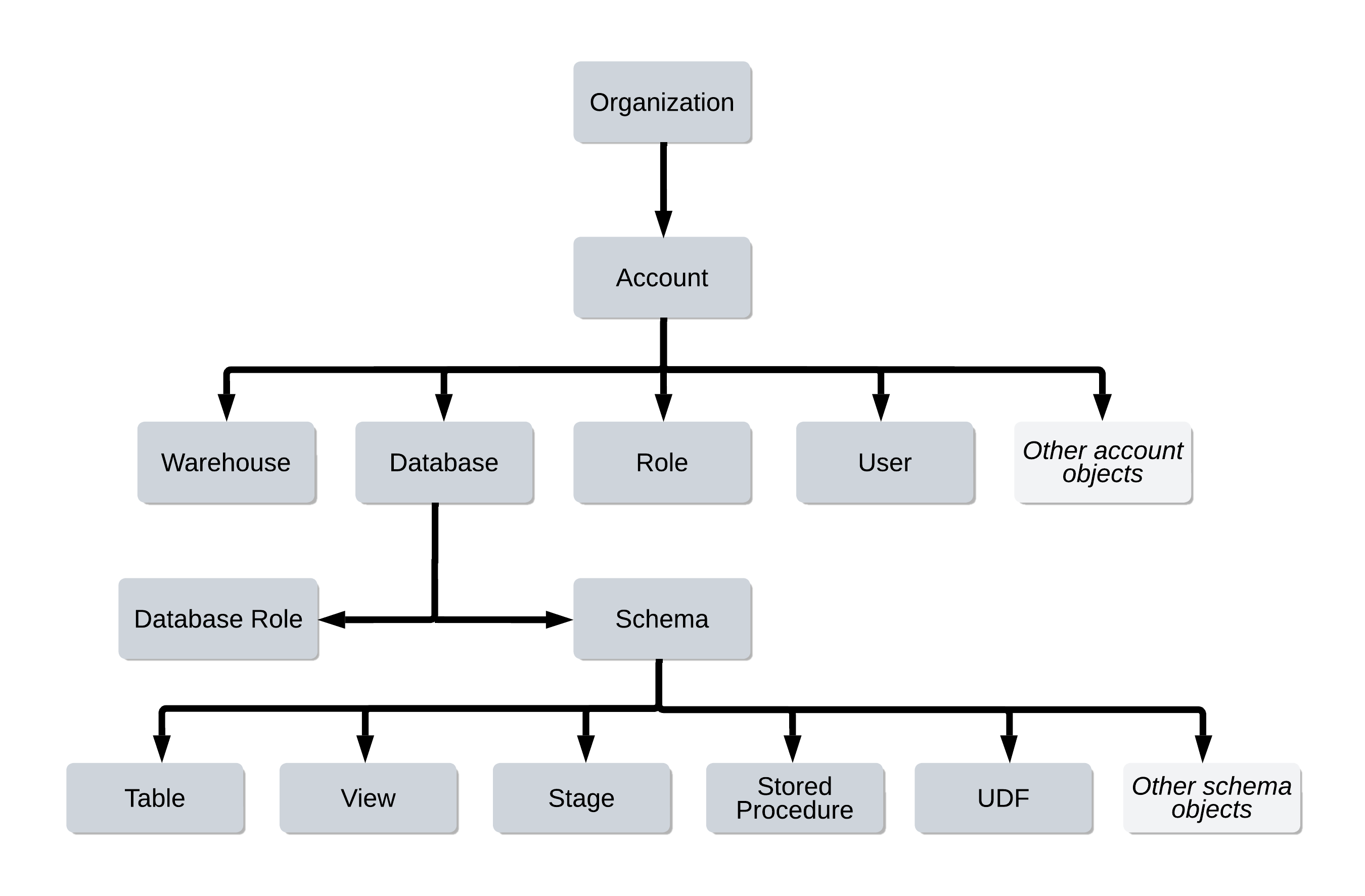
Snowflake organises all data objects in a strict three-level hierarchy: Database > Schema > Table/View/Procedure. This hierarchy enforces namespace isolation and enables granular access control at each level.
Snowflake Object Hierarchy
A tree diagram showing the complete Snowflake object hierarchy. At the top is the Snowflake Account, which contains one or more Databases. Each Database contains two auto-created schemas (INFORMATION_SCHEMA and PUBLIC) plus any user-created schemas. Within each Schema live Tables (Permanent, Transient, Temporary, External), Views, Sequences, File Formats, Stages, Stored Procedures, Functions, Tasks, and Streams. Arrows indicate containment relationships flowing top-down. The INFORMATION_SCHEMA schema is highlighted in blue to show it is system-managed and read-only.
Every object in Snowflake is addressed by its fully qualified name using dot notation:
database_name.schema_name.object_nameFor example: PROD_DB.ANALYTICS.CUSTOMER_ORDERS
Databases
A database in Snowflake is the highest-level logical container for data. It groups related schemas together and provides the top-level namespace for all objects.
Creating and Managing Databases
1-- Create a standard permanent database2CREATE DATABASE prod_db3DATA_RETENTION_TIME_IN_DAYS = 144COMMENT = 'Production analytics database';56-- Create a transient database (no Fail-safe, max 1 day Time Travel)7-- All schemas and tables within inherit the transient property8CREATE TRANSIENT DATABASE staging_db9DATA_RETENTION_TIME_IN_DAYS = 110COMMENT = 'ETL staging area — transient, no Fail-safe';1112-- Switch the active database for the current session13USE DATABASE prod_db;1415-- Rename a database16ALTER DATABASE prod_db RENAME TO production_db;1718-- Change Time Travel retention on an existing database19ALTER DATABASE production_db20SET DATA_RETENTION_TIME_IN_DAYS = 30;2122-- Show all databases accessible to the current role23SHOW DATABASES;2425-- Show databases matching a pattern26SHOW DATABASES LIKE 'prod%';2728-- Drop a database (irreversible — Time Travel window starts here)29DROP DATABASE old_db;3031-- Undrop within Time Travel window32UNDROP DATABASE old_db;When you create a TRANSIENT DATABASE, all schemas and tables created within that database automatically inherit the transient property. You cannot create a permanent table inside a transient database. This is a commonly tested exam behaviour.
Key Database Properties
| Property | Default | Description |
|---|---|---|
DATA_RETENTION_TIME_IN_DAYS | 1 (Standard), up to 90 (Enterprise) | Controls Time Travel window |
TRANSIENT | FALSE | Removes Fail-safe; max 1-day Time Travel |
COMMENT | NULL | Descriptive text for the database |
Schemas
A schema is a logical grouping within a database. It holds tables, views, stages, file formats, sequences, procedures, functions, tasks, and streams.
Auto-Created Schemas
Every database automatically contains two schemas that you cannot drop:
- INFORMATION_SCHEMA — Contains metadata views about objects in the current database
- PUBLIC — The default schema where objects are created when no schema is specified
Attempting to DROP or ALTER the INFORMATION_SCHEMA schema will result in an error. It is a system-managed, read-only schema. This is a common trick question on the exam.
Creating and Managing Schemas
1-- Create a standard schema2CREATE SCHEMA prod_db.analytics3DATA_RETENTION_TIME_IN_DAYS = 144COMMENT = 'Analytics reporting schema';56-- Create a transient schema (no Fail-safe)7CREATE TRANSIENT SCHEMA prod_db.staging8DATA_RETENTION_TIME_IN_DAYS = 1;910-- Switch active schema for the session11USE SCHEMA prod_db.analytics;1213-- Alternatively, use the two-part notation14USE prod_db.analytics;1516-- Rename a schema17ALTER SCHEMA analytics RENAME TO reporting;1819-- Show all schemas in the current database20SHOW SCHEMAS;2122-- Show schemas in a specific database23SHOW SCHEMAS IN DATABASE prod_db;2425-- Drop and undrop schema26DROP SCHEMA old_schema;27UNDROP SCHEMA old_schema;If a schema’s DATA_RETENTION_TIME_IN_DAYS is not explicitly set, it inherits from the parent database. Similarly, if a table’s retention is not set, it inherits from the schema. Setting retention at the database level provides a convenient default for all objects below it.
Table Types — The Exam’s Most Tested Topic
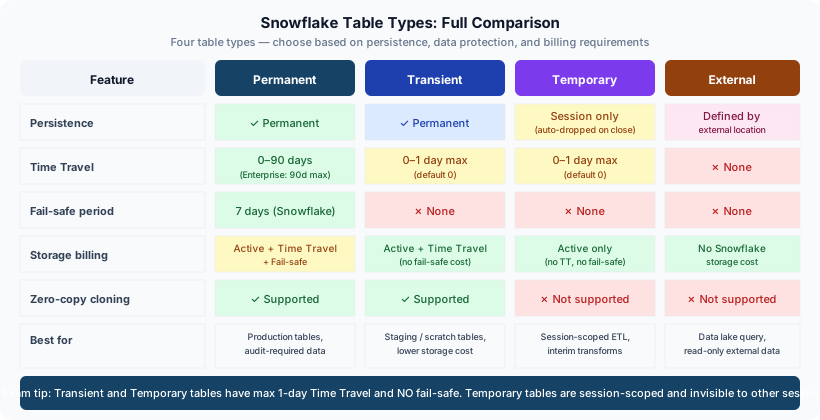
Snowflake has four distinct table types, each with different persistence, Time Travel, and Fail-safe characteristics. Mastering these differences is critical for the COF-C02 exam.
Snowflake Table Types Comparison
A side-by-side comparison matrix of Snowflake's four table types. Columns represent: Permanent Table, Transient Table, Temporary Table, External Table. Rows show: Persistence (Permanent: until dropped; Transient: until dropped; Temporary: session only; External: read-only reference), Time Travel (Permanent: 0-90 days; Transient: 0-1 day; Temporary: 0-1 day; External: none), Fail-safe (Permanent: 7 days; Transient: none; Temporary: none; External: none), Cross-session visibility (Permanent: yes; Transient: yes; Temporary: no, private to session; External: yes), Storage cost (Permanent: highest; Transient: lower, no fail-safe overhead; Temporary: lowest; External: metadata only). The Temporary column is highlighted in yellow with a note 'Session-scoped only'. The External column shows a cloud icon representing data residing in S3/Azure/GCS.
1. Permanent Tables
The default table type. Created with CREATE TABLE unless another type is specified.
- Full Time Travel: 0–90 days (Standard edition: max 1 day; Enterprise+: up to 90 days)
- Full Fail-safe: always 7 days beyond Time Travel window
- Persist until explicitly
DROPped - Visible to all roles with appropriate privileges
2. Transient Tables
Created with CREATE TRANSIENT TABLE. Designed for data that does not require Fail-safe protection.
- No Fail-safe period (0 days)
- Time Travel: 0–1 day maximum
- Persist across sessions until explicitly dropped
- Ideal for: staging tables, ETL intermediates, scratch tables that are rebuilt regularly
3. Temporary Tables
Created with CREATE TEMPORARY TABLE (or CREATE TEMP TABLE).
- Session-scoped: automatically dropped when the session ends
- Not visible to other sessions (private to the creating session)
- No Fail-safe period (0 days)
- Time Travel: 0–1 day maximum
- If a temporary table has the same name as a permanent/transient table in the same schema, the temporary table takes precedence within that session
4. External Tables
Created with CREATE EXTERNAL TABLE. The data resides in an external stage (S3, Azure Blob Storage, or GCS).
- Read-only — you cannot INSERT, UPDATE, or DELETE data via an external table
- Only metadata (column definitions, file locations) is stored in Snowflake
- No Time Travel, No Fail-safe
- Supports partitioning via partition columns
- Requires an external stage to be defined first
1-- 1. Permanent table (default)2CREATE TABLE prod_db.analytics.customers (3customer_id NUMBER(10, 0) NOT NULL,4email VARCHAR(255) NOT NULL,5created_at TIMESTAMP_NTZ DEFAULT CURRENT_TIMESTAMP(),6is_active BOOLEAN DEFAULT TRUE7);89-- 2. Transient table — no Fail-safe, max 1-day Time Travel10CREATE TRANSIENT TABLE staging.raw_customer_events (11event_id VARCHAR(36),12event_type VARCHAR(100),13payload VARIANT,14loaded_at TIMESTAMP_LTZ DEFAULT CURRENT_TIMESTAMP()15)16DATA_RETENTION_TIME_IN_DAYS = 1;1718-- 3. Temporary table — dropped when session ends19CREATE TEMPORARY TABLE temp_dedup_results (20customer_id NUMBER,21row_num NUMBER22);2324-- 4. External table — data lives in S325CREATE EXTERNAL TABLE ext_raw_logs (26log_date DATE AS (TO_DATE($1:log_date::STRING)),27log_level VARCHAR AS ($1:level::STRING),28message VARCHAR AS ($1:message::STRING)29)30PARTITION BY (log_date)31LOCATION = @my_s3_stage/logs/32FILE_FORMAT = (TYPE = 'JSON')33AUTO_REFRESH = TRUE;Transient vs Temporary Tables
Table DDL Operations
1-- CREATE TABLE AS SELECT (CTAS) — creates and populates in one step2CREATE TABLE analytics.customer_summary AS3SELECT4customer_id,5COUNT(*) AS order_count,6SUM(amount) AS total_spend,7MAX(order_date) AS last_order_date8FROM analytics.orders9GROUP BY customer_id;1011-- CREATE TABLE LIKE — copies structure only, no data12CREATE TABLE analytics.customer_summary_backup13LIKE analytics.customer_summary;1415-- CREATE OR REPLACE TABLE — atomically drops and recreates16-- WARNING: drops all data and resets Time Travel history17CREATE OR REPLACE TABLE analytics.staging_load (18id NUMBER AUTOINCREMENT,19raw_data VARIANT20);2122-- ALTER TABLE — add, drop, rename columns23ALTER TABLE analytics.customers24ADD COLUMN phone_number VARCHAR(20);2526ALTER TABLE analytics.customers27DROP COLUMN phone_number;2829ALTER TABLE analytics.customers30RENAME COLUMN email TO email_address;3132-- Change Time Travel retention at table level33ALTER TABLE analytics.customers34SET DATA_RETENTION_TIME_IN_DAYS = 30;3536-- SHOW commands for tables37SHOW TABLES;38SHOW TABLES IN SCHEMA analytics;39SHOW TABLES LIKE 'customer%' IN DATABASE prod_db;40SHOW COLUMNS IN TABLE analytics.customers;Using CREATE OR REPLACE TABLE drops the existing table and creates a new one. This resets the Time Travel history — you cannot use AT (BEFORE) to query data from before the replacement. Use TRUNCATE TABLE instead if you need to preserve the table’s Time Travel history.
Snowflake Data Types
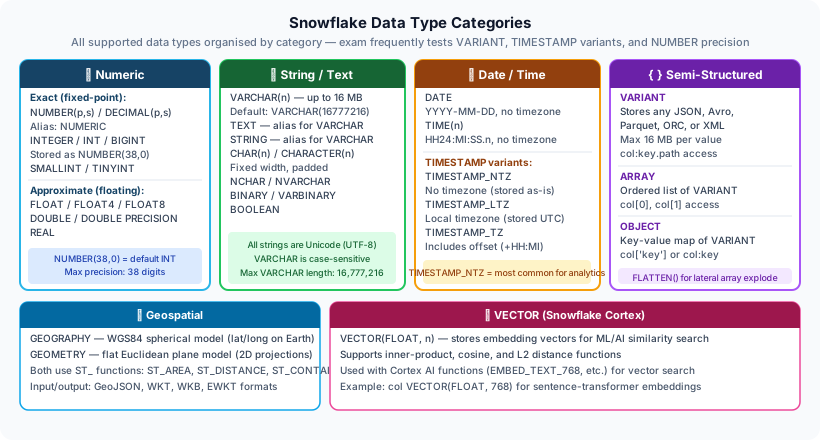
Snowflake Data Type Categories
A categorised diagram of Snowflake data types organised into five groups. Group 1 (Numeric): NUMBER/DECIMAL/NUMERIC (fixed-point), INT/INTEGER/BIGINT/SMALLINT/TINYINT (integer aliases mapped to NUMBER), FLOAT/FLOAT4/FLOAT8/DOUBLE (64-bit floating point), REAL (alias for FLOAT). Group 2 (String): VARCHAR/STRING/TEXT/CHAR/CHARACTER (all map to VARCHAR, max 16MB), BINARY/VARBINARY (raw bytes). Group 3 (Date and Time): DATE (no time component), TIME (no date component), TIMESTAMP_NTZ (no timezone, stored as-is), TIMESTAMP_LTZ (local timezone, stored in UTC), TIMESTAMP_TZ (with timezone offset stored). Group 4 (Boolean): BOOLEAN (TRUE/FALSE/NULL). Group 5 (Semi-Structured): VARIANT (up to 16MB, stores JSON/XML/Avro/Parquet), ARRAY (ordered list of VARIANT values), OBJECT (key-value map of VARIANT values). Group 6 (Geospatial): GEOGRAPHY (earth-curvature-aware), GEOMETRY (flat-plane calculations). Each group has a distinct colour and icon in the diagram.
Key Data Types for the Exam
1-- Numeric types2CREATE TABLE type_examples (3-- NUMBER(precision, scale) — alias: DECIMAL, NUMERIC4price NUMBER(10, 2), -- up to 9,999,999.995quantity NUMBER(8, 0), -- integer stored as NUMBER6rate FLOAT, -- 64-bit double precision78-- String types — all aliases for VARCHAR internally9name VARCHAR(255), -- explicit length10description STRING, -- alias, max 16MB11notes TEXT, -- alias, max 16MB1213-- Boolean14is_active BOOLEAN, -- TRUE / FALSE / NULL1516-- Date and time17birth_date DATE, -- YYYY-MM-DD18login_time TIME, -- HH:MI:SS.FFFFFFFFF19created_utc TIMESTAMP_NTZ, -- no timezone stored20event_local TIMESTAMP_LTZ, -- stores in UTC, displays in session TZ21recorded_at TIMESTAMP_TZ, -- stores offset with value2223-- Semi-structured24raw_json VARIANT, -- any JSON, XML, Avro, Parquet (max 16MB)25tags ARRAY, -- ordered list of VARIANT values26attributes OBJECT -- key-value pairs27);The VARIANT Type — Semi-Structured Data
VARIANT is one of Snowflake’s most powerful features, enabling schema-on-read for semi-structured data. It is a common exam topic.
1-- Insert JSON into a VARIANT column2INSERT INTO staging.raw_events (payload)3SELECT PARSE_JSON('{4"user_id": 12345,5"event": "purchase",6"items": [7 {"sku": "A001", "qty": 2, "price": 29.99},8 {"sku": "B002", "qty": 1, "price": 149.00}9],10"metadata": {11 "session_id": "abc-123",12 "ip_address": "192.168.1.1"13}14}');1516-- Path access using colon (:) notation17SELECT18payload:user_id AS user_id, -- returns VARIANT19payload:event AS event_type,20payload:metadata:session_id AS session_id, -- nested path21payload:items[0]:sku AS first_sku -- array index22FROM staging.raw_events;2324-- Type casting with double-colon (::) — explicit CAST25SELECT26payload:user_id::NUMBER AS user_id_num, -- VARIANT -> NUMBER27payload:event::VARCHAR AS event_str, -- VARIANT -> STRING28payload:metadata:session_id::STRING AS session_str29FROM staging.raw_events;3031-- Flatten arrays — LATERAL FLATTEN expands array into rows32SELECT33f.value:sku::VARCHAR AS sku,34f.value:qty::NUMBER AS quantity,35f.value:price::FLOAT AS price36FROM staging.raw_events,37 LATERAL FLATTEN(INPUT => payload:items) f;3839-- Check if a path exists40SELECT41payload:user_id IS NOT NULL AS has_user_id42FROM staging.raw_events;The exam tests VARIANT syntax carefully. Remember: single colon (:) accesses a nested path and returns a VARIANT; double colon (::) casts the VARIANT to a specific type. For arrays, use square bracket notation with a zero-based index: payload:items[0]:sku::VARCHAR.
INFORMATION_SCHEMA vs ACCOUNT_USAGE
These two metadata sources are heavily tested because they serve different purposes and have different latency and scope characteristics.
INFORMATION_SCHEMA vs ACCOUNT_USAGE
1-- INFORMATION_SCHEMA: tables in current database2SELECT3table_name,4table_type,5row_count,6bytes,7retention_time8FROM information_schema.tables9WHERE table_schema = 'ANALYTICS'10ORDER BY bytes DESC;1112-- INFORMATION_SCHEMA: column metadata13SELECT14table_name,15column_name,16data_type,17character_maximum_length,18is_nullable19FROM information_schema.columns20WHERE table_schema = 'ANALYTICS'21AND table_name = 'CUSTOMERS';2223-- INFORMATION_SCHEMA: load history (last 14 days)24SELECT25table_name,26last_load_time,27row_count,28error_count29FROM information_schema.load_history30WHERE schema_name = 'ANALYTICS'31ORDER BY last_load_time DESC;3233-- ACCOUNT_USAGE: query history across entire account (ACCOUNTADMIN required)34SELECT35query_id,36user_name,37warehouse_name,38execution_time / 1000 AS execution_seconds,39bytes_scanned,40query_text41FROM snowflake.account_usage.query_history42WHERE start_time >= DATEADD('day', -7, CURRENT_TIMESTAMP())43AND execution_status = 'SUCCESS'44ORDER BY execution_time DESC45LIMIT 100;4647-- ACCOUNT_USAGE: storage usage over time48SELECT49usage_date,50database_name,51average_database_bytes / POWER(1024, 3) AS avg_gb52FROM snowflake.account_usage.database_storage_usage_history53WHERE usage_date >= DATEADD('month', -1, CURRENT_DATE())54ORDER BY usage_date DESC;When you need to verify that a table exists or check column definitions right now, use INFORMATION_SCHEMA. When you need to audit what happened over the past week or month across all users and warehouses, use SNOWFLAKE.ACCOUNT_USAGE.
SHOW Commands
SHOW commands retrieve metadata from Snowflake’s internal catalogue without needing to query INFORMATION_SCHEMA.
1-- Show all databases in the account2SHOW DATABASES;34-- Show databases matching a pattern5SHOW DATABASES LIKE 'prod%';67-- Show schemas in the current database8SHOW SCHEMAS;910-- Show schemas in a specific database11SHOW SCHEMAS IN DATABASE prod_db;1213-- Show all tables in the current schema14SHOW TABLES;1516-- Show tables in a specific schema17SHOW TABLES IN SCHEMA prod_db.analytics;1819-- Show tables matching a pattern20SHOW TABLES LIKE 'customer%';2122-- Show column definitions for a table23SHOW COLUMNS IN TABLE analytics.customers;2425-- Show views in the current schema26SHOW VIEWS;2728-- Show stages accessible to current role29SHOW STAGES;3031-- Show file formats32SHOW FILE FORMATS;3334-- Access SHOW results via result_scan35SHOW TABLES IN SCHEMA analytics;36SELECT "name", "kind", "rows", "bytes"37FROM TABLE(RESULT_SCAN(LAST_QUERY_ID()));Constraints in Snowflake
Snowflake supports standard SQL constraint types, but with a critically important caveat: constraints are informational only and are NOT enforced.
This is one of the most frequently tested facts about Snowflake tables. You CAN define PRIMARY KEY, FOREIGN KEY, UNIQUE, and NOT NULL constraints, but Snowflake does NOT enforce them during INSERT, UPDATE, or MERGE operations. They exist purely as metadata for query optimisers and ETL tools that read schema information.
1-- Constraints can be defined inline2CREATE TABLE analytics.orders (3order_id NUMBER NOT NULL, -- informational only4customer_id NUMBER NOT NULL,5order_date DATE NOT NULL,6total_amount NUMBER(12, 2),7status VARCHAR(20),89-- Primary key — informational, not enforced10CONSTRAINT pk_orders PRIMARY KEY (order_id),1112-- Foreign key — informational, not enforced13CONSTRAINT fk_orders_customer14 FOREIGN KEY (customer_id)15 REFERENCES analytics.customers (customer_id)16);1718-- Add constraint to existing table19ALTER TABLE analytics.orders20ADD CONSTRAINT uq_order_customer UNIQUE (order_id, customer_id);2122-- Show constraints on a table23SHOW PRIMARY KEYS IN TABLE analytics.orders;24SHOW IMPORTED KEYS IN TABLE analytics.orders;25SHOW UNIQUE KEYS IN TABLE analytics.orders;2627-- IMPORTANT: This INSERT succeeds even though it violates NOT NULL28-- Snowflake does NOT enforce constraints29INSERT INTO analytics.orders (order_id, customer_id, order_date)30VALUES (NULL, NULL, NULL); -- Will succeed! Constraints not enforced.Step-by-Step: Building a Layered Database Architecture
Setting Up a Medallion Architecture in Snowflake
Create the Databases
Establish separate databases for each layer of your data architecture. Use a transient database for the bronze (raw) layer since that data can be re-loaded from source systems.
-- Bronze: raw ingestion — transient to save costs
CREATE TRANSIENT DATABASE bronze_db
DATA_RETENTION_TIME_IN_DAYS = 1
COMMENT = 'Raw source data — reloadable from source';

-- Silver: cleansed and conformed
CREATE DATABASE silver_db
DATA_RETENTION_TIME_IN_DAYS = 14
COMMENT = 'Cleansed and validated data';

-- Gold: business-ready aggregates
CREATE DATABASE gold_db
DATA_RETENTION_TIME_IN_DAYS = 30
COMMENT = 'Business-ready reporting layer';Create the Schemas
Organise each database with meaningful schemas. The silver and gold databases use permanent schemas that inherit the database's Time Travel retention.
-- Bronze schemas — inherit transient from database
USE DATABASE bronze_db;
CREATE SCHEMA raw_crm;
CREATE SCHEMA raw_erp;
CREATE SCHEMA raw_clickstream;

-- Silver schemas
USE DATABASE silver_db;
CREATE SCHEMA conformed;
CREATE SCHEMA staging;

-- Gold schemas
USE DATABASE gold_db;
CREATE SCHEMA finance;
CREATE SCHEMA marketing;
CREATE SCHEMA operations;Create the Tables
Use the appropriate table type for each layer. Bronze uses transient tables, silver and gold use permanent tables.
-- Bronze: transient staging table
CREATE TRANSIENT TABLE bronze_db.raw_crm.accounts (
_load_id        VARCHAR(36) DEFAULT UUID_STRING(),
_loaded_at      TIMESTAMP_LTZ DEFAULT CURRENT_TIMESTAMP(),
_file_name      VARCHAR(500),
raw_data        VARIANT
)
DATA_RETENTION_TIME_IN_DAYS = 1;

-- Silver: permanent table with proper types
CREATE TABLE silver_db.conformed.customers (
customer_key    NUMBER AUTOINCREMENT PRIMARY KEY,
source_id       VARCHAR(100) NOT NULL,
full_name       VARCHAR(255),
email           VARCHAR(255),
created_date    DATE,
updated_at      TIMESTAMP_NTZ
)
DATA_RETENTION_TIME_IN_DAYS = 14;

-- Gold: permanent aggregate table
CREATE TABLE gold_db.marketing.customer_ltv AS
SELECT
customer_key,
SUM(order_total) AS lifetime_value,
COUNT(*)         AS order_count,
MIN(order_date)  AS first_order_date,
MAX(order_date)  AS last_order_date
FROM silver_db.conformed.orders
GROUP BY customer_key;Verify with INFORMATION_SCHEMA
Query INFORMATION_SCHEMA to verify the table types, retention settings, and row counts across your new architecture.
-- Verify table types and retention across all databases
SELECT
t.table_catalog,
t.table_schema,
t.table_name,
t.table_type,
t.retention_time,
t.row_count,
ROUND(t.bytes / POWER(1024, 3), 4) AS size_gb
FROM gold_db.information_schema.tables t
WHERE table_type NOT IN ('VIEW')
ORDER BY table_catalog, table_schema, table_name;

-- Check that CTAS populated the gold table
SELECT COUNT(*) AS row_count
FROM gold_db.marketing.customer_ltv;
Quick Reference Cheat Sheet
Databases, Schemas & Tables — COF-C02 Cheat Sheet
Table Type Summary
CREATE TABLECREATE TRANSIENT TABLECREATE TEMPORARY TABLECREATE EXTERNAL TABLEKey DDL Patterns
CTASLIKEOR REPLACEAdd columnRename columnVARIANT Access Syntax
Path accessNested pathArray indexType castFlatten arrayMetadata Sources
INFORMATION_SCHEMAACCOUNT_USAGESHOW TABLESConstraints Behaviour
NOT NULLPRIMARY KEYFOREIGN KEYUNIQUEPractice Quiz
A developer creates a TEMPORARY TABLE named CUSTOMER_STAGING in schema ANALYTICS, where a PERMANENT TABLE with the same name already exists. What happens when the developer queries CUSTOMER_STAGING within the same session?
Which of the following statements about Snowflake constraints is CORRECT?
A data engineer needs to store 90 days of Time Travel history for a critical customer table. Which Snowflake edition and table type must be used?
Flashcard Exam Prep
What is the maximum Time Travel retention period for a Transient table?
1 day (DATA_RETENTION_TIME_IN_DAYS = 1). Transient tables do not have a Fail-safe period. They persist across sessions until dropped but sacrifice data protection for lower storage costs.
What happens to a Temporary table when the Snowflake session ends?
The Temporary table is automatically dropped. Temporary tables are session-scoped — they are private to the creating session, invisible to all other sessions, and are automatically destroyed when the session terminates.
What does the :: (double colon) operator do when used with a VARIANT column?
The :: operator performs an explicit type cast, converting a VARIANT value to a specific Snowflake data type. For example, payload:user_id::NUMBER converts the VARIANT value at the 'user_id' path to a NUMBER type. Without ::, path access returns VARIANT.
What is the key difference between INFORMATION_SCHEMA and SNOWFLAKE.ACCOUNT_USAGE?
INFORMATION_SCHEMA is per-database, near real-time, but only shows current objects in that database. SNOWFLAKE.ACCOUNT_USAGE covers the entire account, retains up to 1 year of history including dropped objects, but has a latency of 45 minutes to 3 hours.
Are PRIMARY KEY constraints enforced in Snowflake?
No. Snowflake constraints (NOT NULL, UNIQUE, PRIMARY KEY, FOREIGN KEY) are informational only and are NOT enforced by the query engine. You can insert duplicate values or NULL values into constrained columns without error.
What is the difference between CREATE TABLE LIKE and CREATE TABLE AS SELECT (CTAS)?
CREATE TABLE LIKE copies only the table structure (columns and data types) without any data — it creates an empty table. CREATE TABLE AS SELECT (CTAS) creates a new table AND populates it with the result of the SELECT query in a single atomic operation.
Additional Resources
- Snowflake Documentation — Databases
- Snowflake Documentation — Tables
- Snowflake Documentation — Semi-Structured Data
- Snowflake Documentation — INFORMATION_SCHEMA
- Snowflake Documentation — ACCOUNT_USAGE
- Snowflake Documentation — Constraints
Next Steps
- Virtual Warehouses — Understand the compute layer that queries these tables
- Time Travel & Fail-safe — Deep dive into data recovery mechanisms
- Data Loading — Learn how to load data into your tables
- Access Control — Grant privileges on databases, schemas, and tables
Reinforce what you just read
Study the All flashcards with spaced repetition to lock it in.