Key Terms — Snowflake SQL Essentials
VARIANT
A Snowflake data type that can store any semi-structured data including JSON, Avro, Parquet, and XML. It holds up to 16 MB of compressed data per value.
FLATTEN
A Snowflake table function used with LATERAL to explode arrays or objects in a VARIANT column into individual rows.
Window Function
A SQL function that performs a calculation across a set of rows related to the current row (a window), without collapsing the result set like GROUP BY.
QUALIFY
A Snowflake-specific SQL clause that filters rows based on the result of a window function, avoiding the need for a subquery or CTE.
PIVOT
A SQL operator that rotates rows into columns, turning distinct values in one column into separate column headers (wide format).
UNPIVOT
The reverse of PIVOT — rotates columns into rows, converting wide-format data into a tall/narrow format.
GENERATOR
A Snowflake table function that produces synthetic rows without reading from any source table, useful for testing and data generation.
TABLESAMPLE
A SQL clause that returns a random statistical sample of rows from a table, specified as a percentage.
PARSE_JSON
A Snowflake function that converts a JSON-formatted string into a VARIANT value for semi-structured data processing.
MATCH_RECOGNIZE
A SQL clause that performs row-pattern recognition, enabling complex event processing across sequences of rows.
Semi-Structured Data and the VARIANT Type
Snowflake is built for both structured and semi-structured data. The VARIANT data type is the cornerstone of Snowflake’s semi-structured data support, allowing you to store and query JSON, Avro, Parquet, ORC, and XML natively without needing to pre-define a schema.
The COF-C02 exam heavily tests VARIANT behaviour. Remember these key facts:
- VARIANT can store any semi-structured data format (JSON, Avro, Parquet, ORC, XML)
- Maximum size: 16 MB per row of compressed VARIANT data
- Path access uses the colon (
:) operator, not dot notation at the top level - Casting uses the double-colon (
::) operator:col:key::STRING - VARIANT preserves the original data type internally (string vs number vs boolean)
Accessing Data Within a VARIANT Column
Snowflake provides several ways to traverse VARIANT data. The most common is the path operator (:) which navigates nested structures using key names.
1-- Assume a table: events(id INT, payload VARIANT)2-- where payload contains: {"user": {"id": 42, "name": "Alice"}, "tags": ["a","b"]}34-- Basic path access — returns VARIANT5SELECT payload:user:name FROM events;67-- Cast to a specific SQL type using ::8SELECT9payload:user:id::NUMBER AS user_id,10payload:user:name::STRING AS user_name,11payload:active::BOOLEAN AS is_active12FROM events;1314-- GET() function — equivalent to : operator15SELECT GET(payload, 'user') FROM events;1617-- GET_PATH() function — dot-notation path18SELECT GET_PATH(payload, 'user.name')::STRING FROM events;1920-- TYPEOF() — inspect the internal data type of a VARIANT value21SELECT22TYPEOF(payload:user:id) AS id_type, -- returns 'integer'23TYPEOF(payload:user:name) AS name_type, -- returns 'string'24TYPEOF(payload:tags) AS tags_type -- returns 'array'25FROM events;2627-- PARSE_JSON() — convert a string to VARIANT28SELECT PARSE_JSON('{"key": "value", "count": 99}') AS parsed;2930-- OBJECT_CONSTRUCT() — build a VARIANT object from key-value pairs31SELECT OBJECT_CONSTRUCT('id', 1, 'name', 'Alice', 'score', 99.5) AS obj;3233-- ARRAY_CONSTRUCT() — build a VARIANT array34SELECT ARRAY_CONSTRUCT(10, 20, 30, 'text', NULL) AS arr;VARIANT Data Model — Path Access
How Snowflake stores a VARIANT column as a self-describing columnar structure internally (ELT storage), and how the colon operator traverses nested keys at query time. Each leaf value is stored with its native type tag, enabling efficient casting without full JSON parsing at runtime.
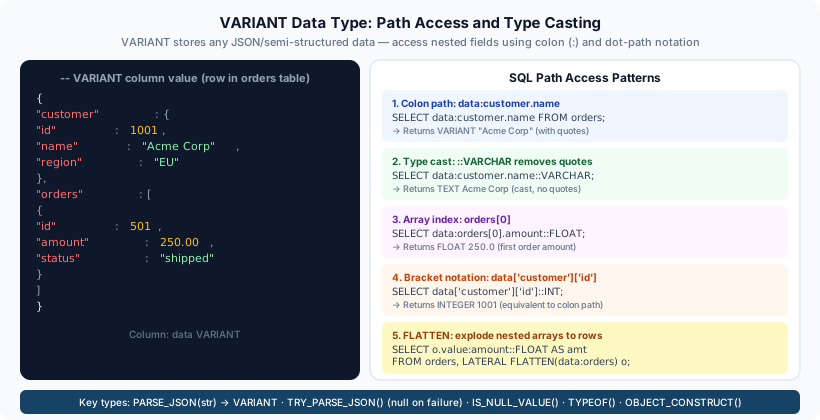
Although VARIANT appears to store raw JSON as a blob, Snowflake internally decomposes it into a columnar representation. This means queries that access a specific path (e.g., payload:user:id) can benefit from column pruning and micro-partition pruning — they do not need to scan the full VARIANT blob for every row.
The FLATTEN Function
FLATTEN is a Snowflake table function that takes an array or object within a VARIANT column and expands it into multiple rows — one per element. It is used with LATERAL to correlate each exploded row back to its parent row.
1-- Table: users(id INT, profile VARIANT)2-- profile: {"name": "Bob", "tags": ["admin","editor","viewer"]}34-- Explode the tags array — one row per tag5SELECT6u.id,7u.profile:name::STRING AS user_name,8f.value::STRING AS tag,9f.index AS tag_position10FROM users u,11LATERAL FLATTEN(INPUT => u.profile:tags) f;1213-- FLATTEN columns available:14-- f.VALUE — the element value (VARIANT)15-- f.KEY — the key name (for objects, NULL for arrays)16-- f.INDEX — the zero-based position in the array17-- f.PATH — full path to the element from the root18-- f.SEQ — sequence number unique per input row19-- f.THIS — the containing array/object2021-- Flattening an OBJECT (key-value pairs)22SELECT f.key, f.value::STRING23FROM (SELECT PARSE_JSON('{"a":1,"b":2,"c":3}') AS obj),24LATERAL FLATTEN(INPUT => obj) f;2526-- OUTER => TRUE — keep rows even when the array is NULL or empty27SELECT u.id, f.value::STRING AS tag28FROM users u,29LATERAL FLATTEN(INPUT => u.profile:tags, OUTER => TRUE) f;3031-- RECURSIVE => TRUE — flatten nested arrays/objects recursively32SELECT f.path, f.value33FROM (SELECT PARSE_JSON('{"a":{"b":{"c":42}}}') AS nested),34LATERAL FLATTEN(INPUT => nested, RECURSIVE => TRUE) f;If a row has a NULL or missing array path, a standard FLATTEN will silently drop that row from results. Use OUTER => TRUE to retain parent rows with no array elements — the FLATTEN output columns will be NULL for those rows.
Window Functions
Window functions perform calculations across a window of rows related to the current row. Unlike GROUP BY, they do not collapse the result set — every input row remains in the output.
Window Function Anatomy
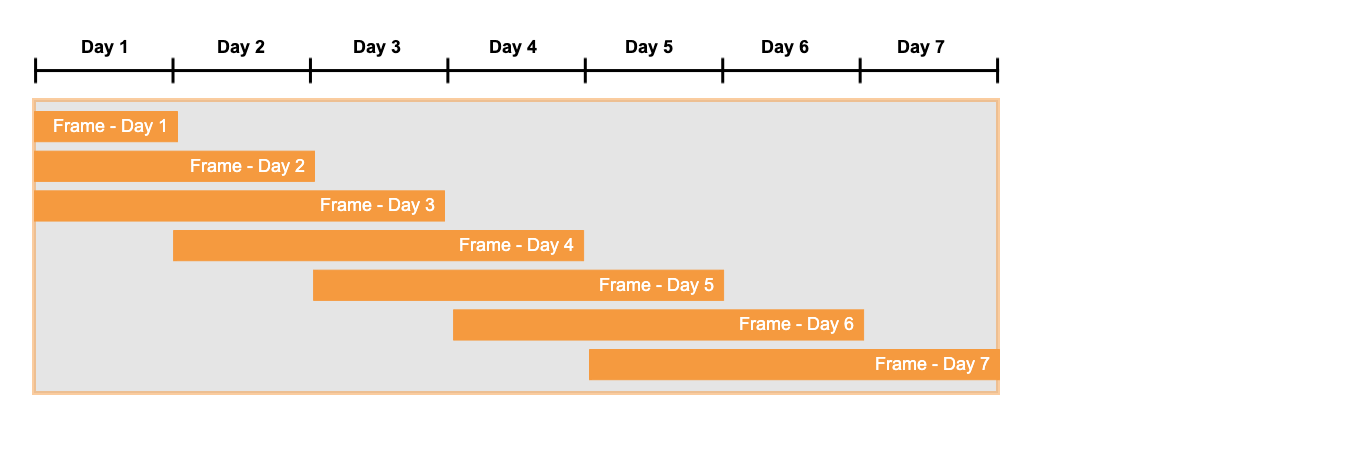
Breakdown of a window function expression: the function name (ROW_NUMBER, RANK, SUM, etc.), the OVER clause, the optional PARTITION BY that defines sub-groups, the ORDER BY that sorts within each partition, and the optional frame specification (ROWS BETWEEN / RANGE BETWEEN) that limits which rows are included in the calculation.
1-- ROW_NUMBER(): unique sequential number per partition2SELECT3order_id,4customer_id,5order_date,6ROW_NUMBER() OVER (PARTITION BY customer_id ORDER BY order_date DESC) AS rn7FROM orders;89-- RANK(): same rank for ties, then skips numbers (1,1,3,4...)10SELECT11product_id, sales,12RANK() OVER (ORDER BY sales DESC) AS sales_rank13FROM product_sales;1415-- DENSE_RANK(): same rank for ties, no gaps (1,1,2,3...)16SELECT17product_id, sales,18DENSE_RANK() OVER (ORDER BY sales DESC) AS dense_rank19FROM product_sales;2021-- LEAD() and LAG() — access rows ahead of or behind the current row22SELECT23order_date,24revenue,25LAG(revenue, 1, 0) OVER (ORDER BY order_date) AS prev_day_revenue,26LEAD(revenue, 1, 0) OVER (ORDER BY order_date) AS next_day_revenue,27revenue - LAG(revenue, 1, 0) OVER (ORDER BY order_date) AS day_over_day_change28FROM daily_revenue;2930-- FIRST_VALUE() and LAST_VALUE() within a window frame31SELECT32department,33employee,34salary,35FIRST_VALUE(salary) OVER (36 PARTITION BY department ORDER BY salary DESC37 ROWS BETWEEN UNBOUNDED PRECEDING AND UNBOUNDED FOLLOWING38) AS dept_max_salary,39LAST_VALUE(salary) OVER (40 PARTITION BY department ORDER BY salary DESC41 ROWS BETWEEN UNBOUNDED PRECEDING AND UNBOUNDED FOLLOWING42) AS dept_min_salary43FROM employees;4445-- Running total and moving average46SELECT47order_date,48daily_sales,49SUM(daily_sales) OVER (ORDER BY order_date50 ROWS BETWEEN UNBOUNDED PRECEDING AND CURRENT ROW) AS running_total,51AVG(daily_sales) OVER (ORDER BY order_date52 ROWS BETWEEN 6 PRECEDING AND CURRENT ROW) AS seven_day_avg53FROM daily_sales;Window Function Quick Reference
Ranking Functions
ROW_NUMBER()RANK()DENSE_RANK()NTILE(n)PERCENT_RANK()CUME_DIST()Navigation Functions
LAG(col, n, def)LEAD(col, n, def)FIRST_VALUE(col)LAST_VALUE(col)NTH_VALUE(col, n)Aggregate Window Functions
SUM() OVERAVG() OVERCOUNT() OVERMIN() / MAX() OVERFrame Specification
ROWS BETWEEN UNBOUNDED PRECEDING AND CURRENT ROWROWS BETWEEN 6 PRECEDING AND CURRENT ROWROWS BETWEEN UNBOUNDED PRECEDING AND UNBOUNDED FOLLOWINGRANGE BETWEENQUALIFY — Snowflake’s Filter on Window Functions
QUALIFY is a Snowflake-specific SQL clause that filters rows based on the result of a window function. It is evaluated after window functions are computed and after HAVING, which means you can reference the window function result directly without wrapping the query in a subquery or CTE.
QUALIFY does not exist in standard SQL or most other databases (though DuckDB has added it). It is a favourite exam topic because it demonstrates Snowflake’s SQL extensions. Know the query execution order: FROM → WHERE → GROUP BY → HAVING → WINDOW FUNCTIONS → QUALIFY → SELECT → ORDER BY → LIMIT.
1-- Get the most recent order per customer (deduplication)2-- WITHOUT QUALIFY — requires subquery:3SELECT * FROM (4SELECT *, ROW_NUMBER() OVER (PARTITION BY customer_id ORDER BY order_date DESC) AS rn5FROM orders6) WHERE rn = 1;78-- WITH QUALIFY — cleaner single-level query:9SELECT *10FROM orders11QUALIFY ROW_NUMBER() OVER (PARTITION BY customer_id ORDER BY order_date DESC) = 1;1213-- Top 3 products per category by sales14SELECT category, product_id, sales15FROM product_sales16QUALIFY DENSE_RANK() OVER (PARTITION BY category ORDER BY sales DESC) <= 3;1718-- Remove duplicate rows keeping the row with highest id19SELECT *20FROM raw_events21QUALIFY ROW_NUMBER() OVER (PARTITION BY event_key ORDER BY id DESC) = 1;2223-- QUALIFY with a WHERE clause — WHERE runs before QUALIFY24SELECT *25FROM orders26WHERE order_status = 'completed'27QUALIFY ROW_NUMBER() OVER (PARTITION BY customer_id ORDER BY order_date DESC) = 1;QUALIFY vs Subquery — Deduplication Approaches
PIVOT and UNPIVOT
PIVOT and UNPIVOT are SQL operators for reshaping data between wide (pivoted) and tall (normalised) formats. Snowflake supports both as part of the FROM clause.
1-- Source data: sales(region TEXT, month TEXT, amount NUMBER)2-- rows: ('North','Jan',100), ('North','Feb',200), ('South','Jan',150)...34-- PIVOT: rotate month values into columns5SELECT *6FROM sales7PIVOT(SUM(amount) FOR month IN ('Jan', 'Feb', 'Mar', 'Apr'))8AS p (region, jan_sales, feb_sales, mar_sales, apr_sales);9-- Result: one row per region, columns jan_sales, feb_sales, mar_sales, apr_sales1011-- UNPIVOT: rotate columns back into rows12-- Source: monthly_sales(region TEXT, jan NUMBER, feb NUMBER, mar NUMBER)13SELECT region, month_name, monthly_amount14FROM monthly_summary15UNPIVOT(monthly_amount FOR month_name IN (jan, feb, mar));16-- Result: three rows per region with month_name and monthly_amount1718-- Dynamic PIVOT using Snowflake scripting (for unknown category values)19-- Step 1: get distinct months20SET months = (21SELECT '[''' || LISTAGG(DISTINCT month, ''',''') || ''']'22FROM sales23);24-- Step 2: use in PIVOT (requires dynamic SQL via Stored Procedure in practice)2526-- ANY keyword for dynamic pivot (Snowflake 8.x+)27SELECT *28FROM sales29PIVOT(SUM(amount) FOR month IN (ANY ORDER BY month));In standard PIVOT syntax, the IN (...) list must contain literal values known at query-write time. For truly dynamic pivots where you do not know the column values in advance, you need to build the SQL string dynamically using a Stored Procedure or Snowflake Scripting. Snowflake’s IN (ANY) extension (introduced in newer versions) allows dynamic pivoting without scripting.
GENERATOR and TABLESAMPLE
These two features are useful for testing, data generation, and sampling — and they appear in the COF-C02 exam.
1-- GENERATOR: produce synthetic rows2-- ROWCOUNT => number of rows to generate3-- SEQ4() or SEQ8() provide unique sequential integers4SELECT SEQ4() AS id,5 UNIFORM(1, 100, RANDOM())::INT AS score,6 DATEADD('day', SEQ4(), '2024-01-01')::DATE AS event_date7FROM TABLE(GENERATOR(ROWCOUNT => 1000000))8LIMIT 10;910-- GENERATOR with TIMELIMIT — run for N seconds instead of fixed row count11SELECT SEQ4() AS id, RANDOM() AS val12FROM TABLE(GENERATOR(TIMELIMIT => 5));1314-- TABLESAMPLE: return a random sample of rows15-- Percentage-based (block sampling — by micro-partition)16SELECT * FROM large_table SAMPLE (10); -- approx 10% of rows1718-- Row-count based sampling19SELECT * FROM large_table SAMPLE (1000 ROWS);2021-- Bernoulli sampling (row-level — more random, slower)22SELECT * FROM large_table SAMPLE BERNOULLI (5);2324-- Block sampling (micro-partition level — faster, less random)25SELECT * FROM large_table SAMPLE BLOCK (5);2627-- Reproducible sample with SEED28SELECT * FROM orders SAMPLE (10) SEED (42);GENERATOR vs TABLESAMPLE
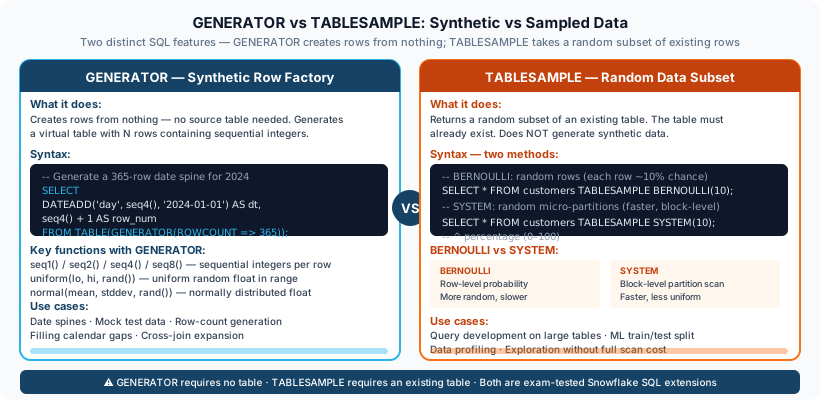
GENERATOR creates new rows from scratch using Snowflake's virtual table function — no source table needed, output is controlled by ROWCOUNT or TIMELIMIT. TABLESAMPLE reads from an existing table and returns a statistical subset, either at the block (micro-partition) level for speed or at the Bernoulli (row) level for better randomness. Both operations happen within a single virtual warehouse.
TIME_SLICE and Date/Time Functions
TIME_SLICE is a Snowflake-specific function for grouping timestamps into fixed-duration buckets — extremely useful for time-series analysis.
1-- TIME_SLICE: group timestamps into fixed intervals2-- Syntax: TIME_SLICE(timestamp_col, slice_length, 'interval_unit')3SELECT4TIME_SLICE(event_ts, 15, 'MINUTE') AS fifteen_min_bucket,5COUNT(*) AS event_count6FROM events7GROUP BY 18ORDER BY 1;910-- Also supports HOUR, DAY, WEEK, MONTH, QUARTER, YEAR11SELECT TIME_SLICE(order_date, 1, 'MONTH') AS month_start FROM orders;1213-- DATE_TRUNC: truncate a timestamp to a specified granularity14SELECT15DATE_TRUNC('month', CURRENT_TIMESTAMP), -- first of current month16DATE_TRUNC('week', CURRENT_TIMESTAMP), -- Monday of current week17DATE_TRUNC('hour', CURRENT_TIMESTAMP); -- current hour start1819-- DATEADD: add/subtract intervals20SELECT21DATEADD('day', 7, CURRENT_DATE), -- 7 days from now22DATEADD('month', -3, CURRENT_DATE), -- 3 months ago23DATEADD('hour', 12, CURRENT_TIMESTAMP);2425-- DATEDIFF: difference between two dates in specified unit26SELECT27DATEDIFF('day', '2024-01-01', '2024-12-31') AS days_diff, -- 36428DATEDIFF('month', '2024-01-01', '2024-12-31') AS months_diff; -- 112930-- DATE_PART and EXTRACT: extract components31SELECT32DATE_PART('year', CURRENT_DATE),33DATE_PART('month', CURRENT_DATE),34DATE_PART('dow', CURRENT_DATE), -- day of week (0=Sunday)35EXTRACT(epoch FROM CURRENT_TIMESTAMP); -- seconds since 1970-01-013637-- Timezone conversion38SELECT39CONVERT_TIMEZONE('UTC', 'Europe/London', CURRENT_TIMESTAMP) AS london_time,40TO_TIMESTAMP_NTZ('2024-06-01 12:00:00') AS no_timezone_ts;Conditional Expressions and NULL Handling
1-- IFF: compact if-then-else (Snowflake-specific)2SELECT IFF(salary > 50000, 'Senior', 'Junior') AS level FROM employees;34-- CASE WHEN: standard SQL conditional5SELECT6CASE7 WHEN score >= 90 THEN 'A'8 WHEN score >= 80 THEN 'B'9 WHEN score >= 70 THEN 'C'10 ELSE 'F'11END AS grade12FROM student_scores;1314-- DECODE: value-based mapping (Oracle-style — Snowflake supports it)15SELECT DECODE(status, 'A', 'Active', 'I', 'Inactive', 'Unknown') FROM users;1617-- NULL handling functions18SELECT19NVL(commission, 0) AS commission, -- replace NULL with 020NVL2(commission, 'Yes', 'No') AS has_commission, -- NVL2(col, not-null-val, null-val)21NULLIF(revenue, 0) AS safe_revenue, -- return NULL if revenue = 022COALESCE(phone, mobile, email, 'none') AS contact,-- first non-null23ZEROIFNULL(discount) AS discount, -- NULL -> 024NULLIFZERO(quantity) AS quantity -- 0 -> NULL25FROM sales;2627-- String functions28SELECT29SPLIT('a,b,c,d', ',') AS arr, -- returns ARRAY VARIANT30SPLIT_PART('hello.world.test', '.', 2) AS part, -- 'world'31TRIM(' hello ') AS trimmed,32LTRIM('---hello', '-') AS left_trim,33CONTAINS('hello world', 'world') AS found, -- TRUE34STARTSWITH('hello', 'hel') AS sw, -- TRUE35ENDSWITH('hello', 'llo') AS ew, -- TRUE36RPAD('abc', 6, '*') AS rpadded, -- 'abc***'37LPAD('42', 5, '0') AS lpadded, -- '00042'38CHARINDEX('world', 'hello world') AS pos -- 739FROM dual;NVL2(expr, not_null_result, null_result) — the second argument is returned when expr IS NOT NULL, and the third argument when expr IS NULL. This is the opposite order from what many developers expect intuitively.
MATCH_RECOGNIZE — Row Pattern Matching
MATCH_RECOGNIZE is an advanced SQL feature for detecting patterns across sequences of rows. It is used in event sequence analysis, fraud detection, and session analysis.
1-- Detect a 'V-shape' pattern in stock prices:2-- a decrease followed by an increase3SELECT *4FROM stock_prices5MATCH_RECOGNIZE (6 PARTITION BY ticker7 ORDER BY trade_date8 MEASURES9 MATCH_NUMBER() AS match_num,10 FIRST(trade_date) AS start_date,11 LAST(trade_date) AS end_date,12 FIRST(close_price) AS start_price,13 MIN(close_price) AS bottom_price,14 LAST(close_price) AS end_price15 ONE ROW PER MATCH16 AFTER MATCH SKIP TO NEXT ROW17 PATTERN (DOWN+ UP+)18 DEFINE19 DOWN AS close_price < LAG(close_price) OVER (ORDER BY trade_date),20 UP AS close_price > LAG(close_price) OVER (ORDER BY trade_date)21);For COF-C02, know that MATCH_RECOGNIZE exists in Snowflake for row-pattern matching and understand its use case (event sequence analysis). You are unlikely to need to write a complete MATCH_RECOGNIZE query from scratch in the exam, but you should recognise the syntax and purpose.
StepByStep: Writing a Full Analytical Query
Building an Analytical Query with VARIANT, Window Functions, and QUALIFY
Load and Parse Semi-Structured Data
Start with a raw events table that stores JSON payloads in a VARIANT column. Extract the relevant fields and cast them to proper SQL types.
-- Raw table: raw_events(id INT, payload VARIANT, loaded_at TIMESTAMP)
-- payload: {"session_id": "abc123", "user_id": 42, "event": "purchase",
--            "items": [{"sku":"X1","qty":2},{"sku":"X2","qty":1}], "total": 89.99}

CREATE OR REPLACE VIEW v_events AS
SELECT
id,
payload:session_id::STRING  AS session_id,
payload:user_id::NUMBER     AS user_id,
payload:event::STRING       AS event_type,
payload:total::FLOAT        AS order_total,
loaded_at
FROM raw_events
WHERE payload:event::STRING = 'purchase';Explode Nested Arrays with FLATTEN
Use LATERAL FLATTEN to expand the items array so each ordered item becomes its own row, preserving the parent session context.
CREATE OR REPLACE VIEW v_order_items AS
SELECT
e.id           AS event_id,
e.session_id,
e.user_id,
e.order_total,
f.value:sku::STRING  AS sku,
f.value:qty::INT     AS quantity,
f.index              AS item_position
FROM v_events e,
LATERAL FLATTEN(INPUT => e.payload:items) f;Add Window Functions for Per-User Ranking
Rank each purchase by total value per user, and compute a running total of spend.
SELECT
user_id,
session_id,
order_total,
loaded_at,
ROW_NUMBER()  OVER (PARTITION BY user_id ORDER BY order_total DESC)    AS spend_rank,
SUM(order_total) OVER (PARTITION BY user_id ORDER BY loaded_at
  ROWS BETWEEN UNBOUNDED PRECEDING AND CURRENT ROW)                    AS cumulative_spend
FROM v_events;Filter with QUALIFY to Get Top Purchase Per User
Use QUALIFY to keep only each user's highest-value order without a subquery wrapper.
SELECT
user_id,
session_id,
order_total,
loaded_at
FROM v_events
QUALIFY ROW_NUMBER() OVER (PARTITION BY user_id ORDER BY order_total DESC) = 1;Practice Quizzes
You have a VARIANT column called data containing the JSON object with a price key set to 9.99. Which expression correctly returns the price as a NUMBER?
Which of the following is a Snowflake-specific SQL clause NOT found in standard SQL or most other databases?
A table has an `events` VARIANT column containing an array. Which FLATTEN option ensures that rows with a NULL or empty array are still included in the output?
Flashcard Review
What is the difference between RANK() and DENSE_RANK() in a window function?
RANK() assigns the same rank to ties but then skips the next rank number — for example, two rows tied at rank 2 both get rank 2, and the next row gets rank 4 (not 3). DENSE_RANK() also assigns the same rank to ties but does NOT skip numbers — the next row after two tied rank-2 rows gets rank 3.
What does TYPEOF() return when called on a VARIANT value that contains a JSON array?
TYPEOF() returns the string 'array' for a VARIANT value that holds a JSON array. Other possible return values include 'string', 'integer', 'decimal', 'double', 'boolean', 'object', and 'null'. It returns NULL if the VARIANT itself is NULL.
What is the key difference between TABLESAMPLE BERNOULLI and TABLESAMPLE BLOCK?
BERNOULLI sampling operates at the individual row level — each row is included independently with the specified probability. This produces better randomness but requires scanning all rows. BLOCK sampling operates at the micro-partition level — entire micro-partitions are either included or excluded. This is much faster (Snowflake can skip excluded partitions entirely) but less precisely random.
In what order does Snowflake evaluate the QUALIFY clause relative to other SQL clauses?
The evaluation order is: FROM → WHERE → GROUP BY → HAVING → WINDOW FUNCTIONS → QUALIFY → SELECT (column aliasing) → DISTINCT → ORDER BY → LIMIT/FETCH. QUALIFY runs after window functions are computed, which is why you can reference window function results directly in QUALIFY without a subquery.
What does OBJECT_CONSTRUCT('k1', v1, 'k2', v2) return and what type is it?
OBJECT_CONSTRUCT returns a VARIANT value containing a JSON object built from the alternating key-value pairs. The keys must be strings, and the values can be any SQL type — they are automatically converted to their VARIANT equivalents. NULL values are omitted from the object by default. Use OBJECT_CONSTRUCT_KEEP_NULL to retain NULL values.
Additional Resources
Official Snowflake Documentation
- Semi-Structured Data Overview
- FLATTEN Function Reference
- Window Functions
- QUALIFY Clause
- PIVOT and UNPIVOT
Next Steps
- Functions and Stored Procedures
- Data Loading — Staging and COPY INTO
- Performance Optimisation — Query Tuning
Reinforce what you just read
Study the All flashcards with spaced repetition to lock it in.