Introduction to Bulk Data Loading
Bulk loading is the process of efficiently loading large volumes of data into Snowflake tables from external sources. Snowflake’s COPY INTO command provides high-performance, parallel data loading capabilities.
Loading Data: The Big Picture
Data Loading Architecture
End-to-end flow showing external data sources → stages → COPY INTO → Snowflake tables
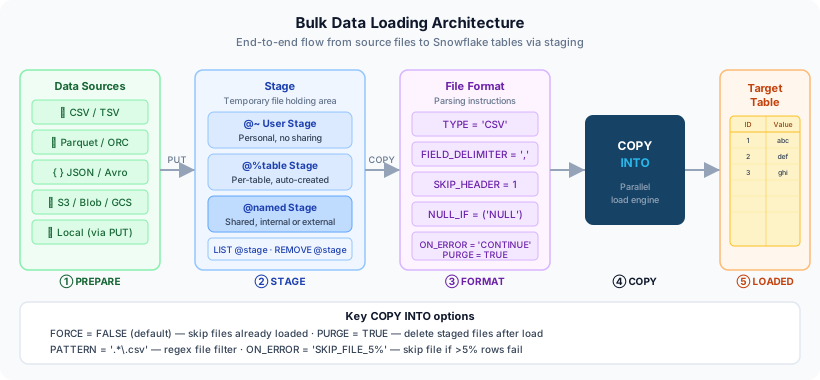
The typical bulk loading workflow:
- Prepare - Format and stage your data files
- Create - Define file formats and stages
- Load - Use COPY INTO to load data
- Validate - Verify and handle errors
- Optimise - Monitor and improve performance
What is the primary command for bulk loading data into Snowflake?
COPY INTO. This command loads data from staged files into existing tables with high performance and automatic parallelisation.
Understanding Stages
Stages are locations where data files are stored before loading into Snowflake. There are three types:
1. User Stages (@~)
Personal staging area for each user.
1-- Upload file to user stage (via SnowSQL or Web UI)2PUT file:///tmp/sales_data.csv @~;34-- List files in user stage5LIST @~;67-- Load from user stage8COPY INTO sales_table9FROM @~/sales_data.csv10FILE_FORMAT = (TYPE = 'CSV');1112-- Remove file from user stage13REMOVE @~/sales_data.csv;2. Table Stages (@%table_name)
Automatically created for each table.
1-- Upload to table stage2PUT file:///tmp/orders.csv @%orders_table;34-- List files in table stage5LIST @%orders_table;67-- Load from table stage8COPY INTO orders_table9FROM @%orders_table10FILE_FORMAT = (TYPE = 'CSV' FIELD_OPTIONALLY_ENCLOSED_BY = '"');3. Named Stages (Internal or External)
Created explicitly and can be shared across the account.
1-- Internal named stage2CREATE STAGE my_internal_stage;34-- External stage (AWS S3)5CREATE STAGE my_s3_stage6URL = 's3://mybucket/data/'7CREDENTIALS = (AWS_KEY_ID = 'xxx' AWS_SECRET_KEY = 'yyy');89-- External stage (Azure Blob)10CREATE STAGE my_azure_stage11URL = 'azure://myaccount.blob.core.windows.net/mycontainer/'12CREDENTIALS = (AZURE_SAS_TOKEN = 'zzz');1314-- External stage (GCP)15CREATE STAGE my_gcs_stage16URL = 'gcs://mybucket/path/'17STORAGE_INTEGRATION = my_gcp_integration;Stage Types Comparison
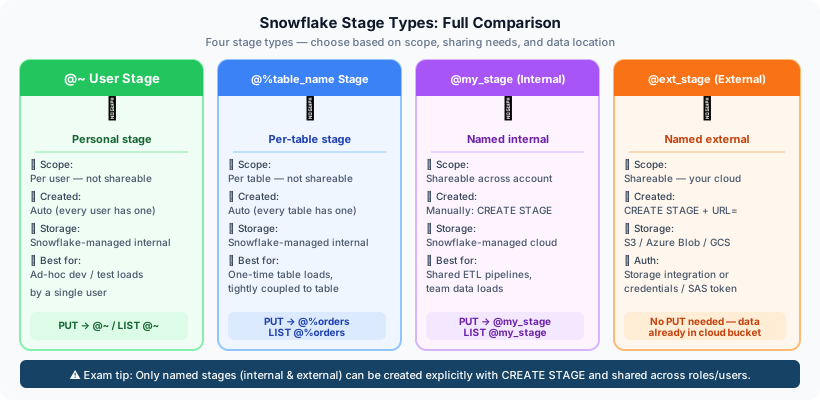
Visual comparison of User, Table, and Named stages with their scope and use cases
What's the difference between internal and external stages?
Internal stages store data within Snowflake's cloud storage. External stages reference data in your own cloud storage (S3, Azure Blob, GCS) without moving it into Snowflake.
File Formats
File formats define how Snowflake interprets the structure and content of your data files.
Supported File Types
| Format | Use Case | Key Benefits |
|---|---|---|
| CSV | Delimited text files | Universal compatibility, simple |
| JSON | Semi-structured data | Flexible schema, nested data |
| Avro | Binary format | Compact, schema evolution |
| Parquet | Columnar format | High compression, fast queries |
| ORC | Optimised row columnar | Efficient for big data workloads |
| XML | Hierarchical data | Legacy systems integration |
Creating File Formats
1-- Basic CSV format2CREATE FILE FORMAT csv_format3TYPE = 'CSV'4FIELD_DELIMITER = ','5SKIP_HEADER = 16FIELD_OPTIONALLY_ENCLOSED_BY = '"'7TRIM_SPACE = TRUE8ERROR_ON_COLUMN_COUNT_MISMATCH = TRUE9NULL_IF = ('NULL', 'null', '');1011-- CSV with custom delimiter12CREATE FILE FORMAT pipe_delimited_format13TYPE = 'CSV'14FIELD_DELIMITER = '|'15RECORD_DELIMITER = '\n'16SKIP_HEADER = 1;1718-- Tab-delimited format19CREATE FILE FORMAT tsv_format20TYPE = 'CSV'21FIELD_DELIMITER = '\t'22COMPRESSION = 'GZIP';1-- Basic JSON format2CREATE FILE FORMAT json_format3TYPE = 'JSON'4COMPRESSION = 'AUTO'5STRIP_OUTER_ARRAY = TRUE;67-- JSON with specific date format8CREATE FILE FORMAT json_with_dates9TYPE = 'JSON'10DATE_FORMAT = 'YYYY-MM-DD'11TIMESTAMP_FORMAT = 'YYYY-MM-DD HH24:MI:SS';1-- Parquet format (binary, no delimiters needed)2CREATE FILE FORMAT parquet_format3TYPE = 'PARQUET'4COMPRESSION = 'SNAPPY';Why would you choose Parquet over CSV for large datasets?
Parquet offers better compression (smaller files), faster query performance (columnar format), and built-in schema definition. It's ideal for large analytical workloads.
The COPY INTO Command
The COPY INTO command loads data from staged files into tables.
Basic Syntax
1COPY INTO target_table2FROM @stage_name/path/3FILE_FORMAT = (FORMAT_NAME = 'format_name')4PATTERN = '.*\.csv'5ON_ERROR = 'CONTINUE';Comprehensive Example
1-- 1. Create target table2CREATE TABLE customer_orders (3order_id INTEGER,4customer_id INTEGER,5order_date DATE,6amount DECIMAL(10,2),7status VARCHAR(50),8product_category VARCHAR(100)9);1011-- 2. Create file format12CREATE FILE FORMAT csv_orders_format13TYPE = 'CSV'14FIELD_DELIMITER = ','15SKIP_HEADER = 116FIELD_OPTIONALLY_ENCLOSED_BY = '"'17NULL_IF = ('NULL', 'null', '')18ERROR_ON_COLUMN_COUNT_MISMATCH = TRUE19COMPRESSION = 'AUTO';2021-- 3. Create named stage22CREATE STAGE orders_stage23FILE_FORMAT = csv_orders_format;2425-- 4. Load data with error handling26COPY INTO customer_orders27FROM @orders_stage/2024/28FILE_FORMAT = (FORMAT_NAME = 'csv_orders_format')29PATTERN = '.*orders.*\.csv\.gz'30ON_ERROR = 'SKIP_FILE_5%' -- Skip file if >5% errors31PURGE = TRUE -- Delete files after successful load32FORCE = FALSE; -- Don't reload previously loaded files3334-- 5. Verify the load35SELECT COUNT(*) FROM customer_orders;COPY INTO Execution Flow
Step-by-step visualisation of how COPY INTO processes files: validation → parallelisation → loading → error handling
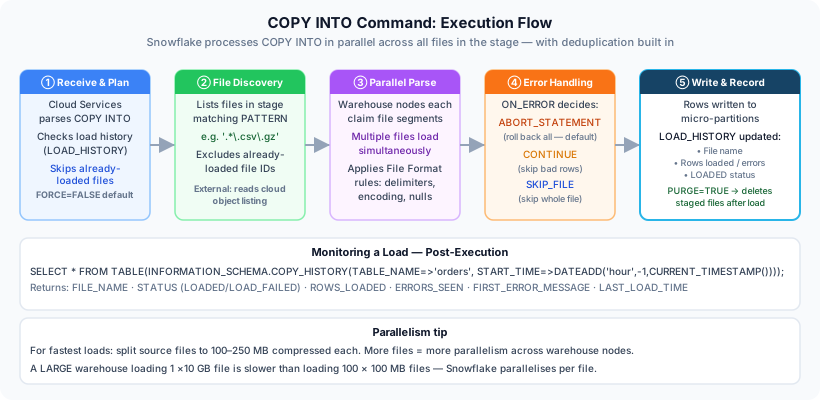
Error Handling Options
1-- Continue on errors (default)2COPY INTO table1 FROM @stage13ON_ERROR = 'CONTINUE';45-- Skip entire file if any error6COPY INTO table1 FROM @stage17ON_ERROR = 'SKIP_FILE';89-- Skip file if more than N errors10COPY INTO table1 FROM @stage111ON_ERROR = 'SKIP_FILE_5'; -- Skip if >5 errors1213-- Skip file if more than N% errors14COPY INTO table1 FROM @stage115ON_ERROR = 'SKIP_FILE_10%'; -- Skip if >10% error rate1617-- Abort on first error18COPY INTO table1 FROM @stage119ON_ERROR = 'ABORT_STATEMENT';What does the PURGE option do in COPY INTO?
PURGE = TRUE automatically deletes successfully loaded files from the stage after loading completes. This helps manage storage costs and prevents reloading the same data.
Advanced Loading Techniques
Column Mapping and Transformation
1-- Load specific columns with transformations2COPY INTO customer_orders (3order_id,4customer_id,5order_date,6amount,7status8)9FROM (10SELECT11 $1::INTEGER, -- Column 1 → order_id12 $2::INTEGER, -- Column 2 → customer_id13 TO_DATE($3, 'YYYY-MM-DD'), -- Column 3 → order_date (converted)14 $4::DECIMAL(10,2), -- Column 4 → amount15 UPPER($5) -- Column 5 → status (uppercase)16FROM @orders_stage/raw/17)18FILE_FORMAT = (TYPE = 'CSV' SKIP_HEADER = 1)19PATTERN = '.*\.csv';Loading JSON Data
1-- Create table with VARIANT column2CREATE TABLE user_events (3event_id INTEGER,4event_data VARIANT,5loaded_at TIMESTAMP_LTZ DEFAULT CURRENT_TIMESTAMP()6);78-- Load JSON data9COPY INTO user_events (event_id, event_data)10FROM (11SELECT12 $1:event_id::INTEGER,13 $1 -- Entire JSON object14FROM @json_stage/events/15)16FILE_FORMAT = (TYPE = 'JSON')17PATTERN = '.*\.json';1819-- Query JSON data20SELECT21event_id,22event_data:user_id::INTEGER AS user_id,23event_data:event_type::STRING AS event_type,24event_data:properties AS properties25FROM user_events;Loading from Multiple Files
1-- Load all CSV files from a path2COPY INTO orders3FROM @my_stage/2024/01/4PATTERN = '.*\.csv';56-- Load files matching specific pattern7COPY INTO orders8FROM @my_stage/9PATTERN = '.*orders_202401.*\.csv\.gz';1011-- Load specific list of files12COPY INTO orders13FROM @my_stage/14FILES = ('file1.csv', 'file2.csv', 'file3.csv');How do you reference columns in a CSV file during COPY INTO with transformations?
Use positional notation: $1 for first column, $2 for second, etc. You can cast and transform these: $1::INTEGER, UPPER($2), TO_DATE($3, 'format').
Monitoring and Troubleshooting
View Load History
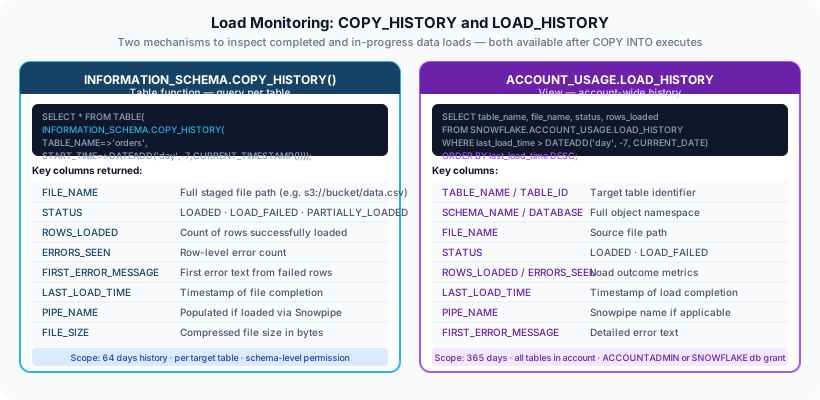
1-- View recent load history2SELECT *3FROM TABLE(INFORMATION_SCHEMA.COPY_HISTORY(4TABLE_NAME => 'CUSTOMER_ORDERS',5START_TIME => DATEADD(HOUR, -24, CURRENT_TIMESTAMP())6))7ORDER BY LAST_LOAD_TIME DESC;89-- Check for errors10SELECT11FILE_NAME,12STATUS,13ERROR_COUNT,14ERROR_LIMIT,15FIRST_ERROR16FROM TABLE(INFORMATION_SCHEMA.COPY_HISTORY(17TABLE_NAME => 'CUSTOMER_ORDERS',18START_TIME => DATEADD(DAY, -7, CURRENT_TIMESTAMP())19))20WHERE STATUS != 'LOADED'21ORDER BY LAST_LOAD_TIME DESC;Validate Before Loading
1-- Test load with limited rows2COPY INTO customer_orders3FROM @orders_stage/4FILE_FORMAT = (FORMAT_NAME = 'csv_orders_format')5VALIDATION_MODE = 'RETURN_ERRORS'; -- See errors without loading67-- Return first N errors8COPY INTO customer_orders9FROM @orders_stage/10FILE_FORMAT = (FORMAT_NAME = 'csv_orders_format')11VALIDATION_MODE = 'RETURN_5_ROWS'; -- Return first 5 error rowsLoad Monitoring Dashboard
Example monitoring view showing load status, error rates, throughput, and file processing metrics
Best Practices
1. File Sizing
- Optimal file size: 100-250 MB compressed
- Avoid: Files < 10 MB (overhead) or > 5 GB (reduced parallelism)
- Split large files into smaller chunks for better performance
What is the optimal file size for bulk loading in Snowflake?
100-250 MB compressed per file. This balances parallelism and overhead. Avoid very small files (<10 MB) and very large files (>5 GB).
2. Compression
Always compress your files before loading:
- gzip - Good compression, widely supported
- Snappy - Faster decompression (Parquet)
- Brotli - Higher compression ratio
1-- Snowflake auto-detects compression2COPY INTO orders3FROM @my_stage/4FILE_FORMAT = (TYPE = 'CSV' COMPRESSION = 'AUTO')5PATTERN = '.*\.csv\.gz';67-- Explicitly specify compression8COPY INTO orders9FROM @my_stage/10FILE_FORMAT = (TYPE = 'CSV' COMPRESSION = 'GZIP');3. Use Dedicated Warehouse
1-- Create warehouse for data loading2CREATE WAREHOUSE LOADING_WH3WITH WAREHOUSE_SIZE = 'LARGE'4AUTO_SUSPEND = 605AUTO_RESUME = TRUE6INITIALLY_SUSPENDED = TRUE;78-- Use it for loading9USE WAREHOUSE LOADING_WH;1011COPY INTO large_table12FROM @data_stage/13FILE_FORMAT = (FORMAT_NAME = 'my_format');4. Partition Data by Date
1-- Organize files by date in stage2-- s3://mybucket/data/2024/01/15/orders_*.csv.gz3-- YYYY/MM/DD/45-- Load specific date range6COPY INTO orders7FROM @my_stage/2024/01/15/8FILE_FORMAT = (FORMAT_NAME = 'csv_format')9PATTERN = '.*\.csv\.gz';5. Enable PURGE for Production
Remove loaded files automatically to save costs:
1COPY INTO orders2FROM @my_stage/3FILE_FORMAT = (FORMAT_NAME = 'csv_format')4PURGE = TRUE; -- Delete files after successful loadWhy should you use a dedicated warehouse for large data loads?
A dedicated warehouse prevents data loading operations from competing with query workloads, ensures predictable performance, and allows independent scaling and monitoring.
Common Patterns
Incremental Loading Pattern
1-- 1. Create or replace transient staging table2CREATE OR REPLACE TRANSIENT TABLE orders_staging LIKE orders;34-- 2. Load into staging5COPY INTO orders_staging6FROM @orders_stage/{{ current_date }}/7FILE_FORMAT = (FORMAT_NAME = 'csv_orders')8PURGE = TRUE;910-- 3. Deduplicate and merge11MERGE INTO orders o12USING (13SELECT * FROM orders_staging14QUALIFY ROW_NUMBER() OVER (PARTITION BY order_id ORDER BY loaded_at DESC) = 115) s16ON o.order_id = s.order_id17WHEN MATCHED THEN UPDATE SET18o.amount = s.amount,19o.status = s.status20WHEN NOT MATCHED THEN INSERT VALUES (21s.order_id, s.customer_id, s.order_date, s.amount, s.status22);2324-- 4. Clean up staging25DROP TABLE orders_staging;Full Refresh Pattern
1-- 1. Create new table2CREATE OR REPLACE TABLE orders_new LIKE orders;34-- 2. Load all data5COPY INTO orders_new6FROM @orders_stage/full_export/7FILE_FORMAT = (FORMAT_NAME = 'csv_orders')8PURGE = TRUE;910-- 3. Swap tables (zero-downtime)11ALTER TABLE orders RENAME TO orders_old;12ALTER TABLE orders_new RENAME TO orders;1314-- 4. Verify and drop old table15-- SELECT COUNT(*) FROM orders;16DROP TABLE orders_old;Practice Questions
Which stage type is automatically created for every table?
Table stage (@%table_name). It's created automatically when a table is created and can only be used for that specific table.
What does VALIDATION_MODE = 'RETURN_ERRORS' do?
It validates the COPY INTO operation and returns all errors without actually loading data. Useful for testing before running the actual load.
What's the default value for ON_ERROR in COPY INTO?
ABORT_STATEMENT. The load operation will fail and rollback if any error is encountered. This is the safest but least flexible option.
Can you transform data during the COPY INTO operation?
YES. You can use a SELECT subquery in the FROM clause to apply transformations, cast data types, rename columns, and filter rows during the load.
What happens if you run COPY INTO twice with the same files and FORCE = FALSE?
The second run loads nothing. Snowflake tracks loaded files for 64 days and skips them unless FORCE = TRUE is specified.
Additional Resources
Official Documentation
Best Practice Guides
- Snowflake Data Loading Best Practices
- Optimising Bulk Loads
- Error Handling Strategies
Summary
Key Takeaways:
✅ Use stages to organise files before loading ✅ Define file formats for reusability and consistency ✅ COPY INTO is the primary bulk loading command ✅ Compress files (100-250 MB each) for optimal performance ✅ Use ON_ERROR and VALIDATION_MODE to handle errors ✅ PURGE = TRUE to auto-delete loaded files ✅ Monitor loads with COPY_HISTORY information schema ✅ Use dedicated warehouses for large loads
Next Steps
Continue your learning journey:
- Snowpipe: Continuous Data Loading
- Stages & File Formats Deep Dive
- Data Unloading Techniques
- Performance Optimisation
Reinforce what you just read
Study the All flashcards with spaced repetition to lock it in.