Stages & File Formats
Stages are one of the most heavily tested topics in the COF-C02 SnowPro Core exam. Understanding the differences between stage types, how to configure external storage integrations, and how to define file format objects is essential for both the exam and real-world Snowflake data engineering work.
Key Terms: Stages & File Formats
Stage
A named location — internal to Snowflake or external in cloud storage — where data files are held before loading into Snowflake tables or after unloading from them.
User Stage
A private staging area automatically created for every Snowflake user. Cannot be explicitly created, dropped, or shared. Accessed via SnowSQL PUT and GET commands.
Table Stage
An automatically created staging area tied to a specific table. Accessible to users with INSERT or OWNERSHIP privilege on that table. Cannot be shared across tables.
Named Internal Stage
A schema-level object explicitly created with CREATE STAGE. Fully shareable, supports encryption options, and can serve multiple tables. The most flexible internal stage type.
Named External Stage
A schema-level object pointing to cloud storage (S3, Azure Blob, GCS). Requires URL and authentication configuration (credentials or storage integration).
Storage Integration
A Snowflake account-level object that enables secure, credential-free authentication to cloud storage providers by establishing a trust relationship with Snowflake's IAM role.
File Format Object
A schema-level object (CREATE FILE FORMAT) that encapsulates parsing options for a specific file type such as CSV, JSON, Parquet, Avro, ORC, or XML.
Directory Table
A feature on named stages (DIRECTORY = ENABLE = TRUE) that allows querying stage file metadata — file name, size, last modified — as a virtual table.
PUT
A SnowSQL command used to upload files from a local machine to an internal stage (user, table, or named).
GET
A SnowSQL command used to download files from an internal stage to a local machine.
LIST
A SQL command (LIST @stage_name) that returns metadata about files in a stage: file name, size, MD5 checksum, and last modified timestamp.
REMOVE
A SQL command used to delete files from a stage. Supports PATTERN parameter for regex-based deletion.
Parquet
A columnar binary file format commonly used with Snowflake for efficient loading. Preserves data types and supports SNAPPY and GZIP compression.
COPY INTO
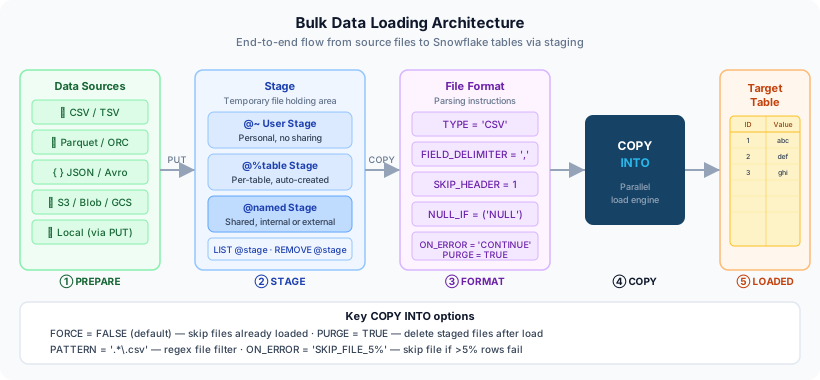
The primary SQL command for loading data from a stage into a Snowflake table, or unloading data from a table to a stage.
What Is a Stage?
A stage in Snowflake is a named location where data files are stored either before being loaded into Snowflake tables or after being exported from them. Stages act as the intermediary between your raw data files and your Snowflake tables.
There are two broad categories:
- Internal stages — storage managed by Snowflake itself
- External stages — references to your own cloud storage (AWS S3, Azure Blob Storage, or Google Cloud Storage)
Snowflake Stage Architecture Overview
Snowflake provides three internal stage types and three external stage targets. Data flows from local files or cloud storage through a stage and into Snowflake tables via COPY INTO. The same pathway works in reverse for unloading.
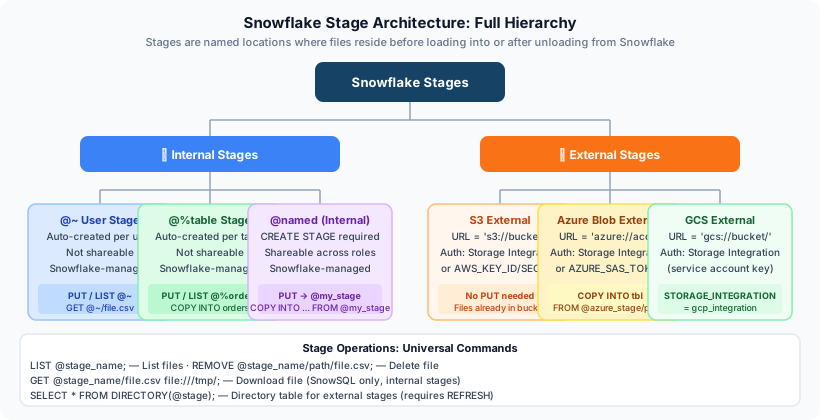
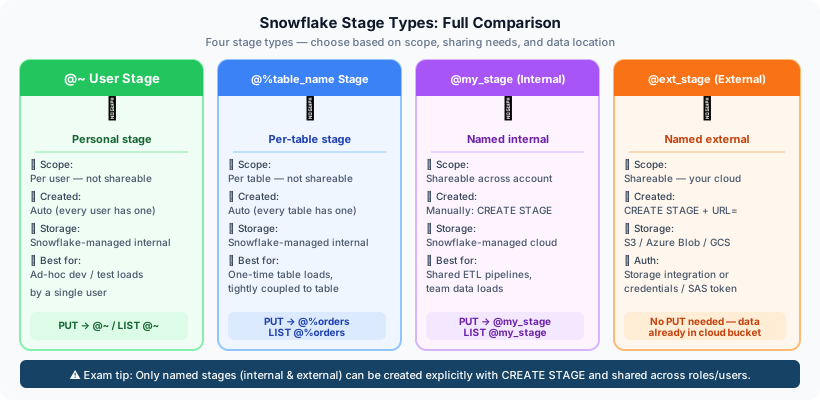
The exam regularly tests which stage type can or cannot be shared, which requires explicit creation, and which privileges are needed for access. Memorise the key distinctions: user stage is private and auto-created; table stage is table-scoped and auto-created; named internal stage is explicitly created and fully shareable.
Internal Stage Types
User Stage (@~)
Every Snowflake user automatically has a private staging area referenced as @~. Key characteristics:
- Cannot be explicitly created — it exists automatically for every user
- Cannot be dropped or altered
- Cannot be shared with other users or roles
- Cannot have a file format assigned at the stage level
- Files are uploaded via SnowSQL
PUTand downloaded viaGET - Useful for quick, personal, one-off data loads
1-- Upload a file from local machine (SnowSQL only)2PUT file:///tmp/my_data.csv @~;34-- List files in your user stage5LIST @~;67-- Load from user stage into a table8COPY INTO my_table9FROM @~/my_data.csv10FILE_FORMAT = (TYPE = CSV SKIP_HEADER = 1);1112-- Remove a file from user stage13REMOVE @~/my_data.csv;Table Stage (@%table_name)
Every Snowflake table automatically has an associated stage. It is referenced using @% followed by the table name.
- Cannot be explicitly created — auto-created with each table
- Cannot be shared across tables
- Accessible to users with INSERT or OWNERSHIP privilege on the table
- Cannot have a file format assigned at the stage level
- Good for simple, single-table loading workflows
1-- Upload a file to the table stage (SnowSQL)2PUT file:///tmp/sales_data.csv @%sales;34-- List files in the table stage5LIST @%sales;67-- Load from table stage (file format specified inline)8COPY INTO sales9FROM @%sales10FILE_FORMAT = (11TYPE = CSV12FIELD_DELIMITER = ','13SKIP_HEADER = 114NULL_IF = ('NULL', 'null', '')15);1617-- Remove all CSV files from the table stage18REMOVE @%sales PATTERN='.*\.csv';Named Internal Stage
The most flexible internal stage type. Created explicitly as a schema-level object and can be shared across roles and used for multiple tables.
- Explicitly created with CREATE STAGE
- Shareable via GRANT
- Supports encryption options (SNOWFLAKE_SSE)
- Can have a default file format assigned
- Can be used by multiple tables and workflows
1-- Create a named internal stage with server-side encryption2CREATE OR REPLACE STAGE my_internal_stage3ENCRYPTION = (TYPE = 'SNOWFLAKE_SSE')4COMMENT = 'Named internal stage for sales data';56-- Assign a file format at stage creation7CREATE OR REPLACE STAGE my_csv_stage8FILE_FORMAT = (9 TYPE = CSV10 FIELD_DELIMITER = ','11 SKIP_HEADER = 112 EMPTY_FIELD_AS_NULL = TRUE13);1415-- Grant usage to a role16GRANT USAGE ON STAGE my_internal_stage TO ROLE data_engineer;17GRANT READ ON STAGE my_internal_stage TO ROLE data_analyst;1819-- List files in named stage20LIST @my_internal_stage;2122-- Load data from named stage23COPY INTO orders24FROM @my_internal_stage/orders/2024/25FILE_FORMAT = (FORMAT_NAME = 'my_csv_format')26ON_ERROR = 'CONTINUE';Named internal stages support SNOWFLAKE_SSE (Snowflake-managed server-side encryption). This is the recommended option for internal stages. External stages use the cloud provider’s encryption (e.g., AWS SSE-S3 or SSE-KMS).
External Stages
External stages point to cloud storage buckets or containers that you own and manage. Snowflake reads files from (or writes files to) these locations without storing the data itself.
External Stage Authentication Methods
External stages can authenticate using inline credentials (AWS key/secret, SAS token for Azure) or via Storage Integrations. Storage Integrations are the recommended approach as they use IAM trust relationships and avoid storing sensitive credentials in Snowflake metadata.
External Stage — AWS S3
1-- Option 1: Using inline credentials (less secure, not recommended for production)2CREATE OR REPLACE STAGE my_s3_stage3URL = 's3://my-bucket/data/sales/'4CREDENTIALS = (5 AWS_KEY_ID = 'AKIAIOSFODNN7EXAMPLE'6 AWS_SECRET_KEY = 'wJalrXUtnFEMI/K7MDENG/bPxRfiCYEXAMPLEKEY'7)8FILE_FORMAT = (TYPE = CSV FIELD_DELIMITER = ',' SKIP_HEADER = 1);910-- Option 2: Using a Storage Integration (recommended)11CREATE OR REPLACE STAGE my_s3_stage_secure12URL = 's3://my-bucket/data/sales/'13STORAGE_INTEGRATION = my_s3_integration14FILE_FORMAT = (TYPE = CSV FIELD_DELIMITER = ',' SKIP_HEADER = 1)15COMMENT = 'Secure S3 stage using storage integration';1617-- Query the external stage directly (using directory table or INFER_SCHEMA)18SELECT * FROM @my_s3_stage (FILE_FORMAT => 'my_csv_format') LIMIT 10;External Stage — Azure Blob Storage
1-- Using a Storage Integration (recommended)2CREATE OR REPLACE STAGE my_azure_stage3URL = 'azure://myaccount.blob.core.windows.net/mycontainer/data/'4STORAGE_INTEGRATION = my_azure_integration5FILE_FORMAT = (6 TYPE = JSON7 STRIP_OUTER_ARRAY = TRUE8);910-- Using a SAS token (less secure)11CREATE OR REPLACE STAGE my_azure_stage_sas12URL = 'azure://myaccount.blob.core.windows.net/mycontainer/data/'13CREDENTIALS = (AZURE_SAS_TOKEN = '?sv=2020-08-04&ss=bfqt...')14FILE_FORMAT = (TYPE = JSON);External Stage — Google Cloud Storage
-- GCS requires a Storage Integration (no credential-based option)
CREATE OR REPLACE STAGE my_gcs_stage
  URL = 'gcs://my-gcs-bucket/data/'
  STORAGE_INTEGRATION = my_gcs_integration
FILE_FORMAT = (TYPE = PARQUET);Storing AWS keys or Azure SAS tokens directly in a stage definition is a security risk. Those credentials can be retrieved by anyone with DESCRIBE STAGE privilege. Always use Storage Integrations in production environments to avoid embedding cloud provider secrets in Snowflake metadata.
Storage Integrations
A Storage Integration is an account-level Snowflake object that establishes a trust relationship between Snowflake and your cloud storage provider. This means Snowflake can access your storage without you needing to store cloud provider credentials.
The trust model works as follows:
- You create the Storage Integration in Snowflake
- Snowflake generates an IAM principal (AWS IAM role ARN, Azure Service Principal, GCS Service Account)
- You grant that principal access to your cloud storage
- Snowflake assumes the identity to read/write files
Setting Up an AWS S3 Storage Integration
Create the Storage Integration in Snowflake
Define which S3 bucket paths Snowflake is allowed to access. Use ACCOUNTADMIN role.
CREATE OR REPLACE STORAGE INTEGRATION my_s3_integration
TYPE = EXTERNAL_STAGE
STORAGE_PROVIDER = 'S3'
ENABLED = TRUE
STORAGE_AWS_ROLE_ARN = 'arn:aws:iam::123456789012:role/snowflake-s3-role'
STORAGE_ALLOWED_LOCATIONS = ('s3://my-bucket/data/', 's3://my-bucket/exports/')
COMMENT = 'S3 integration for data loading';Retrieve the Snowflake IAM Details
Snowflake generates an AWS IAM user ARN and external ID. You need these to configure the trust policy in AWS.
DESC INTEGRATION my_s3_integration;
-- Note these output values:
-- STORAGE_AWS_IAM_USER_ARN (e.g., arn:aws:iam::snowflake-account:user/...)
-- STORAGE_AWS_EXTERNAL_ID (e.g., ABC12345_SFCRole=...)Update the AWS IAM Role Trust Policy
In the AWS console, edit the trust policy of the IAM role to allow Snowflake's IAM user to assume it.
{
"Version": "2012-10-17",
"Statement": [
  {
    "Effect": "Allow",
    "Principal": {
      "AWS": "arn:aws:iam::snowflake-account:user/sfcuser"
    },
    "Action": "sts:AssumeRole",
    "Condition": {
      "StringEquals": {
        "sts:ExternalId": "ABC12345_SFCRole=..."
      }
    }
  }
]
}Create the External Stage Using the Integration
Reference the storage integration in your CREATE STAGE statement instead of inline credentials.
CREATE OR REPLACE STAGE my_s3_stage
URL = 's3://my-bucket/data/'
STORAGE_INTEGRATION = my_s3_integration
FILE_FORMAT = (TYPE = CSV SKIP_HEADER = 1);Verify the Setup
Test the integration by listing files in the stage.
-- List files in the external stage
LIST @my_s3_stage;

-- Attempt to load a sample file
COPY INTO my_table
FROM @my_s3_stage/sample.csv
FILE_FORMAT = (FORMAT_NAME = 'my_csv_format')
VALIDATION_MODE = 'RETURN_ERRORS';LIST and REMOVE Commands
LIST vs REMOVE Commands
-- List all files in a named stage
LIST @my_internal_stage;

-- List files in a subfolder path
LIST @my_s3_stage/data/2024/;

-- List only CSV files using PATTERN
LIST @my_internal_stage PATTERN='.*\\.csv';

-- Remove a specific file
REMOVE @my_internal_stage/old_data.csv;

-- Remove all Parquet files using PATTERN
REMOVE @my_s3_stage PATTERN='.*\\.parquet';
File Format Objects
A file format object is a schema-level object that captures all the parsing configuration for a specific file type. Using file format objects promotes reuse and consistency across multiple COPY INTO statements.
1-- CSV file format with common options2CREATE OR REPLACE FILE FORMAT my_csv_format3TYPE = CSV4FIELD_DELIMITER = ','5RECORD_DELIMITER = '\n'6SKIP_HEADER = 17NULL_IF = ('NULL', 'null', '\\N', '')8EMPTY_FIELD_AS_NULL = TRUE9FIELD_OPTIONALLY_ENCLOSED_BY = '"'10DATE_FORMAT = 'YYYY-MM-DD'11TIMESTAMP_FORMAT = 'YYYY-MM-DD HH24:MI:SS'12ESCAPE = '\\'13TRIM_SPACE = TRUE14ERROR_ON_COLUMN_COUNT_MISMATCH = FALSE;1516-- JSON file format17CREATE OR REPLACE FILE FORMAT my_json_format18TYPE = JSON19STRIP_OUTER_ARRAY = TRUE20ALLOW_DUPLICATE = FALSE21IGNORE_UTF8_ERRORS = FALSE;2223-- Parquet file format24CREATE OR REPLACE FILE FORMAT my_parquet_format25TYPE = PARQUET26SNAPPY_COMPRESSION = TRUE;2728-- Avro file format29CREATE OR REPLACE FILE FORMAT my_avro_format30TYPE = AVRO;3132-- ORC file format33CREATE OR REPLACE FILE FORMAT my_orc_format34TYPE = ORC;When a COPY INTO statement references both a stage with a default file format and an inline FILE_FORMAT clause, the inline specification takes precedence. The order of precedence is: inline FILE_FORMAT option > stage-level file format > file format object referenced by FORMAT_NAME.
CSV File Format Key Options
| Option | Description | Example |
|---|---|---|
FIELD_DELIMITER | Character separating fields | ',' or `' |
RECORD_DELIMITER | Character separating rows | '\n' or '\r\n' |
SKIP_HEADER | Number of header rows to skip | 1 |
NULL_IF | Values to treat as SQL NULL | ('NULL', '', '\\N') |
EMPTY_FIELD_AS_NULL | Treat empty string as NULL | TRUE |
FIELD_OPTIONALLY_ENCLOSED_BY | Quote character for fields | '"' or "'" |
DATE_FORMAT | Pattern for date parsing | 'YYYY-MM-DD' |
TIMESTAMP_FORMAT | Pattern for timestamp parsing | 'YYYY-MM-DD HH24:MI:SS' |
ESCAPE | Escape character | '\\' |
TRIM_SPACE | Remove leading/trailing spaces | TRUE |
ERROR_ON_COLUMN_COUNT_MISMATCH | Fail if column count differs | FALSE |
JSON File Format Key Options
| Option | Description |
|---|---|
STRIP_OUTER_ARRAY | Remove the outer [...] array wrapper — use when JSON is an array of objects |
ALLOW_DUPLICATE | Whether to allow duplicate keys in JSON objects |
IGNORE_UTF8_ERRORS | Replace invalid UTF-8 characters rather than failing |
Columnar Formats (Parquet, Avro, ORC)
Parquet, Avro, and ORC files are binary, self-describing, and schema-embedded. When loading into Snowflake VARIANT columns, no format options are needed for basic ingestion. Use MATCH_BY_COLUMN_NAME = CASE_INSENSITIVE when loading into typed tables to map Parquet column names to Snowflake column names automatically.
Directory Tables
Directory tables are a special feature available on named internal and external stages. When enabled, they expose file metadata as a queryable virtual table.
-- Enable directory table on a named stage
CREATE OR REPLACE STAGE my_stage_with_dir
  URL = 's3://my-bucket/files/'
  STORAGE_INTEGRATION = my_s3_integration
  DIRECTORY = (ENABLE = TRUE);

-- Refresh the directory table (sync with underlying storage)
ALTER STAGE my_stage_with_dir REFRESH;

-- Query the directory table
SELECT *
FROM DIRECTORY(@my_stage_with_dir);

-- Query with filters
SELECT
  RELATIVE_PATH,
  SIZE,
  LAST_MODIFIED,
  MD5,
  ETAG
FROM DIRECTORY(@my_stage_with_dir)
WHERE RELATIVE_PATH LIKE '%.parquet'
ORDER BY LAST_MODIFIED DESC;
Stage URL Reference Patterns
Snowflake uses consistent URL prefixes to reference different stage types. Understanding the @ prefix syntax is critical for writing COPY INTO, LIST, REMOVE, and GET commands correctly.
Stage URL Quick Reference
| Stage Type | URL Pattern | Example |
|---|---|---|
| User stage | @~ | LIST @~; |
| User stage file | @~/filename | @~/data.csv |
| Table stage | @%tablename | @%orders |
| Table stage file | @%tablename/file | @%orders/data.csv |
| Named stage | @stagename | @my_stage |
| Named stage subfolder | @stagename/path/ | @my_stage/2024/01/ |
| Named stage file | @stagename/file | @my_stage/data.csv |
Cheat Sheet
Stages & File Formats Cheat Sheet
Stage Types at a Glance
User StageTable StageNamed InternalNamed External (S3)Named External (Azure)Named External (GCS)File Format Types
CSVJSONParquetAvroORCXMLEssential Commands
PUTGETLISTREMOVECOPY INTO tableCOPY INTO locationStorage Integration Key Facts
Object levelSupported providersKey optionDESC commandSecurity benefitPractice Quizzes
A data engineer needs to load files from multiple tables and share the staging area with multiple roles. Which stage type is most appropriate?
Which of the following statements about the user stage (@~) is TRUE?
When loading JSON data where the top-level structure is an array of objects (e.g., [{...},{...}]), which FILE FORMAT option must be set to load each object as a separate row?
Flashcards
What is the URL prefix for a user stage, a table stage, and a named stage respectively?
User stage: @~ | Table stage: @%tablename | Named stage: @stagename. These prefixes are used in all stage-related commands including COPY INTO, LIST, REMOVE, PUT, and GET.
What are the two authentication options for an external stage, and which is recommended for production?
Option 1: Inline credentials (AWS_KEY_ID/AWS_SECRET_KEY, Azure SAS token) — embedded in stage definition, less secure. Option 2: Storage Integration — Snowflake assumes a cloud IAM role via a trust relationship, no credentials stored in Snowflake metadata. Storage Integrations are strongly recommended for production.
What does the STRIP_OUTER_ARRAY = TRUE option do in a JSON file format, and when should it be used?
STRIP_OUTER_ARRAY = TRUE removes the outermost square brackets from a JSON array, causing each element of the array to be loaded as a separate row. Use it when your JSON files contain an array of objects at the top level, e.g., [{...}, {...}, {...}]. Without it, the entire array is loaded as a single VARIANT row.
Which Snowflake command refreshes the directory table metadata for a named stage after new files are added to the underlying cloud storage?
ALTER STAGE stage_name REFRESH; — this synchronises the directory table metadata with the current state of the underlying cloud storage. Without refreshing, newly added files may not appear in DIRECTORY(@stage_name) query results.
What privilege is required to access a table stage (@%tablename), and what are the limitations of a table stage compared to a named internal stage?
Access to a table stage requires INSERT or OWNERSHIP privilege on the table. Limitations: cannot be explicitly created or dropped, cannot be shared across tables, cannot have a default file format, and cannot be used for multiple tables. Named internal stages overcome all of these limitations.
- Stage types and their key characteristics: user (@~) — private, auto-created; table (@%name) — table-scoped, auto-created; named internal — explicit, shareable; named external — points to cloud storage.
- External stages authenticate via inline credentials or Storage Integrations. Storage Integrations are the secure, credential-free option and are ACCOUNT-level objects.
- Storage Integration setup: create in Snowflake, get IAM details via DESC INTEGRATION, configure trust policy in cloud provider, reference in stage definition.
- LIST returns file metadata; REMOVE deletes files. Both support PATTERN for regex-based filtering.
- File format precedence: inline FILE_FORMAT > stage-level format > named FILE FORMAT object.
- STRIP_OUTER_ARRAY = TRUE is critical for loading JSON arrays as individual rows.
- Directory tables require DIRECTORY = (ENABLE = TRUE) on the stage and must be refreshed with ALTER STAGE … REFRESH.
Reinforce what you just read
Study the All flashcards with spaced repetition to lock it in.