Key Terms — Data Unloading
COPY INTO <location>
SQL command to export data from a Snowflake table into files in a stage (internal or external). The reverse of COPY INTO <table>.
GET
SQL command to download files from an internal stage to a local machine. Only works with internal stages, not external.
SINGLE
COPY INTO option that writes all output to a single file instead of splitting across multiple files.
MAX_FILE_SIZE
Controls the maximum size of each output file. Default is 16 MB for most formats.
PARTITION BY
Organises unloaded files into a directory structure based on column expressions — useful for partitioned data lakes.
OVERWRITE
When TRUE, overwrites existing files in the target location. Default is FALSE.
What is Data Unloading?
Data unloading is the process of exporting data from Snowflake tables into files in a stage. This is the reverse of data loading — instead of COPY INTO a table, you COPY INTO a location.
Unloading Flow
Flow diagram: 1) Snowflake table contains the source data. 2) COPY INTO location command executes on a virtual warehouse. 3) Data is written as files (CSV, JSON, Parquet) to internal stage (@~, @%, @named) or external stage (S3/Blob/GCS). 4) Optionally, GET command downloads from internal stage to local filesystem.
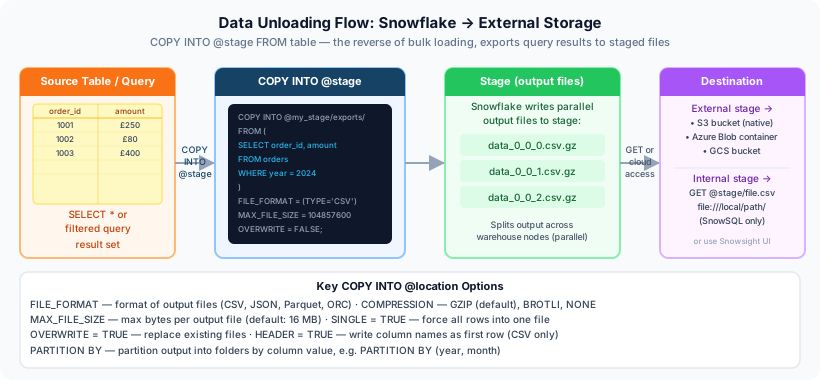
COPY INTO table = loading (files to table). COPY INTO location = unloading (table to files). Both use a virtual warehouse. Snowpipe only supports loading — you cannot use Snowpipe to unload data.
COPY INTO Location Syntax
1-- Unload to a named internal stage2COPY INTO @my_stage/export/3FROM sales.orders4FILE_FORMAT = (TYPE = CSV COMPRESSION = GZIP)5HEADER = TRUE;67-- Unload to an external stage (S3)8COPY INTO @my_s3_stage/daily_export/9FROM (10SELECT order_id, customer_id, total_amount11FROM sales.orders12WHERE order_date = CURRENT_DATE()13)14FILE_FORMAT = (TYPE = PARQUET)15HEADER = TRUE;You can unload from a full table or from a SELECT query (wrapped in parentheses). This lets you filter, transform, and join data before exporting — no need to create a temporary table first.
Key COPY INTO Options
1-- Single file output (default splits into multiple files)2COPY INTO @my_stage/single_export/3FROM sales.orders4SINGLE = TRUE5MAX_FILE_SIZE = 5368709120; -- 5 GB max for single file67-- Overwrite existing files8COPY INTO @my_stage/export/9FROM sales.orders10OVERWRITE = TRUE;1112-- Control file size (default 16 MB)13COPY INTO @my_stage/export/14FROM sales.orders15MAX_FILE_SIZE = 67108864; -- 64 MB per file1617-- Include column headers18COPY INTO @my_stage/export/19FROM sales.orders20FILE_FORMAT = (TYPE = CSV)21HEADER = TRUE;Writing to a single file is slower because it cannot parallelise writes. Use SINGLE only when the consumer requires a single file. For large exports, multiple files is significantly faster.
PARTITION BY
PARTITION BY organises unloaded files into a directory structure based on column expressions — ideal for creating partitioned data lakes.
1-- Partition by date2COPY INTO @my_s3_stage/orders/3FROM (4SELECT *, DATE_TRUNC('month', order_date) AS month5FROM sales.orders6)7PARTITION BY (month)8FILE_FORMAT = (TYPE = PARQUET)9HEADER = TRUE;10-- Creates: orders/2024-01/data_0_0_0.parquet11-- orders/2024-02/data_0_0_0.parquet1213-- Partition by multiple columns14COPY INTO @my_s3_stage/events/15FROM (16SELECT *, YEAR(event_date) AS yr, MONTH(event_date) AS mo17FROM analytics.events18)19PARTITION BY (yr, mo)20FILE_FORMAT = (TYPE = PARQUET);Supported File Formats
Unloading File Formats
Parquet is the preferred format for data lake exports. It preserves data types, supports columnar compression, and maintains schema metadata. Snowflake can unload directly to Parquet without any external tools.
GET Command
The GET command downloads files from an internal stage to your local filesystem. It does not work with external stages.
1-- Download from named internal stage2GET @my_stage/export/ file:///tmp/local_data/;34-- Download from user stage5GET @~/export/ file:///tmp/local_data/;67-- Download from table stage8GET @%orders/export/ file:///tmp/local_data/;GET only works with internal stages (@~, @%, @named_internal). For external stages, use cloud-native tools (AWS CLI, Azure CLI, gsutil) to download files directly from cloud storage.
Compression Options
Compression by Format
CSV / TSV
DefaultOptionsRecommendationJSON
DefaultOptionsParquet
DefaultOptionsStepByStep: Unloading Data
Unloading Data End-to-End
Choose your destination
Decide whether to unload to an internal stage (for GET download) or external stage (for cloud storage access).
Write the COPY INTO statement
Specify the target location, source query, file format, and options.
COPY INTO @my_s3_stage/daily/
FROM (
  SELECT order_id, customer_id, total_amount
  FROM sales.orders
  WHERE order_date = CURRENT_DATE()
)
FILE_FORMAT = (TYPE = PARQUET)
HEADER = TRUE
OVERWRITE = TRUE;Verify the output
List the files in the stage to confirm they were created.
LIST @my_s3_stage/daily/;Download if needed
For internal stages, use GET to download locally.
-- Only for internal stages
GET @my_stage/daily/ file:///tmp/export/;
Cheat Sheet
Data Unloading Quick Reference
Key Commands
UnloadDownloadList filesRemove filesKey Options
SINGLEMAX_FILE_SIZEOVERWRITEHEADERPARTITION BYPractice Quiz
Which command exports data from a Snowflake table into files?
What is the default compression for Parquet unloading?
The GET command can download files from which type of stage?
Flashcards
What is the difference between COPY INTO table and COPY INTO location?
COPY INTO table = loading (files to table). COPY INTO location = unloading (table to files). Both require a virtual warehouse.
What does SINGLE = TRUE do when unloading?
Writes all output to a single file instead of splitting across multiple parallel files. Slower but useful when the consumer requires exactly one file.
What does PARTITION BY do in an unload operation?
Organises output files into a directory structure based on column expressions. For example, PARTITION BY (year, month) creates folders like /2024/01/, /2024/02/. Ideal for data lake patterns.
Can you unload data using Snowpipe?
No. Snowpipe only supports loading (ingesting files into tables). For unloading, use COPY INTO <location> with a virtual warehouse, or schedule it with a Task.
What is the default MAX_FILE_SIZE for unloading?
16 MB. Snowflake splits output into multiple files of this size by default. You can increase it or use SINGLE = TRUE for one file.
Resources
Next Steps
Reinforce what you just read
Study the All flashcards with spaced repetition to lock it in.