Key Terms — Secure Data Sharing
Secure Data Sharing
Snowflake's mechanism for sharing live, read-only data between accounts without copying data. No ETL, no file transfers — consumers query shared data in place.
Share
A Snowflake object (CREATE SHARE) that defines which objects (databases, schemas, tables, views) are shared and with which accounts.
Provider
The account that creates and owns the share — controls what data is shared and with whom.
Consumer
The account that receives the share and creates a read-only database from it.
Reader Account
A managed account created by the provider for consumers who do not have their own Snowflake account. The provider pays for the reader's compute.
Snowflake Marketplace
A platform for discovering and consuming shared data products from third-party providers — both free and paid listings.
What is Secure Data Sharing?
Secure Data Sharing allows Snowflake accounts to share live, read-only data without copying, moving, or transferring files. Consumers query the provider’s data directly — always up to date, zero ETL.
Secure Data Sharing Architecture
Diagram: Provider Account on the left owns tables stored in micro-partitions in shared cloud storage. Provider creates a SHARE object granting access to specific tables/views. Consumer Account on the right creates a database FROM SHARE, which is a read-only pointer to the provider's micro-partitions. No data is copied — the consumer queries the provider's storage directly. Both accounts must be in the same cloud region (or use replication for cross-region).
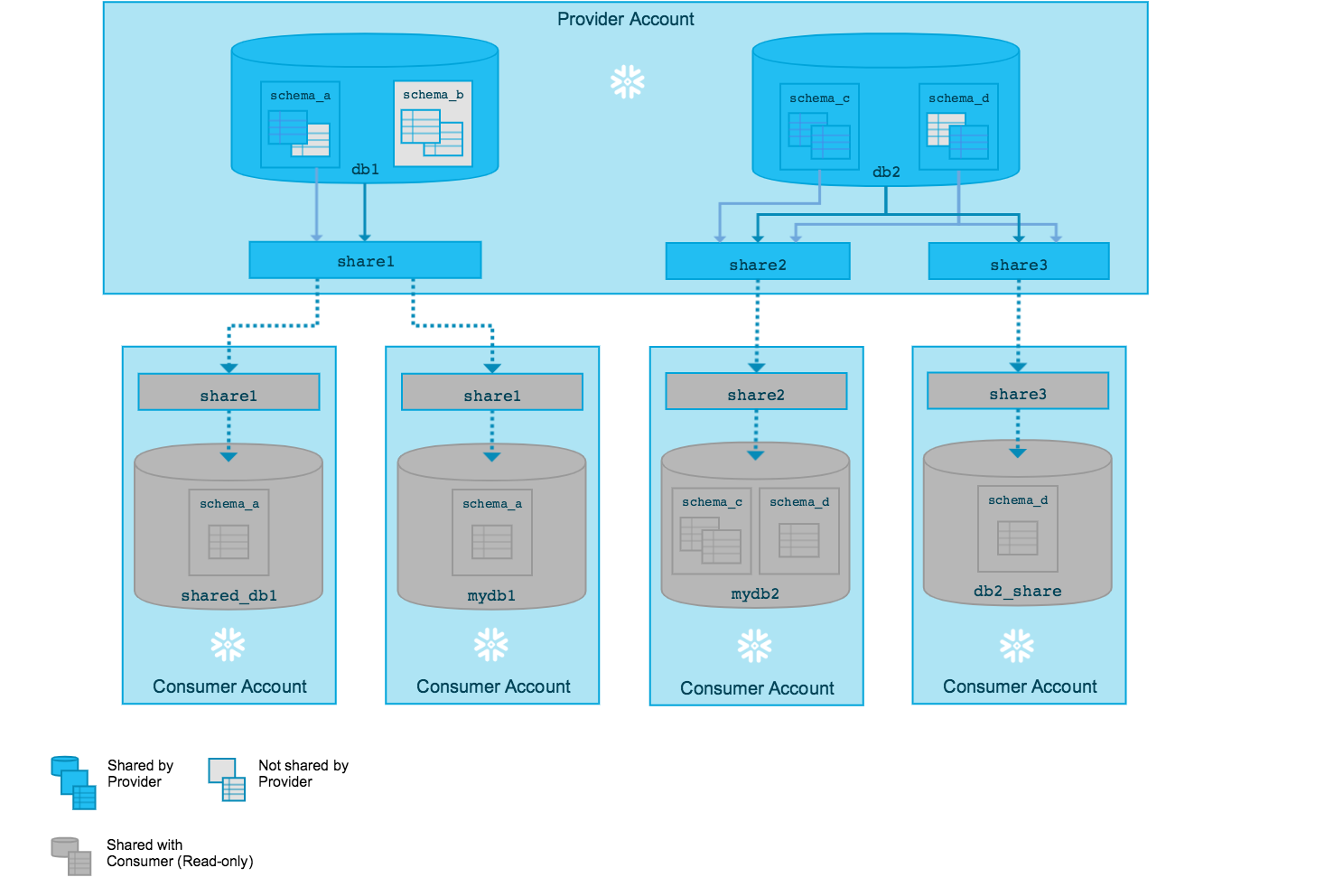
Secure Data Sharing involves zero data copying. The consumer reads the provider’s micro-partitions directly. This means: instant availability of new data, no storage cost for the consumer (only compute), and no ETL pipelines to maintain.
Creating and Managing Shares
1-- Step 1: Create the share2CREATE SHARE sales_share;34-- Step 2: Grant access to objects5GRANT USAGE ON DATABASE sales_db TO SHARE sales_share;6GRANT USAGE ON SCHEMA sales_db.public TO SHARE sales_share;7GRANT SELECT ON TABLE sales_db.public.orders TO SHARE sales_share;8GRANT SELECT ON TABLE sales_db.public.customers TO SHARE sales_share;910-- Step 3: Add consumer accounts11ALTER SHARE sales_share ADD ACCOUNTS = org1.consumer_acct;1213-- View shares14SHOW SHARES;15DESCRIBE SHARE sales_share;1-- View available shares2SHOW SHARES;34-- Create a database from the share5CREATE DATABASE shared_sales FROM SHARE provider_org.provider_acct.sales_share;67-- Grant access to roles8GRANT IMPORTED PRIVILEGES ON DATABASE shared_sales TO ROLE analyst_role;910-- Query shared data (read-only)11SELECT * FROM shared_sales.public.orders LIMIT 10;- Shared data is read-only for consumers — no INSERT, UPDATE, or DELETE
- Consumers can only create a database from a share, not individual tables
- The privilege granted to consumer roles is IMPORTED PRIVILEGES, not SELECT
- Shares work between accounts in the same cloud region by default (use database replication for cross-region)
Sharing Secure Views
Providers typically share secure views rather than base tables to control exactly what data consumers can see.
1-- Create a secure view that filters data per consumer2CREATE OR REPLACE SECURE VIEW sales_db.public.v_orders_shared AS3SELECT order_id, order_date, product, amount4FROM sales_db.public.orders5WHERE region = CURRENT_ACCOUNT(); -- Row-level filtering67-- Grant the secure view to the share8GRANT SELECT ON VIEW sales_db.public.v_orders_shared TO SHARE sales_share;Secure views hide the view definition from consumers (no SHOW CREATE VIEW). This prevents consumers from reverse-engineering your data model or filter logic. Regular views expose their SQL — never share a regular view if the logic is sensitive.
Sharing Objects
Shareable vs Non-Shareable Objects
Reader Accounts
Reader accounts are for consumers who do not have their own Snowflake account. The provider creates and manages the reader account, and pays for its compute.
1-- Create a managed (reader) account2CREATE MANAGED ACCOUNT partner_reader3ADMIN_NAME = 'partner_admin'4ADMIN_PASSWORD = 'SecurePass123!'5TYPE = READER;67-- Add the reader account to the share8ALTER SHARE sales_share ADD ACCOUNTS = partner_reader;Full Account vs Reader Account Consumer
Full account consumers pay their own compute costs. Reader account compute is billed to the provider. Storage is always the provider’s cost since data is never copied.
Snowflake Marketplace
The Snowflake Marketplace is a platform where providers publish data products that any Snowflake account can discover and consume.
Snowflake Marketplace
Diagram: Three layers. Top: Data Providers publish listings (free or paid) to the Marketplace. Middle: Snowflake Marketplace acts as a discovery and governance platform. Bottom: Data Consumers browse, request access, and create databases from listings. Listings can be Standard (available to all) or Personalised (customised per consumer). Paid listings use Snowflake's billing integration.
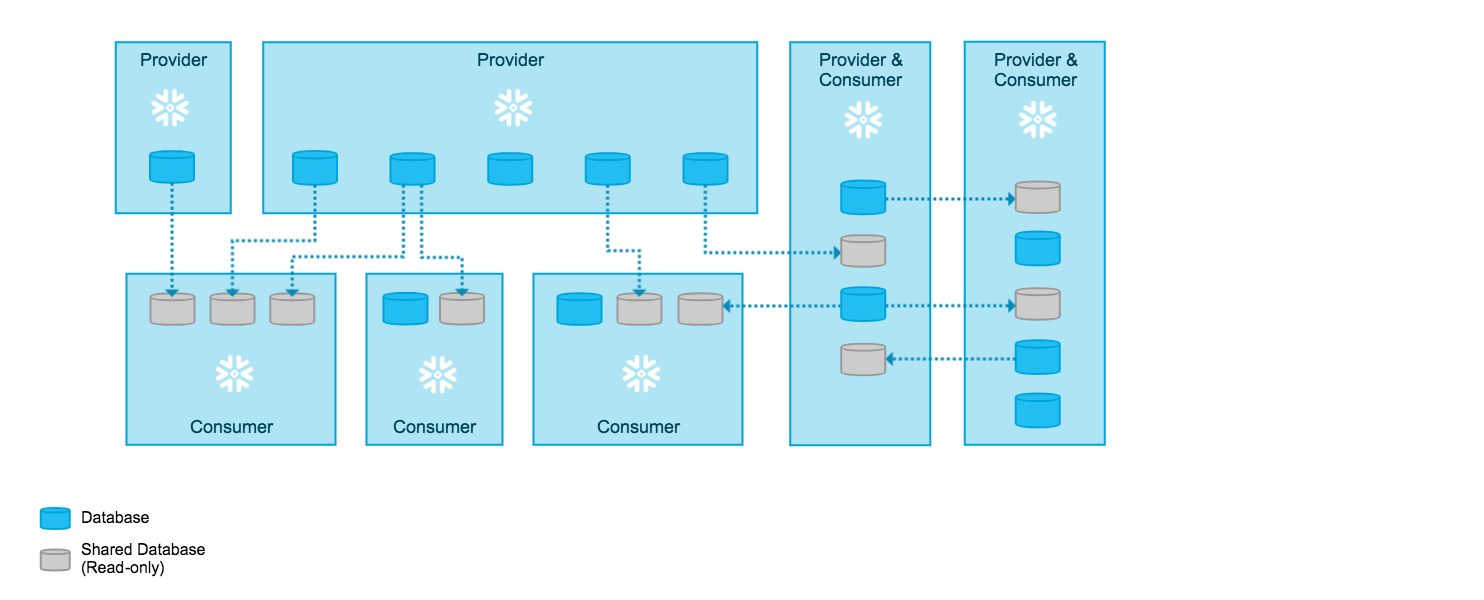
- Standard listings: same data for all consumers (e.g., weather data, postcode lookups)
- Personalised listings: customised data per consumer (e.g., vendor-specific analytics)
- Free listings: no charge, instant access
- Paid listings: commercial data products with Snowflake-managed billing
Data Exchange
A Data Exchange is a private marketplace — a curated group of accounts that can share data with each other. Unlike the public Marketplace, membership is controlled by the exchange administrator.
The public Marketplace is open to all Snowflake accounts. A Data Exchange is a private, invite-only group — ideal for sharing within an organisation, industry consortium, or partner network.
Cheat Sheet
Secure Data Sharing Quick Reference
Key Facts
Data movementConsumer accessStorage costCompute costRegionProvider Commands
Create shareGrant objectsAdd consumerReader accountConsumer Commands
Create from shareGrant accessView sharesPractice Quiz
What happens to data when a provider shares a table with a consumer?
Who pays for compute when a Reader Account queries shared data?
What privilege does a consumer grant to roles to access a shared database?
Flashcards
How does Secure Data Sharing work at the storage level?
No data is copied. The consumer creates a read-only database that references the provider's micro-partitions directly. Both accounts access the same physical storage. Consumer pays only for compute; provider pays for storage.
What is a Reader Account and who pays for it?
A Reader Account is a managed Snowflake account created by the provider for consumers who do not have their own Snowflake account. The provider pays for the reader's compute. Reader accounts can only consume shares from the provider that created them.
Why should you share secure views instead of base tables?
Secure views hide the view definition from consumers, preventing them from seeing your data model or filter logic. They also enable row-level and column-level filtering using functions like CURRENT_ACCOUNT(). Regular views expose their SQL to anyone with access.
What is the difference between Snowflake Marketplace and a Data Exchange?
The Marketplace is public — any Snowflake account can discover and consume listings. A Data Exchange is a private, invite-only group controlled by an administrator. Data Exchanges are ideal for intra-organisation or partner sharing.
What objects can be included in a share?
Tables, secure views, and secure UDFs. You must also grant USAGE on the containing database and schema. Stages, tasks, pipes, and stored procedures cannot be shared.
Resources
Next Steps
Reinforce what you just read
Study the All flashcards with spaced repetition to lock it in.