Key Terms — Data Protection
Time Travel
Snowflake feature allowing you to query, clone, or restore data as it existed at any point within the retention period.
Fail-safe
A 7-day non-configurable storage period beyond Time Travel, managed exclusively by Snowflake for disaster recovery.
Retention Period
The configurable number of days (0–90) that Time Travel data is preserved for a database, schema, or table.
Zero-Copy Clone
A copy of a database, schema, or table created instantly by sharing metadata pointers rather than duplicating data.
AT / BEFORE
SQL clauses used with SELECT, CREATE CLONE, and UNDROP to access historical data at a specific timestamp or offset.
UNDROP
DDL command that restores a dropped table, schema, or database from Time Travel storage.
What is Time Travel?
Snowflake’s Time Travel is one of its most powerful differentiating features. It allows you to access historical data — data that has been updated, deleted, or dropped — at any point within your defined retention period.
Time Travel retention is heavily tested in COF-C02. Know the defaults and maximums for each edition:
- Standard Edition: 0–1 days (default: 1 day)
- Enterprise Edition and above: 0–90 days (default: 1 day)
- Transient & Temporary tables: maximum 1 day (regardless of edition)
How Time Travel Works
Snowflake’s immutable micro-partition storage model is what makes Time Travel possible at no extra complexity cost. When data changes, old micro-partitions are retained rather than overwritten, and their metadata is preserved for the duration of the retention period.
Time Travel Data Lifecycle
Illustration of how data moves from Active Storage → Time Travel Storage → Fail-safe Storage → Purged, showing the retention timeline and what operations are available at each stage
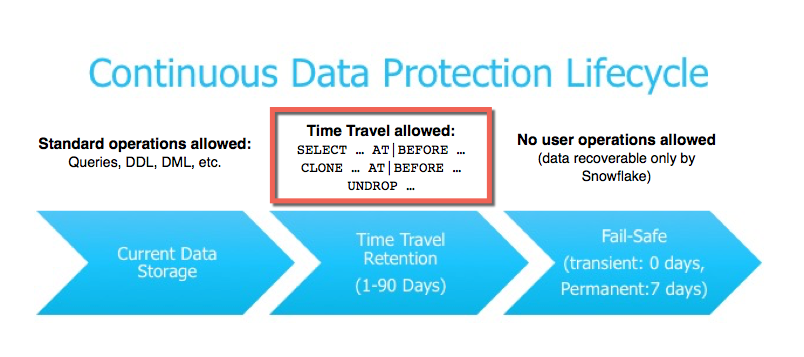
Time Travel data is stored in addition to your active data. A 90-day retention period can significantly increase storage costs. Monitor usage with SNOWFLAKE.ACCOUNT_USAGE.TABLE_STORAGE_METRICS.
Time Travel SQL Syntax
There are three ways to specify a point in time for historical queries:
Time Travel Query Syntax
Timestamp-Based
ATBEFOREOffset-Based
ATBEFOREStatement-Based
ATBEFORE1-- Query table as it was 1 hour ago (offset in seconds)2SELECT * FROM orders3AT(OFFSET => -3600);45-- Query at a specific timestamp6SELECT * FROM customers7AT(TIMESTAMP => '2024-06-01 00:00:00'::TIMESTAMP_TZ);89-- Query data BEFORE a specific DML statement ran10SELECT * FROM products11BEFORE(STATEMENT => '01ab2345-0001-dead-beef-246800135246');1213-- Find deleted rows by comparing historical data to current14SELECT h.* FROM orders AT(OFFSET => -86400) h15LEFT JOIN orders c ON h.order_id = c.order_id16WHERE c.order_id IS NULL;What are the three Time Travel clause options available in Snowflake SQL?
AT(TIMESTAMP => ...), AT(OFFSET => ...), and AT(STATEMENT => ...) — each also has a BEFORE variant. TIMESTAMP pins to a wall-clock time, OFFSET specifies seconds from now, and STATEMENT references a specific query ID.
Restoring Data with UNDROP
Time Travel lets you recover accidentally dropped objects with the UNDROP command.
You can only UNDROP an object if a newer object with the same name does not already exist. If you accidentally dropped CUSTOMERS and created a new empty CUSTOMERS table, you must rename or drop the new one first before calling UNDROP.
Recovering a Dropped Table
Identify the Dropped Table
Check your query history or ACCOUNT_USAGE to find when the table was dropped and confirm it is within the Time Travel retention window.
-- List dropped tables (still within retention)
SHOW TABLES HISTORY LIKE '%CUSTOMERS%' IN SCHEMA my_db.public;

-- Check account usage for drop events
SELECT table_name, dropped_on, retention_time
FROM SNOWFLAKE.ACCOUNT_USAGE.TABLES
WHERE deleted IS NOT NULL
AND table_name = 'CUSTOMERS';Rename Any Conflicting Object
If a new object with the same name exists, rename it to avoid a conflict before restoring.
-- Rename the conflicting table if needed
ALTER TABLE customers RENAME TO customers_new_empty;Run UNDROP
UNDROP restores the table with all its data, grants, and metadata to the state just before it was dropped.
-- Restore the dropped table
UNDROP TABLE customers;

-- Verify restoration
SELECT COUNT(*) FROM customers;Validate the Restored Data
Query the restored table alongside the historical view to confirm data integrity before communicating recovery to stakeholders.
-- Compare current vs. historical row counts
SELECT 'Current' AS source, COUNT(*) AS rows FROM customers
UNION ALL
SELECT 'Before Drop (24h ago)', COUNT(*)
FROM customers AT(OFFSET => -86400);Which objects can be restored using UNDROP in Snowflake?
Tables, Schemas, and Databases can all be restored with UNDROP — as long as they are within the Time Travel retention period and no newer object with the same name exists at the same level.
Zero-Copy Cloning with Time Travel
One of the most powerful combinations in Snowflake is using Time Travel + Cloning. You can clone a table or schema as it existed at any historical point, creating an instant copy with no data duplication.
Zero-Copy Clone with Time Travel
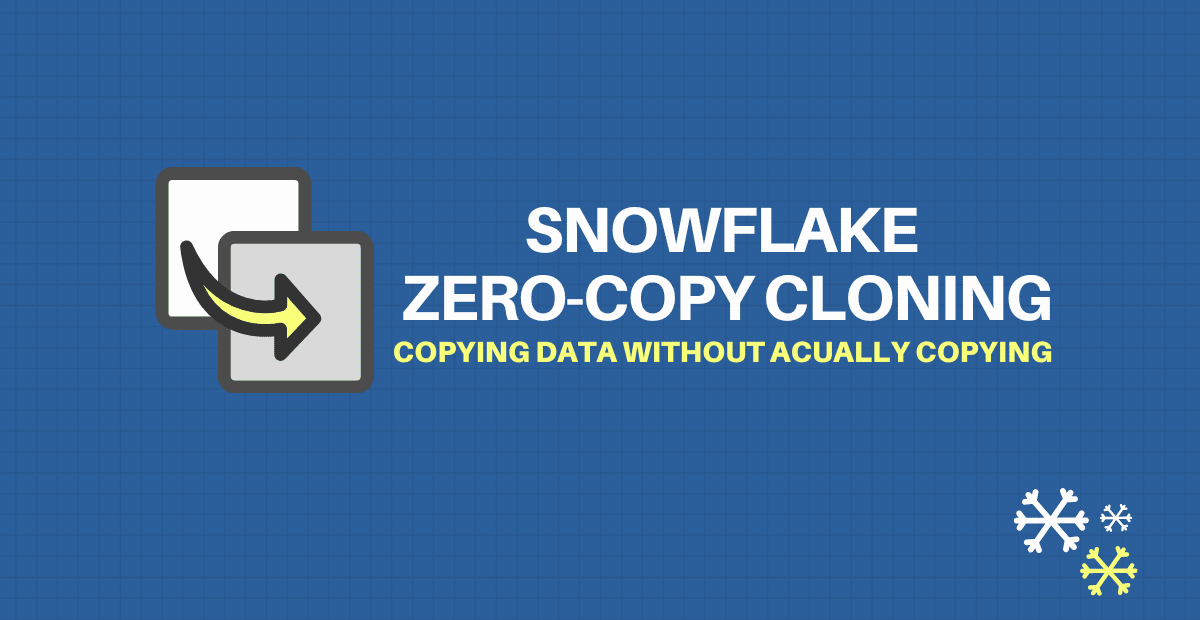
How cloning from a historical point works: the new clone shares micro-partition pointers from the past state, adding only metadata overhead until new writes diverge
1-- Clone a table as it was before yesterday's batch run2CREATE TABLE orders_backup3CLONE orders4BEFORE(STATEMENT => '01ab2345-0001-dead-beef-246800135246');56-- Clone an entire schema as it existed 24 hours ago7CREATE SCHEMA reporting_backup8CLONE reporting9AT(OFFSET => -86400);1011-- Clone database to a point before a failed migration12CREATE DATABASE prod_backup13CLONE production14AT(TIMESTAMP => '2024-06-10 08:00:00'::TIMESTAMP_TZ);Before running a large DELETE or UPDATE, clone the target table with CREATE TABLE backup CLONE my_table. If something goes wrong, you can recover instantly without waiting for a full restore. The clone costs almost nothing until you write to it.
Time Travel vs. Fail-safe
Time Travel vs. Fail-safe
Fail-safe is not a backup strategy. It exists only for catastrophic failure scenarios and can only be accessed by Snowflake staff. Do not rely on Fail-safe as your data recovery plan — use Time Travel and Zero-Copy Clones proactively.
What is the Fail-safe period in Snowflake and who can access it?
Fail-safe is a fixed 7-day non-configurable period after the Time Travel period expires. Only Snowflake Support can access Fail-safe data — it is not self-service. It applies to permanent tables only (not transient or temporary).
Configuring Retention Periods
You can set the DATA_RETENTION_TIME_IN_DAYS parameter at the account, database, schema, or table level. More specific levels override broader settings.
1-- Set retention at account level (applies to all objects by default)2ALTER ACCOUNT SET DATA_RETENTION_TIME_IN_DAYS = 30;34-- Override at database level5ALTER DATABASE sales_db SET DATA_RETENTION_TIME_IN_DAYS = 90;67-- Override at schema level8ALTER SCHEMA sales_db.staging SET DATA_RETENTION_TIME_IN_DAYS = 1;910-- Disable Time Travel for a specific table (0 = off)11ALTER TABLE large_staging_table SET DATA_RETENTION_TIME_IN_DAYS = 0;1213-- Create a transient table (max 1 day, no Fail-safe)14CREATE TRANSIENT TABLE temp_calculations (15id INT,16result FLOAT17) DATA_RETENTION_TIME_IN_DAYS = 0;1819-- Check current retention setting for a table20SHOW TABLES LIKE 'orders';Transient tables persist across sessions and have no Fail-safe, with max 1-day Time Travel. Temporary tables only exist for the session duration and also have no Fail-safe. Both are useful for reducing storage costs on intermediate/staging data.
Retention Period Inheritance
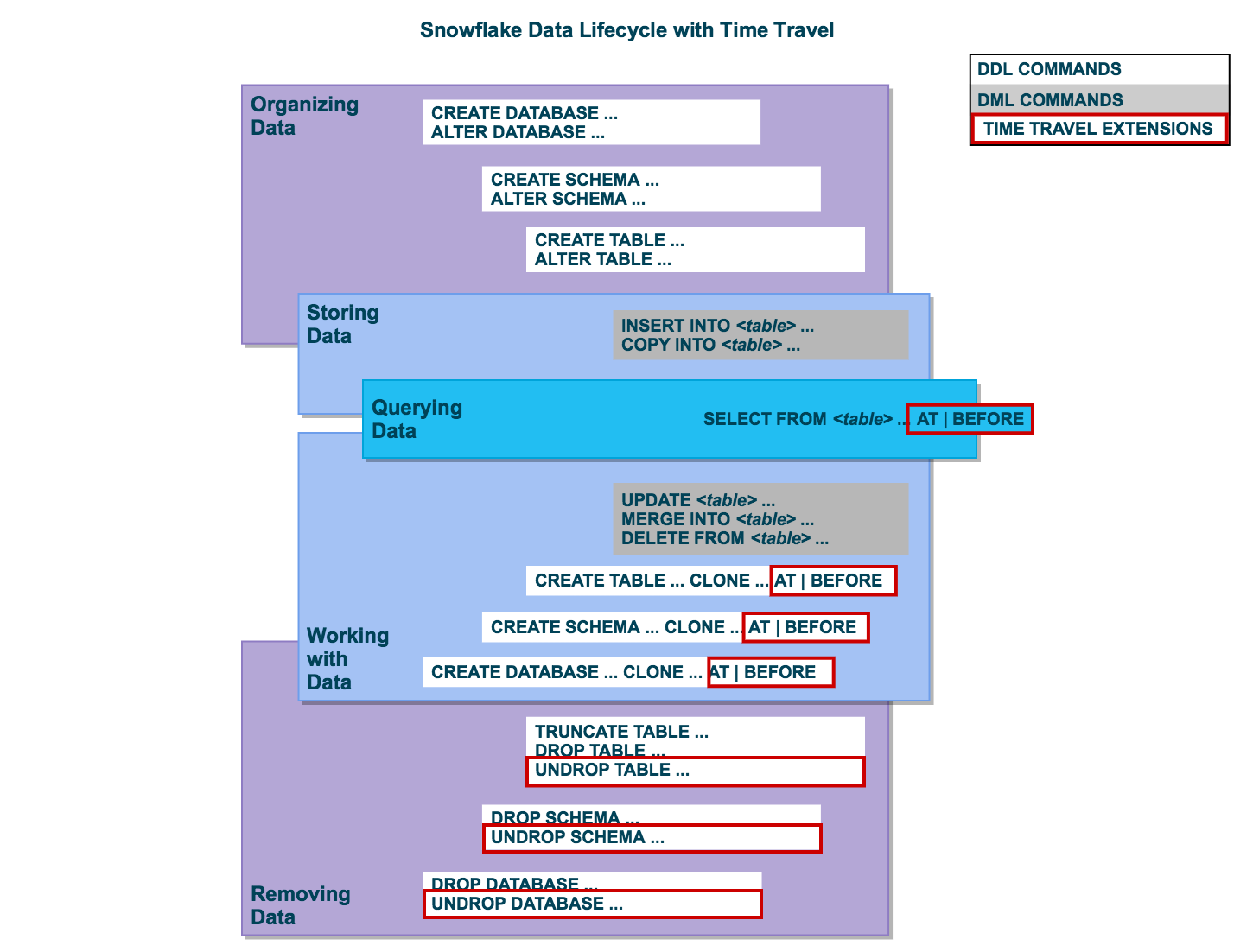
How DATA_RETENTION_TIME_IN_DAYS cascades from account → database → schema → table level, with more specific settings overriding broader ones
Storage Cost Considerations
Time Travel and Fail-safe data count towards your Snowflake storage bill. Understanding cost drivers is important for both the exam and real-world usage.
Storage Cost Reference
What Gets Billed
ActiveTTFSStageCost Reduction Strategies
Transient0 daysCloneMonitor1-- View Time Travel and Fail-safe storage by table2SELECT3table_name,4active_bytes / POWER(1024, 3) AS active_gb,5time_travel_bytes / POWER(1024, 3) AS time_travel_gb,6failsafe_bytes / POWER(1024, 3) AS failsafe_gb,7retained_for_clone_bytes / POWER(1024, 3) AS clone_gb8FROM SNOWFLAKE.ACCOUNT_USAGE.TABLE_STORAGE_METRICS9WHERE deleted = FALSE10ORDER BY (time_travel_bytes + failsafe_bytes) DESC11LIMIT 20;Practice Quiz
A table in Snowflake Enterprise Edition was accidentally dropped 5 days ago. The table had DATA_RETENTION_TIME_IN_DAYS = 3. Can you recover this table?
Which of the following table types does NOT have a Fail-safe period?
You need to create a point-in-time backup of a 2 TB production table before running a major migration. Which approach minimises both time and cost?
Flashcard Review
What is the maximum Time Travel retention period, and which edition is required?
90 days maximum. Requires Enterprise Edition or higher. Standard Edition is limited to 1 day maximum. The default for all editions is 1 day.
A transient table has DATA_RETENTION_TIME_IN_DAYS = 5. Is this valid?
No — transient and temporary tables have a maximum retention of 1 day, regardless of how you set the parameter. Setting it to 5 on a transient table will result in an error or be capped at 1.
What happens to Time Travel data when a table's retention period expires?
After Time Travel expires, the data moves into Fail-safe for 7 days (permanent tables only). After Fail-safe, the data is permanently purged. You lose self-service access when Time Travel expires.
Can you use Time Travel across different accounts in Snowflake?
No. Time Travel is scoped to the account where the data lives. You cannot query historical data from another account using AT/BEFORE. Data sharing shares live data only.
True or False: Setting DATA_RETENTION_TIME_IN_DAYS = 0 on a table still provides Fail-safe protection.
FALSE. Setting retention to 0 disables Time Travel AND removes Fail-safe protection. The data is immediately eligible for removal with no recovery options from Fail-safe.
Additional Resources
Official Snowflake Documentation
Next Steps
Reinforce what you just read
Study the All flashcards with spaced repetition to lock it in.