Role-Based Access Control (RBAC)
Role-Based Access Control is the primary security model in Snowflake. Every action a user performs — reading a table, running a query, creating a schema — is governed by privileges granted to roles, which are then assigned to users. Understanding RBAC thoroughly is essential for the COF-C02 exam.
How RBAC Works in Snowflake
The core formula is simple:
GRANT privilege ON object TO role
A user activates a role in their session, and that role determines what the user can do. If the role does not have the required privilege on the required object, the action is denied — even if the user is an ACCOUNTADMIN in another context.
RBAC Hierarchy: Users, Roles, Privileges, and Objects
Diagram showing the RBAC chain: Users are assigned Roles. Roles hold Privileges. Privileges are granted ON Securable Objects (account, database, schema, table, warehouse). Role inheritance flows upward — a parent role inherits all privileges of its child roles. The ACCOUNTADMIN role sits at the top, inheriting from SYSADMIN and SECURITYADMIN. SYSADMIN inherits from any custom roles beneath it.
Securable Objects
A securable object is any object in Snowflake on which privileges can be granted. They are organised into a hierarchy:
| Level | Examples |
|---|---|
| Account | Account-level settings, warehouses, integrations |
| Database | Databases |
| Schema | Schemas within a database |
| Table / View | Tables, views, materialised views |
| Stage / Pipe | Named stages, Snowpipe definitions |
| Stream / Task | Change tracking streams, scheduled tasks |
| Warehouse | Virtual warehouses |
Privileges are not inherited downward through the object hierarchy. Granting USAGE on a database does not automatically grant USAGE on its schemas, nor SELECT on its tables. You must grant privileges at each level separately.
System-Defined Roles
Snowflake provisions five system-defined roles automatically:
Key Terms — System-Defined Roles
ACCOUNTADMIN
Top-level role combining SYSADMIN and SECURITYADMIN. Has all privileges. Should be used sparingly and always with MFA. Owns account-level settings.
SECURITYADMIN
Manages security objects: users, roles, network policies, and grants. Can GRANT/REVOKE any privilege in the account. Reports to ACCOUNTADMIN.
SYSADMIN
Creates and manages warehouses, databases, and other objects. Custom roles should be granted to SYSADMIN so SYSADMIN inherits their object ownership.
USERADMIN
A sub-role of SECURITYADMIN. Can create users and roles only. Does not have GRANT privileges on all objects.
PUBLIC
Automatically granted to every user and role. Represents the minimum level of access. Can be granted privileges for objects accessible to all users.
Snowflake strongly recommends assigning at least two users to ACCOUNTADMIN in case one account is locked out. Day-to-day administration should use SYSADMIN or custom roles, not ACCOUNTADMIN.
Privileges on Databases
To access any object in a database, a role must first have USAGE on the database itself.
| Privilege | What It Allows |
|---|---|
| USAGE | Access the database; required before any lower-level access |
| CREATE SCHEMA | Create new schemas within the database |
| MODIFY | Alter the database properties |
| MONITOR | View database-level usage and metadata |
| OWNERSHIP | Full control; only one role may own an object at a time |
1-- Grant USAGE so a role can access the database2GRANT USAGE ON DATABASE sales_db TO ROLE analyst_role;34-- Grant the ability to create schemas in the database5GRANT CREATE SCHEMA ON DATABASE sales_db TO ROLE developer_role;67-- Grant full ownership of the database to a role8GRANT OWNERSHIP ON DATABASE sales_db TO ROLE db_owner_role REVOKE CURRENT GRANTS;910-- Show all privileges granted ON a database11SHOW GRANTS ON DATABASE sales_db;Privileges on Schemas
After gaining USAGE on a database, a role needs USAGE on each schema it accesses.
| Privilege | What It Allows |
|---|---|
| USAGE | Access the schema and its objects (required) |
| CREATE TABLE | Create tables in the schema |
| CREATE VIEW | Create views |
| CREATE STAGE | Create named stages for data loading |
| CREATE PIPE | Create Snowpipe objects |
| CREATE STREAM | Create change-data-capture streams |
| CREATE TASK | Create scheduled tasks |
| MODIFY | Alter schema properties |
| OWNERSHIP | Full control of the schema |
1-- Grant USAGE on schema so role can see its contents2GRANT USAGE ON SCHEMA sales_db.public TO ROLE analyst_role;34-- Grant CREATE TABLE so role can build tables in the schema5GRANT CREATE TABLE ON SCHEMA sales_db.public TO ROLE developer_role;67-- Grant multiple create privileges at once8GRANT CREATE VIEW, CREATE STAGE, CREATE PIPE9ON SCHEMA sales_db.public10TO ROLE developer_role;1112-- Bulk grant on all existing tables in schema13GRANT SELECT ON ALL TABLES IN SCHEMA sales_db.public TO ROLE analyst_role;1415-- Show privileges on a schema16SHOW GRANTS ON SCHEMA sales_db.public;Privileges on Tables and Views
| Privilege | What It Allows |
|---|---|
| SELECT | Read rows from the table or view |
| INSERT | Add new rows |
| UPDATE | Modify existing rows |
| DELETE | Remove rows |
| TRUNCATE | Remove all rows (faster than DELETE, not logged per-row) |
| REFERENCES | Create foreign key references to the table |
| OWNERSHIP | Full control; required to DROP the table |
TRUNCATE requires the TRUNCATE privilege, not DELETE. A role with only DELETE cannot truncate a table. This distinction appears regularly in exam questions.
Which privilege is required to read rows from a Snowflake table?
SELECT. The role must also have USAGE on both the containing database and schema before SELECT on the table is meaningful.
What is the minimum set of privileges required for a role to query a table called sales_db.public.orders?
1) USAGE ON DATABASE sales_db 2) USAGE ON SCHEMA sales_db.public 3) SELECT ON TABLE sales_db.public.orders
Privileges on Warehouses
Warehouses are compute resources. Their privileges are separate from data object privileges.
| Privilege | What It Allows |
|---|---|
| USAGE | Execute queries using this warehouse |
| OPERATE | Start, suspend, and abort queries on the warehouse |
| MONITOR | View warehouse usage statistics and query history |
| MODIFY | Change warehouse properties (size, auto-suspend settings) |
| OWNERSHIP | Full control of the warehouse |
1-- Allow analyst to run queries on the warehouse2GRANT USAGE ON WAREHOUSE analytics_wh TO ROLE analyst_role;34-- Allow an ops role to suspend or resize the warehouse5GRANT OPERATE ON WAREHOUSE analytics_wh TO ROLE ops_role;6GRANT MODIFY ON WAREHOUSE analytics_wh TO ROLE ops_role;78-- Allow a monitoring role to see query history9GRANT MONITOR ON WAREHOUSE analytics_wh TO ROLE monitor_role;1011-- Check what privileges a role holds on the warehouse12SHOW GRANTS TO ROLE analyst_role;A data engineer needs to resize a warehouse from X-Small to Medium and also suspend it between jobs. Which warehouse privileges are required?
OWNERSHIP Privilege
Ownership is a special privilege in Snowflake:
- Only one role can own an object at any time.
- The owning role has full control over the object, including the ability to DROP it.
- Ownership is automatically assigned to the role that created the object (the active role in the session at creation time).
- Ownership can be transferred using
GRANT OWNERSHIP.
1-- Transfer ownership of a table to a new role2-- REVOKE CURRENT GRANTS removes all existing privilege grants on the object3GRANT OWNERSHIP ON TABLE sales_db.public.orders4TO ROLE new_owner_role5REVOKE CURRENT GRANTS;67-- Transfer ownership WITHOUT removing existing grants (COPY CURRENT GRANTS)8GRANT OWNERSHIP ON TABLE sales_db.public.orders9TO ROLE new_owner_role10COPY CURRENT GRANTS;1112-- Transfer ownership of an entire schema13GRANT OWNERSHIP ON SCHEMA sales_db.public14TO ROLE new_owner_role15REVOKE CURRENT GRANTS;1617-- Transfer ownership of a database18GRANT OWNERSHIP ON DATABASE sales_db19TO ROLE new_owner_role20REVOKE CURRENT GRANTS;How many roles can own a single Snowflake object at one time?
Exactly ONE role can own a Snowflake object at any given time. Ownership can be transferred but not shared.
When transferring ownership:
- REVOKE CURRENT GRANTS — removes all existing privilege grants on the object from other roles. The new owner starts fresh.
- COPY CURRENT GRANTS — preserves all existing privilege grants. Other roles retain their previously granted privileges.
The exam may ask which option is used when you want a clean transfer with no inherited grants.
Discretionary Access Control (DAC)
Snowflake combines RBAC with Discretionary Access Control (DAC):
- In RBAC, access is managed centrally by an administrator.
- In DAC, object owners can grant access to their own objects to other roles — without requiring a central admin to do so.
This means a role that owns a table can run:
GRANT SELECT ON TABLE my_table TO ROLE other_role;…even if that role is not SECURITYADMIN or ACCOUNTADMIN.
DAC + RBAC Combined Model
Diagram showing Snowflake's hybrid access control model. On the left side, a central SECURITYADMIN manages roles and their hierarchy. On the right side, individual object owners (any role with OWNERSHIP privilege) can grant/revoke access on their own objects directly to other roles. Both paths result in privilege grants tracked in the same access control system. This combination allows both centralised governance and delegated object-level access management.
GRANT WITH GRANT OPTION
By default, when role A grants SELECT to role B, role B cannot further grant that privilege to role C. The WITH GRANT OPTION changes this:
1-- Grant SELECT and allow the grantee to pass it on2GRANT SELECT ON TABLE sales_db.public.orders3TO ROLE analyst_role4WITH GRANT OPTION;56-- analyst_role can now grant SELECT to other roles:7-- (Run while using analyst_role)8GRANT SELECT ON TABLE sales_db.public.orders9TO ROLE junior_analyst_role;1011-- Revoke the grant option without revoking the privilege itself12-- (must revoke and re-grant without WITH GRANT OPTION)13REVOKE GRANT OPTION FOR SELECT ON TABLE sales_db.public.orders14FROM ROLE analyst_role;Role A has been granted SELECT ON TABLE orders WITH GRANT OPTION. Role A then grants SELECT to Role B. If Role A's grant option is revoked, what happens to Role B's SELECT privilege?
Role Hierarchy and Privilege Inheritance
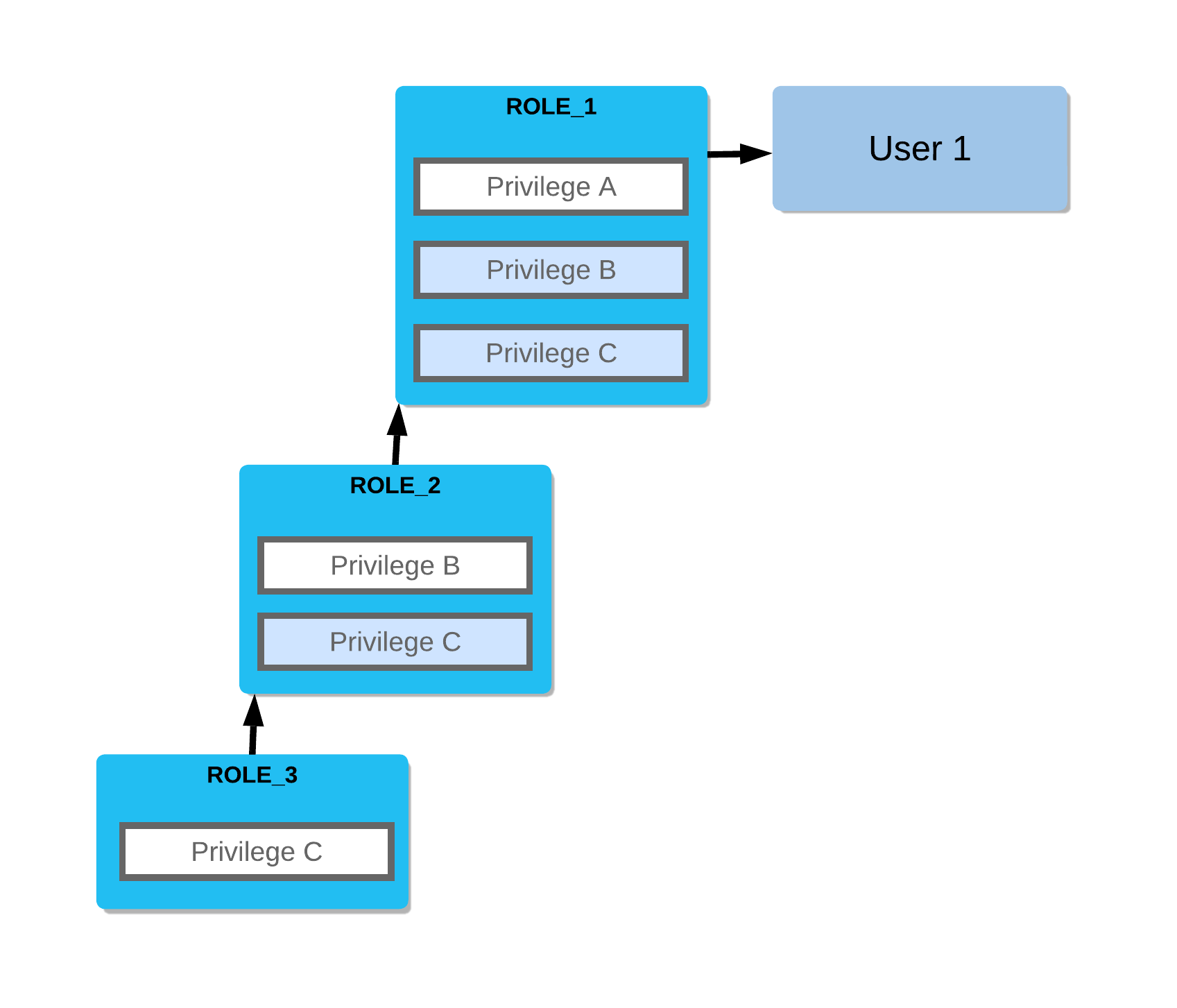
Roles can be organised into a hierarchy. A parent role inherits all privileges of its child roles.
1-- Create custom roles2CREATE ROLE junior_analyst;3CREATE ROLE senior_analyst;4CREATE ROLE data_team_lead;56-- Build the hierarchy: senior_analyst inherits junior_analyst's privileges7GRANT ROLE junior_analyst TO ROLE senior_analyst;89-- data_team_lead inherits all privileges of senior_analyst (and thus junior_analyst)10GRANT ROLE senior_analyst TO ROLE data_team_lead;1112-- Assign a role to a user13GRANT ROLE junior_analyst TO USER alice;14GRANT ROLE data_team_lead TO USER bob;1516-- Best practice: grant custom roles up to SYSADMIN17GRANT ROLE data_team_lead TO ROLE sysadmin;Role Inheritance Chain Example
Visual diagram showing a four-level role hierarchy. At the bottom: junior_analyst role with SELECT on raw tables. Above it: senior_analyst role with SELECT on curated views, which also inherits junior_analyst's SELECT on raw tables. Above that: data_team_lead with CREATE TABLE privilege, inheriting all privileges from both lower roles. At the top: SYSADMIN, which has data_team_lead granted to it, giving SYSADMIN visibility over all objects managed by the hierarchy. Arrows point upward showing the direction of privilege inheritance.
REVOKE — Removing Privileges
1-- Basic revoke2REVOKE SELECT ON TABLE sales_db.public.orders FROM ROLE analyst_role;34-- Revoke a schema privilege5REVOKE CREATE TABLE ON SCHEMA sales_db.public FROM ROLE developer_role;67-- Revoke with CASCADE: also revokes downstream grants made by this role8REVOKE SELECT ON TABLE sales_db.public.orders9FROM ROLE analyst_role CASCADE;1011-- Revoke with RESTRICT: fails if the role has granted this privilege to others12-- (prevents accidental breakage of downstream access)13REVOKE SELECT ON TABLE sales_db.public.orders14FROM ROLE analyst_role RESTRICT;1516-- Revoke a role assignment from a user17REVOKE ROLE analyst_role FROM USER alice;- CASCADE: The revoke propagates downward — any grants that the target role made using this privilege are also revoked.
- RESTRICT: The revoke fails with an error if the target role has granted this privilege to any other roles. This is the safer option to avoid unknowingly breaking access.
The exam often presents a scenario where a downstream role loses access unexpectedly — this is caused by a CASCADE revoke up the chain.
FUTURE GRANTS
Future grants automatically apply a privilege to objects created in the future within a schema or database, eliminating the need to grant privileges every time a new object is created.
1-- Automatically grant SELECT on any future tables created in this schema2GRANT SELECT ON FUTURE TABLES IN SCHEMA sales_db.public3TO ROLE analyst_role;45-- Automatically grant SELECT on future views6GRANT SELECT ON FUTURE VIEWS IN SCHEMA sales_db.public7TO ROLE analyst_role;89-- Future grants at the database level (applies to all schemas)10GRANT SELECT ON FUTURE TABLES IN DATABASE sales_db11TO ROLE analyst_role;1213-- Grant future pipe usage14GRANT USAGE ON FUTURE STAGES IN SCHEMA sales_db.public15TO ROLE loader_role;1617-- Show future grants configured on a schema18SHOW FUTURE GRANTS IN SCHEMA sales_db.public;1920-- Show future grants configured on a database21SHOW FUTURE GRANTS IN DATABASE sales_db;Future grants apply to objects created after the grant is set up — they do not backfill existing objects.
To cover existing objects, use:
GRANT SELECT ON ALL TABLES IN SCHEMA sales_db.public TO ROLE analyst_role;You often need both: one for existing objects and one for future objects.
What is the purpose of FUTURE GRANTS in Snowflake?
FUTURE GRANTS automatically apply a specified privilege to all objects of a given type created in a schema or database after the grant is configured. They prevent access gaps when new objects are added.
Bulk Grants with GRANT ALL
1-- Grant ALL privileges on a specific table2GRANT ALL PRIVILEGES ON TABLE sales_db.public.orders TO ROLE power_user;34-- Grant SELECT on every existing table in a schema5GRANT SELECT ON ALL TABLES IN SCHEMA sales_db.public TO ROLE analyst_role;67-- Grant SELECT on all existing views in a schema8GRANT SELECT ON ALL VIEWS IN SCHEMA sales_db.public TO ROLE analyst_role;910-- Grant USAGE on all existing schemas in a database11GRANT USAGE ON ALL SCHEMAS IN DATABASE sales_db TO ROLE analyst_role;1213-- Combine bulk (existing) + future grants for complete coverage14GRANT SELECT ON ALL TABLES IN SCHEMA sales_db.public TO ROLE analyst_role;15GRANT SELECT ON FUTURE TABLES IN SCHEMA sales_db.public TO ROLE analyst_role;SHOW GRANTS Commands
1-- Show all privileges granted TO a specific role2SHOW GRANTS TO ROLE analyst_role;34-- Show which roles and users have been granted a specific role5SHOW GRANTS OF ROLE analyst_role;67-- Show all privileges granted ON a specific table8SHOW GRANTS ON TABLE sales_db.public.orders;910-- Show all privileges granted ON a database11SHOW GRANTS ON DATABASE sales_db;1213-- Show all privileges granted ON a schema14SHOW GRANTS ON SCHEMA sales_db.public;1516-- Show all privileges granted ON a warehouse17SHOW GRANTS ON WAREHOUSE analytics_wh;1819-- Show future grants in a schema20SHOW FUTURE GRANTS IN SCHEMA sales_db.public;Comparing RBAC and DAC
RBAC vs DAC in Snowflake
Setting Up RBAC — Step-by-Step
Setting Up a Full RBAC Structure for an Analytics Team
Create custom roles
Define functional roles that map to job functions in your organisation. Avoid giving users ACCOUNTADMIN or SYSADMIN for day-to-day work.
CREATE ROLE junior_analyst;
CREATE ROLE senior_analyst;
CREATE ROLE data_engineer;Build the role hierarchy
Grant child roles to parent roles so privileges are inherited upward. Always grant top-level custom roles to SYSADMIN.
GRANT ROLE junior_analyst TO ROLE senior_analyst;
GRANT ROLE senior_analyst TO ROLE data_engineer;
GRANT ROLE data_engineer TO ROLE sysadmin;Create warehouse and grant access
Create the compute resource and grant the USAGE privilege so roles can run queries.
CREATE WAREHOUSE analytics_wh
WAREHOUSE_SIZE = 'X-SMALL'
AUTO_SUSPEND = 300
AUTO_RESUME = TRUE;

GRANT USAGE ON WAREHOUSE analytics_wh TO ROLE junior_analyst;
GRANT USAGE ON WAREHOUSE analytics_wh TO ROLE senior_analyst;
GRANT OPERATE ON WAREHOUSE analytics_wh TO ROLE data_engineer;Grant database and schema access
Grant USAGE at the database and schema level. Without these, lower-level object grants are ineffective.
GRANT USAGE ON DATABASE sales_db TO ROLE junior_analyst;
GRANT USAGE ON DATABASE sales_db TO ROLE senior_analyst;
GRANT USAGE ON DATABASE sales_db TO ROLE data_engineer;

GRANT USAGE ON SCHEMA sales_db.public TO ROLE junior_analyst;
GRANT USAGE ON SCHEMA sales_db.public TO ROLE senior_analyst;
GRANT CREATE TABLE, CREATE VIEW ON SCHEMA sales_db.public TO ROLE data_engineer;Grant table-level privileges with future grants
Grant both existing and future table access so new tables are covered automatically.
-- Existing tables
GRANT SELECT ON ALL TABLES IN SCHEMA sales_db.public TO ROLE junior_analyst;
GRANT SELECT ON ALL TABLES IN SCHEMA sales_db.public TO ROLE senior_analyst;

-- Future tables
GRANT SELECT ON FUTURE TABLES IN SCHEMA sales_db.public TO ROLE junior_analyst;
GRANT SELECT ON FUTURE TABLES IN SCHEMA sales_db.public TO ROLE senior_analyst;Assign roles to users
Grant roles to individual users. Users can hold multiple roles and switch between them within a session.
GRANT ROLE junior_analyst TO USER alice;
GRANT ROLE senior_analyst TO USER bob;
GRANT ROLE data_engineer TO USER carol;

-- A user can also be granted multiple roles
GRANT ROLE junior_analyst TO USER dave;
GRANT ROLE senior_analyst TO USER dave;Least Privilege Principle
The principle of least privilege means granting only the minimum privileges necessary for a role to perform its function. In Snowflake, this manifests as:
- Never granting ACCOUNTADMIN for day-to-day work.
- Using custom roles rather than system-defined roles for functional access.
- Separating functional roles (e.g.,
analyst,loader) from access roles (e.g.,db_read_only,schema_write). - Preferring USAGE over OWNERSHIP wherever possible.
- Using FUTURE GRANTS to avoid granting overly broad blanket access.
What is the difference between a functional role and an access role in Snowflake RBAC best practice?
An ACCESS ROLE is granted privileges on specific objects (e.g., SELECT on a table). A FUNCTIONAL ROLE maps to a job function (e.g., analyst) and is granted one or more access roles. This separation makes it easy to adjust object-level privileges without reassigning users to different functional roles.
Quiz — Privilege Inheritance
Role C is a child of Role B, which is a child of Role A. Role C has SELECT on table T. A user is assigned Role A. Can the user query table T?
RBAC Cheat Sheet
RBAC Quick Reference — COF-C02
Database Privileges
USAGECREATE SCHEMAMODIFYOWNERSHIPSchema Privileges
USAGECREATE TABLE/VIEW/STAGE/PIPECREATE STREAM / TASKOWNERSHIPTable Privileges
SELECTINSERT / UPDATE / DELETETRUNCATEREFERENCESOWNERSHIPWarehouse Privileges
USAGEOPERATEMODIFYMONITOROWNERSHIPKey GRANT Commands
GRANT privilege ON object TO roleWITH GRANT OPTIONGRANT ROLE child TO ROLE parentGRANT SELECT ON ALL TABLES IN SCHEMAGRANT SELECT ON FUTURE TABLES IN SCHEMAGRANT OWNERSHIP ... REVOKE CURRENT GRANTSSHOW GRANTS Commands
SHOW GRANTS TO ROLE rSHOW GRANTS OF ROLE rSHOW GRANTS ON TABLE tSHOW FUTURE GRANTS IN SCHEMA sSummary
Snowflake’s RBAC model combines centralised role management with discretionary object-level control. The key principles to remember for the COF-C02 exam are:
- Access requires privileges at every level — database, schema, and object.
- USAGE is the gateway — without USAGE on a database and schema, object-level privileges are useless.
- OWNERSHIP is exclusive — only one role owns an object; transfer with
GRANT OWNERSHIP ... REVOKE CURRENT GRANTS. - Privilege inheritance flows upward — parent roles inherit all privileges of child roles.
- FUTURE GRANTS automate privilege assignment for new objects but do not backfill existing ones.
- DAC + RBAC: Object owners can grant access without central admin involvement.
- Least privilege is the guiding principle — always grant the minimum required.
Reinforce what you just read
Study the All flashcards with spaced repetition to lock it in.