User & Role Management
Snowflake’s access control model is built on a role-based access control (RBAC) framework. Users are granted roles, roles hold privileges, and roles can be granted to other roles to form a hierarchy. Understanding the system roles, their responsibilities, and how to configure users correctly is one of the most heavily tested areas of the COF-C02 exam.
This module covers the Account Access & Security domain of the COF-C02 exam. Expect 4–6 questions on system role responsibilities, the role hierarchy, user creation properties, future grants, and ACCOUNTADMIN best practices. This is consistently one of the highest-yield security topics.
1. Creating Users
Users in Snowflake are created with the CREATE USER statement. Only the login name (which defaults to the user name) is required — all other properties are optional but important to understand for the exam.
1-- Minimum viable user creation (name is the only mandatory element)2CREATE USER analyst_jane;34-- Full user creation with all commonly tested properties5CREATE USER analyst_jane6 PASSWORD = 'InitialPassword123!' -- Login password (hashed, never readable)7 LOGIN_NAME = 'jane.smith@company.com' -- What the user types at login (defaults to user name)8 DISPLAY_NAME = 'Jane Smith' -- Name shown in Snowsight UI9 EMAIL = 'jane.smith@company.com' -- Email address (used for notifications)10 DEFAULT_ROLE = analyst_role -- Active role when Jane connects11 DEFAULT_WAREHOUSE = analytics_wh -- Warehouse used for queries by default12 DEFAULT_NAMESPACE = analytics_db.public -- Default database.schema context13 MUST_CHANGE_PASSWORD = TRUE -- Forces password reset on first login14 DISABLED = FALSE -- TRUE = user cannot log in at all15 COMMENT = 'Analytics team member';1617-- Verify the user was created18SHOW USERS LIKE 'ANALYST_JANE';1920-- Get detailed information about a specific user21DESCRIBE USER analyst_jane;The user name (the identifier used in SQL like GRANT ROLE ... TO USER analyst_jane) and the LOGIN_NAME (what the user types at the login screen) are two different things. By default they are the same, but you can set LOGIN_NAME to an email address while keeping the SQL identifier shorter. This distinction is tested in the exam.
Altering and Managing Existing Users
1-- Change a user's default role2ALTER USER analyst_jane SET DEFAULT_ROLE = senior_analyst_role;34-- Reset a user's password and force change on next login5ALTER USER analyst_jane SET6 PASSWORD = 'TemporaryReset456!'7 MUST_CHANGE_PASSWORD = TRUE;89-- Disable a user account (prevents login without dropping the user)10ALTER USER analyst_jane SET DISABLED = TRUE;1112-- Re-enable a disabled user13ALTER USER analyst_jane SET DISABLED = FALSE;1415-- Remove a property (reset to null/default)16ALTER USER analyst_jane UNSET EMAIL;1718-- Change the default warehouse19ALTER USER analyst_jane SET DEFAULT_WAREHOUSE = 'reporting_wh';2021-- Change the default namespace (database.schema)22ALTER USER analyst_jane SET DEFAULT_NAMESPACE = 'sales_db.public';2324-- Drop a user permanently25DROP USER analyst_jane;2627-- List all users in the account (requires SECURITYADMIN or ACCOUNTADMIN)28SHOW USERS;2930-- Filter users with a pattern31SHOW USERS LIKE '%analyst%';By default, only SECURITYADMIN and ACCOUNTADMIN can create, alter, and drop users. The USERADMIN system role can also create and manage users and roles — that is its specific purpose. Custom roles can be granted the CREATE USER privilege on the account, but this is less common.
2. System Roles
Snowflake provides five system-defined roles that exist in every Snowflake account. These roles form the foundation of the role hierarchy and have specific, non-configurable responsibilities. Memorising each role’s purpose is essential for the COF-C02 exam.
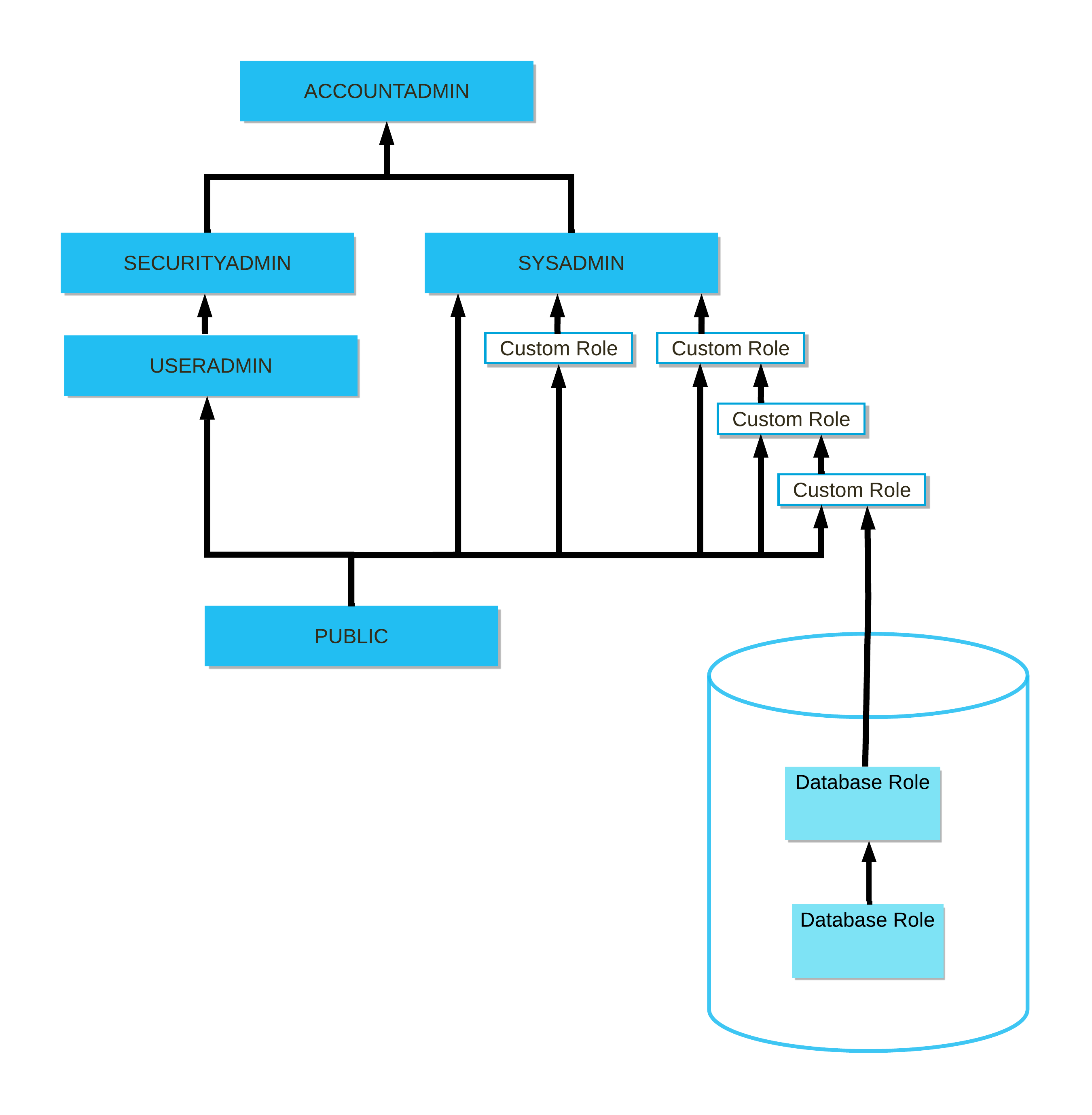
Snowflake System Role Hierarchy
The five system roles form a hierarchy where higher roles inherit all privileges of the roles below them. ACCOUNTADMIN sits at the top and inherits from both SYSADMIN and SECURITYADMIN. SECURITYADMIN inherits from USERADMIN. PUBLIC is granted to every user automatically. Custom roles should be created under SYSADMIN to ensure their objects are manageable by the organisation.
The Five System Roles in Detail
ACCOUNTADMIN is the top-level role in Snowflake. It combines the privileges of SYSADMIN and SECURITYADMIN and adds account-level administration capabilities that no other role has. Responsibilities include: viewing and managing billing and usage data, creating and managing resource monitors, managing account parameters, managing network policies, viewing the SNOWFLAKE database (account usage views), and performing all operations available to SYSADMIN and SECURITYADMIN.
SYSADMIN is granted the ability to create and manage all database objects — databases, schemas, tables, views, stages, file formats, pipes, tasks, warehouses, and sequences. It is the appropriate role for day-to-day object management in most organisations. By convention, custom roles are granted to SYSADMIN so that SYSADMIN can manage objects owned by those custom roles.
SECURITYADMIN manages users, roles, and grants across the account. It inherits all USERADMIN privileges and additionally has the ability to manage grants on any object in the account (it holds the MANAGE GRANTS privilege). Use SECURITYADMIN when you need to grant or revoke privileges on objects without being ACCOUNTADMIN.
USERADMIN can create and manage users and roles only. It does not have the ability to manage grants, create databases, or manage warehouses. It is a limited-privilege role suitable for delegating user provisioning to an IT team without giving them full security administration capabilities.
PUBLIC is automatically granted to every user in the account. By default it has no privileges, but you can grant privileges to PUBLIC to make them available to all users. Objects created by PUBLIC are accessible to all users. In practice, avoid granting meaningful privileges to PUBLIC to maintain least-privilege security.
3. System Role Comparison
System Roles: Capability Comparison
4. Role Hierarchy and Privilege Inheritance
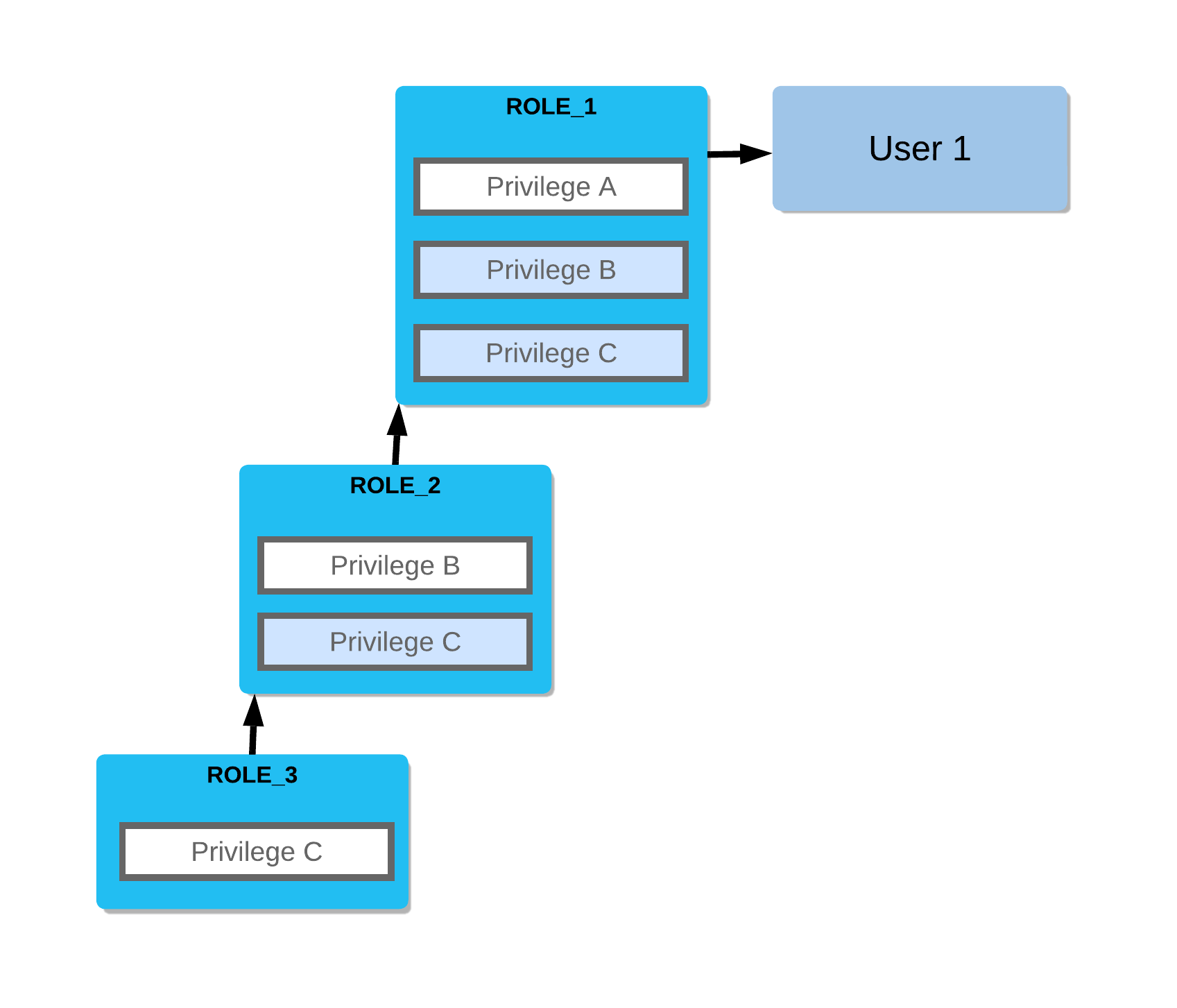
Snowflake’s RBAC model supports role hierarchies — a role can be granted to another role, causing the parent role to inherit all privileges of the child role. This is how Snowflake’s system roles are structured, and it is the recommended pattern for custom roles as well.
Custom Role Hierarchy — Best Practice Pattern
Custom roles should be created beneath SYSADMIN in the role hierarchy. Each functional team gets a custom role (e.g., analytics_role, data_engineer_role). These custom roles own their respective database objects and are granted to users. All custom roles roll up to SYSADMIN, ensuring SYSADMIN can always manage objects owned by those roles. This prevents orphaned objects that only ACCOUNTADMIN can manage.
1-- Step 1: Create custom roles (use SECURITYADMIN or ACCOUNTADMIN)2USE ROLE securityadmin;34CREATE ROLE analytics_role COMMENT = 'Read access to analytics database';5CREATE ROLE data_engineer_role COMMENT = 'Write access to staging and transformation schemas';6CREATE ROLE reporting_role COMMENT = 'Read-only access to reporting views';78-- Step 2: Roll custom roles up to SYSADMIN (best practice)9-- This ensures SYSADMIN can manage objects owned by these roles10GRANT ROLE analytics_role TO ROLE sysadmin;11GRANT ROLE data_engineer_role TO ROLE sysadmin;12GRANT ROLE reporting_role TO ROLE sysadmin;1314-- Step 3: Grant object privileges to the custom roles15USE ROLE sysadmin;1617-- Grant warehouse usage18GRANT USAGE ON WAREHOUSE analytics_wh TO ROLE analytics_role;19GRANT USAGE ON WAREHOUSE analytics_wh TO ROLE data_engineer_role;2021-- Grant database/schema access22GRANT USAGE ON DATABASE analytics_db TO ROLE analytics_role;23GRANT USAGE ON SCHEMA analytics_db.public TO ROLE analytics_role;2425-- Grant table-level privileges26GRANT SELECT ON ALL TABLES IN SCHEMA analytics_db.public TO ROLE analytics_role;27GRANT SELECT, INSERT, UPDATE ON ALL TABLES IN SCHEMA analytics_db.staging TO ROLE data_engineer_role;2829-- Step 4: Assign custom roles to users30USE ROLE securityadmin;3132GRANT ROLE analytics_role TO USER analyst_jane;33GRANT ROLE data_engineer_role TO USER engineer_bob;34GRANT ROLE reporting_role TO USER manager_carol;3536-- Grant a role to another role (inheritance)37-- reporting_role will inherit all privileges of analytics_role38GRANT ROLE analytics_role TO ROLE reporting_role;3940-- Verify the hierarchy41SHOW GRANTS OF ROLE analytics_role; -- Who has this role?42SHOW GRANTS TO ROLE analytics_role; -- What does this role have?The exam tests the difference between these two patterns:
GRANT ROLE child_role TO ROLE parent_role— creates a role hierarchy (parent inherits child’s privileges)GRANT ROLE my_role TO USER jane— assigns a role to a specific user
When rolling custom roles up to SYSADMIN, you always use GRANT ROLE custom_role TO ROLE sysadmin.
5. Creating and Managing Custom Roles
Setting Up a Complete Custom Role for a New Team
Plan the role's scope and naming convention
Before creating any roles, define what database objects the team needs to access, what operations they need to perform (SELECT, INSERT, etc.), and establish a consistent naming convention (e.g., <team>_<access_level>_role).
Create the role as SECURITYADMIN
Switch to SECURITYADMIN to create the role. Include a COMMENT to document its purpose — this is visible in SHOW ROLES and INFORMATION_SCHEMA.APPLICABLE_ROLES.
USE ROLE securityadmin;
CREATE ROLE analytics_read_role
COMMENT = 'Read-only access to analytics_db for the Analytics team';Roll the role up to SYSADMIN
Grant the new role to SYSADMIN. This is the single most important best practice — it ensures SYSADMIN can always manage objects owned by this role, preventing orphaned objects.
GRANT ROLE analytics_read_role TO ROLE sysadmin;Grant object privileges to the role
Switch to SYSADMIN to grant object-level privileges. You need to grant USAGE on the database, USAGE on the schema, and then SELECT on tables. All three are required for a user to query a table.
USE ROLE sysadmin;

-- Database access (required first)
GRANT USAGE ON DATABASE analytics_db TO ROLE analytics_read_role;

-- Schema access (required second)
GRANT USAGE ON SCHEMA analytics_db.public TO ROLE analytics_read_role;

-- Table privileges
GRANT SELECT ON ALL TABLES IN SCHEMA analytics_db.public TO ROLE analytics_read_role;

-- Warehouse access (required to execute queries)
GRANT USAGE ON WAREHOUSE analytics_wh TO ROLE analytics_read_role;Set up future grants so new tables are automatically covered
The privileges granted in step 4 only apply to EXISTING tables. Use GRANT ... ON FUTURE TABLES to automatically grant SELECT on any tables created in this schema in the future.
GRANT SELECT ON FUTURE TABLES IN SCHEMA analytics_db.public
TO ROLE analytics_read_role;Assign the role to users and set as default
Switch back to SECURITYADMIN to assign the role to users. Optionally set it as each user's default role if it is their primary role.
USE ROLE securityadmin;

GRANT ROLE analytics_read_role TO USER analyst_jane;
GRANT ROLE analytics_read_role TO USER analyst_mike;

-- Set as default role for Jane
ALTER USER analyst_jane SET DEFAULT_ROLE = analytics_read_role;6. Default Roles and Role Switching
Every user has a default role — the role that becomes active when they establish a new Snowflake connection. Users can hold multiple roles and switch between them during a session.
1-- Check the current active role in a session2SELECT CURRENT_ROLE(); -- Returns the active role name as a string3SELECT CURRENT_USER(); -- Returns the current user name45-- Switch to a different role mid-session6USE ROLE sysadmin;7USE ROLE analytics_read_role;8USE ROLE accountadmin; -- Only works if the user has been granted ACCOUNTADMIN910-- Set a user's default role (the role active on connection)11ALTER USER analyst_jane SET DEFAULT_ROLE = analytics_read_role;1213-- Check all roles granted to a specific user14SHOW GRANTS TO USER analyst_jane;1516-- Check what privileges a specific role has17SHOW GRANTS TO ROLE analytics_read_role;1819-- Check who has been granted a specific role20SHOW GRANTS OF ROLE analytics_read_role;2122-- Check all grants on a specific object23SHOW GRANTS ON TABLE analytics_db.public.sales;24SHOW GRANTS ON DATABASE analytics_db;25SHOW GRANTS ON WAREHOUSE analytics_wh;CURRENT_ROLE() is a useful context function you can embed in queries for auditing and row-level security policies. For example, you can use it in a row access policy expression: CURRENT_ROLE() = 'ANALYTICS_READ_ROLE' to restrict rows based on the active session role.
7. ACCOUNTADMIN Best Practices
ACCOUNTADMIN is the most powerful role in Snowflake. Misusing it is a significant security risk. Snowflake and the COF-C02 exam both emphasise specific best practices for managing ACCOUNTADMIN access.
ACCOUNTADMIN Security Best Practices
The ACCOUNTADMIN role should be held by a minimum of two users (to avoid account lockout if one user is unavailable), never set as anyone's default role, always protected with multi-factor authentication, and used only for specific administrative tasks — never for day-to-day query work. Operational work should be performed with SYSADMIN, SECURITYADMIN, or a custom role.
The COF-C02 exam frequently tests ACCOUNTADMIN best practices. Memorise all four:
- Assign ACCOUNTADMIN to at least 2 users — if the sole ACCOUNTADMIN user is unavailable (forgotten password, employee departure), the account becomes unmanageable. Snowflake recommends a minimum of 2.
- Never set ACCOUNTADMIN as a user’s DEFAULT_ROLE — it should only be used when specifically needed for administrative tasks. Day-to-day connections should use a less-privileged default role.
- Enable MFA (Multi-Factor Authentication) for all ACCOUNTADMIN users — ACCOUNTADMIN can access billing data, modify account parameters, and perform destructive operations. MFA is a critical security control.
- Restrict ACCOUNTADMIN to the most trusted personnel only — typically limited to senior DBAs, security administrators, or a dedicated service account for automation.
1-- Grant ACCOUNTADMIN to a second administrator (requires existing ACCOUNTADMIN session)2USE ROLE accountadmin;3GRANT ROLE accountadmin TO USER admin_bob;45-- Verify who currently has ACCOUNTADMIN6SHOW GRANTS OF ROLE accountadmin;78-- Verify a user's default role is NOT accountadmin9DESCRIBE USER admin_bob;10-- Check the "default_role" property in the output1112-- Ensure ACCOUNTADMIN is never someone's default role13-- If it is, correct it immediately:14ALTER USER admin_bob SET DEFAULT_ROLE = sysadmin;1516-- Enforce MFA policy (typically via network policy or Snowflake's MFA enrollment)17-- Check MFA status for users (requires ACCOUNTADMIN)18SELECT19 name,20 login_name,21 default_role,22 has_mfa, -- Shows whether MFA is enrolled23 disabled24FROM SNOWFLAKE.ACCOUNT_USAGE.USERS25WHERE default_role = 'ACCOUNTADMIN';26-- If any rows are returned, those users have ACCOUNTADMIN as their default — fix this!8. Future Grants
Future grants are one of the most powerful privilege management tools in Snowflake. They automatically apply a privilege to all objects of a given type that are created in the future within a specified scope (schema or database).
Without future grants, every time a new table, view, or other object is created, a DBA must manually grant privileges to the relevant roles. Future grants eliminate this operational burden.
1-- Grant SELECT on all future tables in a schema2GRANT SELECT ON FUTURE TABLES IN SCHEMA analytics_db.public3 TO ROLE analytics_read_role;45-- Grant SELECT on all future tables in an entire database6GRANT SELECT ON FUTURE TABLES IN DATABASE analytics_db7 TO ROLE analytics_read_role;89-- Grant multiple privileges as future grants10GRANT SELECT, INSERT ON FUTURE TABLES IN SCHEMA analytics_db.staging11 TO ROLE data_engineer_role;1213-- Future grants work for other object types too:14GRANT USAGE ON FUTURE SCHEMAS IN DATABASE analytics_db15 TO ROLE analytics_read_role;1617GRANT SELECT ON FUTURE VIEWS IN SCHEMA analytics_db.public18 TO ROLE reporting_role;1920GRANT ALL ON FUTURE SEQUENCES IN SCHEMA analytics_db.public21 TO ROLE data_engineer_role;2223-- View all future grants in a schema24SHOW FUTURE GRANTS IN SCHEMA analytics_db.public;2526-- View all future grants in a database27SHOW FUTURE GRANTS IN DATABASE analytics_db;2829-- Revoke a future grant30REVOKE SELECT ON FUTURE TABLES IN SCHEMA analytics_db.public31 FROM ROLE analytics_read_role;3233-- IMPORTANT: Future grants do NOT retroactively apply to existing objects.34-- To grant on existing objects + future objects, run both:35GRANT SELECT ON ALL TABLES IN SCHEMA analytics_db.public TO ROLE analytics_read_role;36GRANT SELECT ON FUTURE TABLES IN SCHEMA analytics_db.public TO ROLE analytics_read_role;Future grants apply only to objects created after the grant statement runs. They do NOT apply to objects that already exist at the time the future grant is executed. To cover both existing and future objects, you must run two separate grant statements: one with ON ALL TABLES (for existing) and one with ON FUTURE TABLES (for future). This distinction is a common exam trap.
9. SHOW GRANTS — Auditing Privileges
Snowflake provides multiple SHOW GRANTS variants for auditing who has what access across the account. These are critical for security audits and are tested in the exam.
1-- Show all privileges granted TO a specific role2-- (what can this role do?)3SHOW GRANTS TO ROLE analytics_read_role;45-- Show all roles granted OF a specific role6-- (who holds this role? Users and parent roles)7SHOW GRANTS OF ROLE analytics_read_role;89-- Show all privileges granted TO a specific user10-- (what roles does this user have?)11SHOW GRANTS TO USER analyst_jane;1213-- Show all privileges granted ON a specific object14-- (who has access to this table?)15SHOW GRANTS ON TABLE analytics_db.public.sales;16SHOW GRANTS ON DATABASE analytics_db;17SHOW GRANTS ON SCHEMA analytics_db.public;18SHOW GRANTS ON WAREHOUSE analytics_wh;19SHOW GRANTS ON VIEW analytics_db.public.sales_summary;2021-- Show all future grants in a schema or database22SHOW FUTURE GRANTS IN SCHEMA analytics_db.public;23SHOW FUTURE GRANTS IN DATABASE analytics_db;2425-- Comprehensive audit query using ACCOUNT_USAGE26-- Find all users with direct or inherited ACCOUNTADMIN access27SELECT28 grantee_name,29 granted_on,30 privilege,31 name AS object_name,32 granted_by33FROM SNOWFLAKE.ACCOUNT_USAGE.GRANTS_TO_ROLES34WHERE role = 'ACCOUNTADMIN'35AND deleted_on IS NULL36ORDER BY grantee_name;3738-- Find all objects a specific role can SELECT from39SELECT40 table_catalog,41 table_schema,42 table_name,43 privilege_type44FROM SNOWFLAKE.ACCOUNT_USAGE.OBJECT_PRIVILEGES45WHERE grantee = 'ANALYTICS_READ_ROLE'46AND privilege_type = 'SELECT'47ORDER BY table_catalog, table_schema, table_name;SHOW GRANTS returns the current state of grants — ideal for interactive checks. The SNOWFLAKE.ACCOUNT_USAGE.GRANTS_TO_ROLES and SNOWFLAKE.ACCOUNT_USAGE.OBJECT_PRIVILEGES views provide historical grant data with up to a 45-minute latency, but support full SQL filtering and aggregation. Use ACCOUNT_USAGE views for automated audit reporting and compliance queries.
10. Managed Access Schemas
A managed access schema is a special schema type where only the schema owner (or SECURITYADMIN/ACCOUNTADMIN) can grant privileges on objects within it — not the object owners themselves. This centralises privilege management and prevents privilege escalation.
1-- Create a managed access schema2CREATE SCHEMA analytics_db.secure_data3 WITH MANAGED ACCESS;45-- In a managed access schema:6-- Object OWNERS cannot grant privileges on their own objects7-- Only the SCHEMA OWNER (or SECURITYADMIN/ACCOUNTADMIN) can grant privileges89-- This prevents the situation where a developer creates a table10-- and then grants SELECT on it to unauthorised users1112-- Convert an existing schema to managed access13ALTER SCHEMA analytics_db.public ENABLE MANAGED ACCESS;1415-- Revert to normal (non-managed) access16ALTER SCHEMA analytics_db.public DISABLE MANAGED ACCESS;1718-- Check if a schema uses managed access19SHOW SCHEMAS IN DATABASE analytics_db;20-- Look at the "managed_access" column in the outputKey Terms
User & Role Management Key Terms
Role-Based Access Control
The access control model used by Snowflake. Privileges are granted to roles, roles are granted to users (or other roles). Users inherit privileges from all roles in their role hierarchy.
ACCOUNTADMIN
The highest-privilege system role in Snowflake. Inherits SYSADMIN and SECURITYADMIN privileges and adds account-level administration: billing, usage data, network policies, resource monitors, account parameters.
SYSADMIN
System role responsible for creating and managing database objects (databases, schemas, tables, warehouses, views, stages, etc.). Custom roles should be granted to SYSADMIN to allow it to manage their objects.
SECURITYADMIN
System role responsible for managing users, roles, and grants. Holds the MANAGE GRANTS privilege, allowing it to grant/revoke privileges on any object in the account.
USERADMIN
System role with the ability to create and manage users and roles only. Cannot manage grants, databases, or warehouses. A subset of SECURITYADMIN's capabilities.
PUBLIC
A system role automatically granted to every user in the account. Has no default privileges. Granting privileges to PUBLIC makes them available to all users — use with caution.
Default role
The role that becomes active when a user establishes a new session. Set with ALTER USER ... SET DEFAULT_ROLE. If not set, defaults to PUBLIC.
Future grant
A privilege grant that automatically applies to all objects of a specified type created in the future within a schema or database. Does not retroactively apply to existing objects.
Managed access schema
A schema type where only the schema owner (or SECURITYADMIN/ACCOUNTADMIN) can grant privileges on objects within it, centralising access control and preventing object owners from sharing their own objects.
Role hierarchy
The structure created when a role is granted to another role, causing the parent role to inherit all privileges of the child role. ACCOUNTADMIN → SYSADMIN → custom roles is the recommended pattern.
LOGIN_NAME
The credential a user types at the Snowflake login screen. Can be set independently from the user's SQL identifier name — for example, set to an email address while keeping the SQL name shorter.
MUST_CHANGE_PASSWORD
A user property that forces the user to set a new password the first time they log in. Used when creating users with a temporary initial password.
Flashcard Review
What are the five Snowflake system roles and their primary responsibilities?
1. ACCOUNTADMIN — highest privilege, manages billing, account settings, inherits SYSADMIN + SECURITYADMIN. 2. SYSADMIN — creates and manages databases, schemas, tables, warehouses. 3. SECURITYADMIN — manages users, roles, and grants (holds MANAGE GRANTS). 4. USERADMIN — creates users and roles only (no grant management). 5. PUBLIC — automatically granted to all users, no default privileges.
What are the four ACCOUNTADMIN best practices that appear on the COF-C02 exam?
1. Assign ACCOUNTADMIN to a minimum of 2 users to prevent lockout. 2. Never set ACCOUNTADMIN as anyone's DEFAULT_ROLE — use it only when needed for admin tasks. 3. Enable MFA (Multi-Factor Authentication) for all ACCOUNTADMIN users. 4. Restrict ACCOUNTADMIN to the most trusted staff only — do not use it for day-to-day queries.
What is the difference between GRANT ROLE child TO ROLE parent versus GRANT ROLE my_role TO USER jane?
GRANT ROLE child TO ROLE parent creates a role hierarchy — parent inherits all of child's privileges. GRANT ROLE my_role TO USER jane assigns a role directly to a user, giving them access to that role's privileges. Both are needed: custom roles must be granted to SYSADMIN (role-to-role) AND granted to users (role-to-user).
Are future grants retroactive? What must you do to cover both existing and future objects?
No. Future grants (GRANT SELECT ON FUTURE TABLES IN SCHEMA ...) only apply to objects created AFTER the grant is executed. They do NOT apply to tables that already exist. To cover both, run two statements: GRANT SELECT ON ALL TABLES IN SCHEMA ... (for existing objects) AND GRANT SELECT ON FUTURE TABLES IN SCHEMA ... (for new objects).
What is the difference between LOGIN_NAME and the user name in Snowflake?
The user name is the SQL identifier used in GRANT/ALTER/DROP USER statements (e.g., analyst_jane). The LOGIN_NAME is the credential the user types at the Snowflake login screen — it can be set to an email address (e.g., jane.smith@company.com) while the SQL identifier remains shorter. They default to the same value if LOGIN_NAME is not specified at CREATE USER.
Practice Quizzes
A Snowflake account has only one user assigned to the ACCOUNTADMIN role. That user suddenly becomes unavailable. What risk does this create and what is the best practice to prevent it?
A data engineer creates a new table in the analytics_db.public schema. The analytics_read_role was previously granted SELECT on ALL TABLES in that schema, but users with analytics_read_role report they cannot query the new table. What is the MOST likely cause?
Which of the following SQL statements creates a role hierarchy where the analytics_role inherits all privileges of the reporting_role?
Cheat Sheet
User & Role Management — COF-C02 Quick Reference
User Creation Properties
MandatoryPASSWORDLOGIN_NAMEDEFAULT_ROLEDEFAULT_WAREHOUSEDEFAULT_NAMESPACEMUST_CHANGE_PASSWORDDISABLEDSystem Roles Summary
ACCOUNTADMINSYSADMINSECURITYADMINUSERADMINPUBLICKey GRANT Patterns
Role to userRole to roleObject privilegeFuture grantShow grantsAudit Commands
List all usersUser detailsRole privilegesRole holdersObject accessFuture grantsSwitch roleCurrent roleSummary
Snowflake’s access control is built on a role-based model where privileges flow from objects to roles to users. The five system roles — ACCOUNTADMIN, SYSADMIN, SECURITYADMIN, USERADMIN, and PUBLIC — each have specific, non-overlapping responsibilities that the COF-C02 exam tests in detail.
For the exam, internalise these key principles:
- ACCOUNTADMIN is the top of the hierarchy — minimum 2 users, never a default role, always MFA-protected
- SYSADMIN creates objects — custom roles must roll up to SYSADMIN to prevent orphaned objects
- SECURITYADMIN manages access — it holds MANAGE GRANTS and inherits USERADMIN
- USERADMIN creates users and roles only — no grant management
- Future grants are essential but not retroactive — always pair with
ON ALLfor existing objects SHOW GRANTS TO ROLE rshows what a role can do;SHOW GRANTS OF ROLE rshows who holds it- Every user needs: USAGE on warehouse + USAGE on database + USAGE on schema + object privilege (e.g. SELECT) to successfully query a table
- Custom roles should be created by SECURITYADMIN and then granted to SYSADMIN for object management
Reinforce what you just read
Study the All flashcards with spaced repetition to lock it in.