Network Policies & Security
Snowflake provides a comprehensive layered security model. Beyond Role-Based Access Control (RBAC), Snowflake gives administrators control over which networks can connect to an account, how traffic is routed, how data is encrypted, and how users authenticate. This module covers all network and security features tested in the COF-C02 exam.
The Snowflake Security Model at a Glance
Snowflake’s security architecture operates at several distinct layers:
| Layer | Feature | Edition Requirement |
|---|---|---|
| Network | Network Policies (IP allowlist) | All editions |
| Network | Private Link (AWS/Azure/GCP) | Business Critical+ |
| Authentication | Multi-Factor Authentication (MFA) | All editions |
| Authentication | SSO via SAML / OAuth | All editions |
| Encryption | TLS 1.2+ in transit | All editions (automatic) |
| Encryption | AES-256 at rest | All editions (automatic) |
| Encryption | Periodic Rekeying | Enterprise+ |
| Encryption | Tri-Secret Secure (customer-managed keys) | Business Critical+ |
Key Terms — Network Security
Network Policy
A Snowflake object that restricts account or user access to specified IP address ranges. Consists of an ALLOWED_IP_LIST and an optional BLOCKED_IP_LIST.
CIDR Notation
Classless Inter-Domain Routing notation (e.g., 192.168.1.0/24) used to specify a range of IP addresses in network policy rules.
PrivateLink
A cloud provider mechanism (AWS PrivateLink, Azure Private Link, GCP Private Service Connect) that routes traffic between your VPC/VNet and Snowflake without traversing the public internet.
Tri-Secret Secure
Business Critical feature that encrypts Snowflake data using a composite key — one half held by Snowflake, the other held by the customer in their own KMS. Neither party alone can decrypt the data.
MFA
A second authentication factor beyond username and password, implemented via Duo Security integration in Snowflake. Can be enforced at the account or user level.
TLS
The cryptographic protocol used to encrypt all data transmitted between Snowflake clients and the Snowflake service. Snowflake requires TLS 1.2 or higher.
AES-256
Advanced Encryption Standard with 256-bit keys, used by Snowflake to encrypt all data at rest in cloud storage.
Security Integration
A Snowflake object created with CREATE SECURITY INTEGRATION that configures external authentication providers such as OAuth or SAML SSO.
Periodic Rekeying
An Enterprise+ feature where Snowflake automatically re-encrypts stored data with new encryption keys on a periodic basis, limiting the exposure window if a key is ever compromised.
Network Policies
A network policy controls which IP addresses can connect to your Snowflake account. It is the first line of defence — checked even before authentication is attempted.
How Network Policies Work
Network Policy Enforcement Flow
Flowchart showing what happens when a client attempts to connect to Snowflake. Step 1: Client sends connection request with its IP address. Step 2: Snowflake checks if a user-level network policy is applied to this user. If yes, it evaluates that policy. If no, it checks the account-level network policy. Step 3: The IP is checked against the BLOCKED_IP_LIST first — if found, the connection is refused. Step 4: The IP is checked against the ALLOWED_IP_LIST. If found (or if the list is empty), the connection proceeds to authentication. If not found, the connection is refused. Step 5: Authentication proceeds (username/password, MFA, SSO, etc.).
Rules for Network Policies
- If ALLOWED_IP_LIST is empty, all IP addresses are allowed (no restriction).
- If an IP appears in both ALLOWED_IP_LIST and BLOCKED_IP_LIST, the BLOCKED_IP_LIST takes precedence — the IP is denied.
- User-level network policies override account-level network policies for that specific user.
- Only ACCOUNTADMIN (or a role with the ATTACH POLICY privilege) can apply a network policy.
If an IP address appears in both the ALLOWED_IP_LIST and the BLOCKED_IP_LIST of the same network policy, the connection is BLOCKED. The block list always wins.
This is a commonly tested edge case in the COF-C02 exam.
CREATE NETWORK POLICY Syntax
1-- Create a network policy with an allowed IP range and a blocked IP2CREATE NETWORK POLICY corporate_policy3ALLOWED_IP_LIST = (4 '203.0.113.0/24', -- Corporate office CIDR range5 '198.51.100.10', -- Specific VPN endpoint IP6 '10.0.0.0/8' -- Internal network range7)8BLOCKED_IP_LIST = (9 '203.0.113.100' -- Blocked specific host within allowed range10);1112-- View all network policies in the account13SHOW NETWORK POLICIES;1415-- Inspect the details of a specific policy16DESCRIBE NETWORK POLICY corporate_policy;1718-- Modify an existing network policy19ALTER NETWORK POLICY corporate_policy20SET ALLOWED_IP_LIST = (21 '203.0.113.0/24',22 '198.51.100.10',23 '10.0.0.0/8',24 '172.16.0.0/12' -- Add new range for branch offices25);2627-- Drop a network policy (fails if currently applied)28DROP NETWORK POLICY corporate_policy;Applying Network Policies
Network policies can be applied at two levels: account-wide or to a specific user.
1-- Apply a network policy at the ACCOUNT level2-- All users connecting to this account are subject to this policy3-- (unless they have a user-level policy that overrides it)4ALTER ACCOUNT SET NETWORK_POLICY = corporate_policy;56-- Remove the account-level network policy7ALTER ACCOUNT UNSET NETWORK_POLICY;89-- Apply a network policy to a SPECIFIC USER10-- This overrides the account-level policy for this user only11ALTER USER alice SET NETWORK_POLICY = developer_policy;1213-- Remove the user-level network policy14-- User then falls back to the account-level policy15ALTER USER alice UNSET NETWORK_POLICY;1617-- View what policy is applied to a user18DESCRIBE USER alice;1920-- View the current account-level network policy21SHOW PARAMETERS LIKE 'NETWORK_POLICY' IN ACCOUNT;If a Snowflake account has an account-level network policy and a user also has a user-level network policy, which takes precedence?
The USER-LEVEL network policy takes precedence for that specific user. All other users without a user-level policy remain subject to the account-level policy.
A Snowflake account has a network policy with ALLOWED_IP_LIST = ('10.0.0.0/8') and BLOCKED_IP_LIST = ('10.0.0.50'). A user attempts to connect from IP 10.0.0.50. What happens?
SHOW and DESCRIBE Commands for Network Policies
1-- List all network policies defined in the account2SHOW NETWORK POLICIES;34-- Describe a specific policy to see its IP lists5DESCRIBE NETWORK POLICY corporate_policy;67-- See which network policy is active at account level8SHOW PARAMETERS LIKE '%NETWORK%' IN ACCOUNT;910-- See which network policy a specific user has assigned11SHOW PARAMETERS LIKE '%NETWORK%' IN USER alice;Private Connectivity (Business Critical+)
For organisations with strict security requirements, Snowflake supports private connectivity that routes traffic entirely within the cloud provider’s network — bypassing the public internet.
Private Link vs Public Internet Connectivity to Snowflake
Side-by-side diagram comparing two connectivity models. On the left: Standard connectivity. Client in a corporate VPC sends traffic over the public internet to Snowflake's public endpoint. Traffic is encrypted with TLS but traverses multiple public network hops. On the right: Private Link connectivity. Client in a corporate VPC connects to a VPC endpoint (AWS) or Private Endpoint (Azure) or Service Attachment (GCP) within their own cloud environment. Traffic travels entirely within the cloud provider's internal backbone network and arrives at Snowflake's private endpoint without ever touching the public internet. Both paths encrypt data in transit, but Private Link eliminates public internet exposure entirely.
| Provider | Technology | Snowflake Support |
|---|---|---|
| AWS | AWS PrivateLink | Yes (Business Critical+) |
| Azure | Azure Private Link | Yes (Business Critical+) |
| GCP | GCP Private Service Connect | Yes (Business Critical+) |
Private connectivity (AWS PrivateLink, Azure Private Link, GCP Private Service Connect) requires Business Critical edition or higher. This is frequently tested. Standard, Premier, and Enterprise editions do not support private link connectivity.
Which Snowflake editions support AWS PrivateLink for private connectivity?
Business Critical edition and above. Private connectivity is not available on Standard or Enterprise editions.
Tri-Secret Secure (Business Critical+)
Tri-Secret Secure is an advanced encryption option where customer-managed keys are combined with Snowflake-managed keys to create a composite encryption key. Neither Snowflake nor the customer alone can decrypt the data.
Tri-Secret Secure Key Hierarchy
Diagram illustrating the Tri-Secret Secure key model. At the top is the composite encryption key, which is derived from two components: 1) The Snowflake Master Key, held and managed by Snowflake internally. 2) The Customer Master Key, held by the customer in their cloud KMS (AWS KMS, Azure Key Vault, or GCP Cloud KMS). The composite key is created by combining both components at query time. Data encrypted with this composite key cannot be decrypted by Snowflake alone (they only have half the key) and cannot be decrypted by the customer alone (they only have the other half). To revoke Snowflake's access to data, the customer simply rotates or deletes their key in the KMS — Snowflake can no longer form the composite key and all data becomes inaccessible.
Supported KMS Providers for Tri-Secret Secure
| Cloud Provider | KMS Service |
|---|---|
| AWS | AWS Key Management Service (KMS) |
| Azure | Azure Key Vault |
| GCP | Google Cloud Key Management Service |
Because the composite key requires the customer’s key to function, the customer can revoke Snowflake’s ability to access their data at any time simply by rotating or disabling their key in their KMS. This provides ultimate data sovereignty — even Snowflake cannot access your data without your key.
This is a Business Critical+ feature only.
What is Tri-Secret Secure and which Snowflake edition is required?
Tri-Secret Secure uses a composite encryption key made up of a Snowflake-managed key AND a customer-managed key stored in their cloud KMS (AWS KMS, Azure Key Vault, or GCP KMS). Neither party alone can decrypt the data. It requires Business Critical edition or above.
Encryption — In Transit and At Rest
In Transit
- All communication between Snowflake clients and the Snowflake service is encrypted using TLS 1.2 or higher.
- This applies to the Snowflake web UI, SnowSQL CLI, ODBC/JDBC drivers, Python connector, and all other client interfaces.
- Encryption in transit is automatic — it cannot be disabled.
At Rest
- All data stored in Snowflake’s cloud storage layer (S3, Azure Blob, GCS) is encrypted using AES-256.
- Encryption at rest is automatic — no configuration is required.
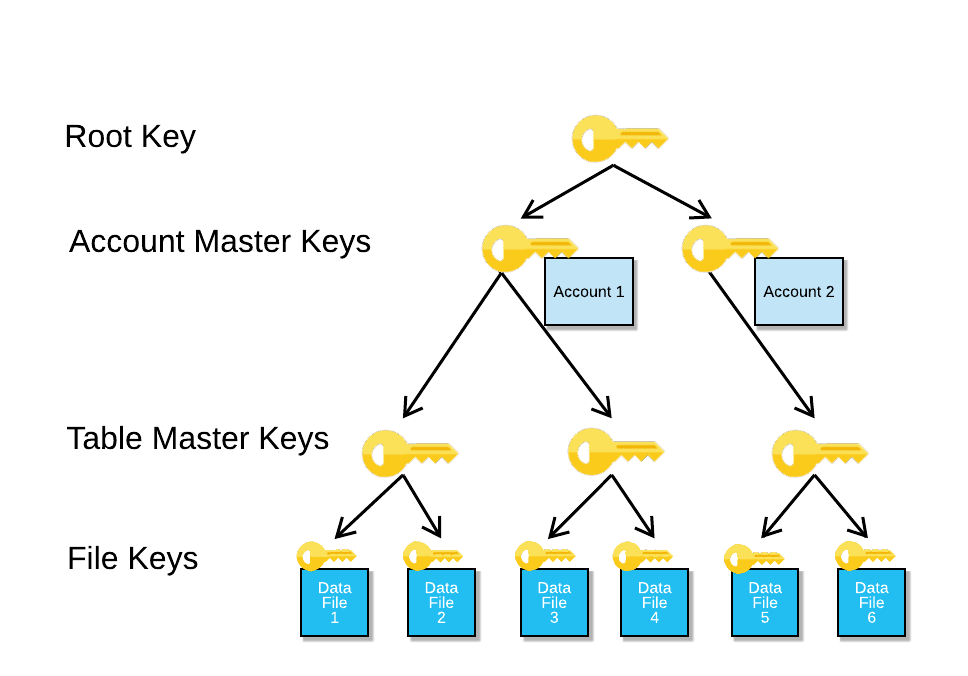
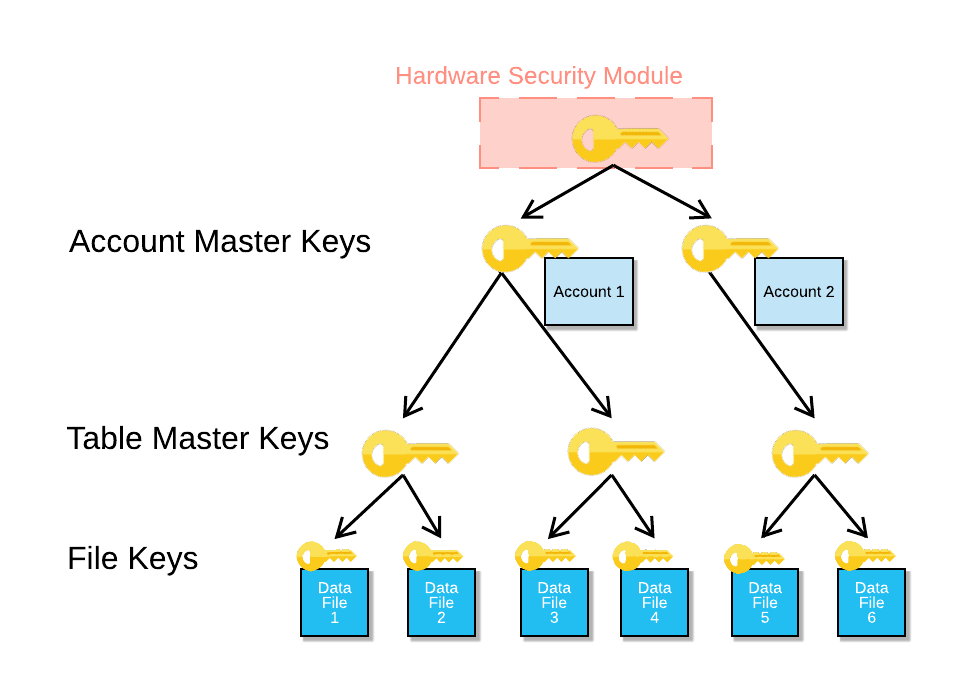
- Snowflake uses a hierarchical key model: file keys encrypt data files, column master keys protect file keys, account master keys protect column master keys.
1-- Check encryption settings at the account level2SHOW PARAMETERS LIKE '%ENCRYPT%' IN ACCOUNT;34-- View data retention settings (related to security posture)5SHOW PARAMETERS LIKE '%DATA_RETENTION%' IN ACCOUNT;67-- Check if periodic rekeying is enabled (Enterprise+)8SHOW PARAMETERS LIKE '%REKEY%' IN ACCOUNT;Periodic Rekeying (Enterprise+)
Periodic rekeying is a feature where Snowflake automatically re-encrypts stored data with new encryption keys on a scheduled basis. This limits the exposure window if an encryption key is ever compromised.
| Edition | Periodic Rekeying |
|---|---|
| Standard | Not available |
| Enterprise | Available |
| Business Critical | Available |
| Virtual Private Snowflake | Available |
Even with strong AES-256 encryption, if an encryption key is somehow compromised, all data encrypted with that key is at risk indefinitely. Periodic rekeying limits the blast radius — data older than the rekeying period is already protected by a new key, so a compromised key only exposes data from a limited recent window.
Multi-Factor Authentication (MFA)
Snowflake integrates with Duo Security to provide MFA for user accounts. MFA adds a second authentication factor beyond username and password.
MFA Enrolment and Enforcement
1-- Check MFA status for a user2DESCRIBE USER alice;3-- Look for ext_authn_duo in the output45-- As ACCOUNTADMIN, require MFA for a specific user6-- (User must have already enrolled via the Snowflake UI or SnowSQL)7ALTER USER alice SET MINS_TO_BYPASS_MFA = 0;89-- Allow MFA token caching for a session (reduces repeated prompts)10-- Set the number of minutes MFA tokens can be cached per session11ALTER USER alice SET MINS_TO_BYPASS_MFA = 60;1213-- Disable MFA token caching (prompt on every session)14ALTER USER alice SET MINS_TO_BYPASS_MFA = 0;1516-- Check MFA-related parameters across the account17SHOW PARAMETERS LIKE '%MFA%' IN ACCOUNT;MFA Token Caching
MFA token caching reduces the frequency of MFA prompts. When enabled, a user authenticates with MFA once and their token is cached for a configurable number of minutes. Within that window, subsequent connections do not require a new MFA prompt.
MFA Token Caching: Enabled vs Disabled
Which third-party service does Snowflake integrate with to provide Multi-Factor Authentication?
Duo Security. Snowflake's MFA is implemented through integration with Duo Security, which provides the second authentication factor via push notifications, SMS, or TOTP codes.
Setting Up Security Integrations
Security integrations configure external authentication providers for OAuth and SAML-based Single Sign-On (SSO).
1-- Create a security integration for Okta SAML SSO2CREATE SECURITY INTEGRATION okta_sso3TYPE = SAML24ENABLED = TRUE5SAML2_ISSUER = 'http://www.okta.com/exkXXXXXXXXXXX'6SAML2_SSO_URL = 'https://mycompany.okta.com/app/snowflake/exkXXX/sso/saml'7SAML2_PROVIDER = 'OKTA'8SAML2_X509_CERT = 'MIIDnjCCAoagAwIBAgIGAXXXXXXX...'9SAML2_SP_INITIATED_LOGIN_PAGE_LABEL = 'Okta SSO'10SAML2_ENABLE_SP_INITIATED = TRUE;1112-- Create a security integration for OAuth (e.g., for Tableau)13CREATE SECURITY INTEGRATION tableau_oauth14TYPE = OAUTH15ENABLED = TRUE16OAUTH_CLIENT = TABLEAU_DESKTOP;1718-- Create a custom OAuth integration for a partner application19CREATE SECURITY INTEGRATION my_app_oauth20TYPE = OAUTH21ENABLED = TRUE22OAUTH_CLIENT = CUSTOM23OAUTH_CLIENT_TYPE = 'CONFIDENTIAL'24OAUTH_REDIRECT_URI = 'https://myapp.example.com/oauth/callback'25OAUTH_ISSUE_REFRESH_TOKENS = TRUE26OAUTH_REFRESH_TOKEN_VALIDITY = 86400;2728-- View all security integrations29SHOW INTEGRATIONS;3031-- Describe a specific security integration32DESCRIBE INTEGRATION okta_sso;Security integrations are account-level objects created with CREATE SECURITY INTEGRATION. They are used for:
- SAML2: SSO with identity providers like Okta, Azure AD, or ADFS.
- OAUTH: Delegated authorisation for partner tools (Tableau, Power BI, etc.) or custom applications.
Only ACCOUNTADMIN can create security integrations.
Network Security Setup — Step-by-Step
Implementing a Complete Network Security Configuration
Plan your IP ranges
Before creating network policies, collect all IP addresses and CIDR ranges that should have access: corporate office ranges, VPN endpoints, cloud service IPs, and developer home IPs if needed. Document any IPs that should be explicitly blocked.
-- Document your IP ranges first (no SQL needed here)
-- Example ranges:
-- Corporate HQ: 203.0.113.0/24
-- VPN endpoint: 198.51.100.10
-- Internal network: 10.0.0.0/8
-- Blocked IP (compromised device): 203.0.113.100Create the account-level network policy
Create a network policy covering all legitimate access sources. Use CIDR notation for ranges and individual IPs for specific hosts.
CREATE NETWORK POLICY corporate_access_policy
ALLOWED_IP_LIST = (
  '203.0.113.0/24',
  '198.51.100.10',
  '10.0.0.0/8'
)
BLOCKED_IP_LIST = (
  '203.0.113.100'
);

-- Verify the policy was created correctly
DESCRIBE NETWORK POLICY corporate_access_policy;Apply the policy at account level
Apply the network policy to the entire Snowflake account. All users will now be subject to this policy unless they have a user-level override.
-- Apply account-level network policy
ALTER ACCOUNT SET NETWORK_POLICY = corporate_access_policy;

-- Confirm the policy is applied
SHOW PARAMETERS LIKE 'NETWORK_POLICY' IN ACCOUNT;Create user-specific policies where needed
For developers or service accounts that connect from different networks (e.g., home office, cloud automation), create separate policies and apply them at the user level.
-- Policy for developers who work remotely
CREATE NETWORK POLICY developer_policy
ALLOWED_IP_LIST = (
  '203.0.113.0/24',   -- Office
  '0.0.0.0/0'          -- Allow any IP (for remote work)
);

-- Apply to specific developer users
ALTER USER alice SET NETWORK_POLICY = developer_policy;
ALTER USER bob SET NETWORK_POLICY = developer_policy;

-- Service accounts: create tightly scoped policies
CREATE NETWORK POLICY etl_service_policy
ALLOWED_IP_LIST = ('10.5.0.10', '10.5.0.11');

ALTER USER etl_service_account SET NETWORK_POLICY = etl_service_policy;Enable MFA for administrative users
Require MFA for all users with elevated privileges (ACCOUNTADMIN, SECURITYADMIN, SYSADMIN). Users must first self-enrol via the Snowflake UI.
-- After user has enrolled in MFA via Snowflake UI,
-- set token caching to 0 for admin accounts (always prompt)
ALTER USER admin_alice SET MINS_TO_BYPASS_MFA = 0;

-- For regular analysts, allow 60-minute MFA token caching
ALTER USER analyst_bob SET MINS_TO_BYPASS_MFA = 60;

-- Verify MFA configuration for a user
DESCRIBE USER admin_alice;Configure SSO via Security Integration (optional)
If your organisation uses an identity provider, configure a SAML2 or OAuth security integration to centralise authentication management.
-- Example: Okta SAML integration
CREATE SECURITY INTEGRATION okta_integration
TYPE = SAML2
ENABLED = TRUE
SAML2_ISSUER = 'http://www.okta.com/exkYOUR_APP_ID'
SAML2_SSO_URL = 'https://yourcompany.okta.com/app/snowflake/exkYOUR_APP_ID/sso/saml'
SAML2_PROVIDER = 'OKTA'
SAML2_X509_CERT = 'YOUR_CERTIFICATE_HERE'
SAML2_ENABLE_SP_INITIATED = TRUE;

SHOW INTEGRATIONS;Quiz — Network Policy Precedence
User 'dave' has a user-level network policy applied that allows IPs 192.168.0.0/16. The account-level network policy allows 10.0.0.0/8. Dave connects from IP 192.168.1.50. What is the result?
Quiz — Private Link and Encryption
A company requires that all traffic between their AWS VPC and their Snowflake account never traverse the public internet. They also require customer-managed encryption keys. Which Snowflake edition and features are required?
Comparing Snowflake Security Editions
Security Features by Snowflake Edition
Encryption Architecture in Detail
Snowflake uses a hierarchical key model to manage encryption:
Account Master Key (AMK)
  └── Table Master Keys (TMK)
        └── File Keys (FK)
└── Encrypted data files (in S3 / Azure Blob / GCS)- File Keys (FK) are unique per micro-partition data file. They encrypt the actual data.
- Table Master Keys (TMK) encrypt the file keys. One per table.
- Account Master Key (AMK) encrypts the table master keys. One per account.
- With Tri-Secret Secure, the AMK itself is a composite of Snowflake’s key and the customer’s KMS key.
1-- View account-level security parameters including encryption2SHOW PARAMETERS IN ACCOUNT;34-- Check if SSMS (server-side encryption at rest) is configured5SHOW PARAMETERS LIKE '%ENCRYPTION%' IN ACCOUNT;67-- Periodic rekeying configuration8-- (Managed by Snowflake for Enterprise+; no explicit SQL to enable)9-- Check if rekeying is active:10SHOW PARAMETERS LIKE '%REKEY%' IN ACCOUNT;1112-- Key pair authentication (alternative to password + MFA for programmatic access)13-- Generate RSA key pair outside Snowflake, then register the public key:14ALTER USER service_account15SET RSA_PUBLIC_KEY = 'MIIBIjANBgkqhkiG9w0BAQEFAAOCAQ8AMIIBCgKC...';1617-- Verify key pair is registered18DESCRIBE USER service_account;For service accounts used by ETL tools, Airflow, dbt, or custom applications, Snowflake recommends RSA key-pair authentication instead of passwords. Key-pair auth does not require MFA prompts and is more secure than password-based auth for automated processes.
Key pairs are configured with ALTER USER ... SET RSA_PUBLIC_KEY = '...'. The private key is stored securely by the client application.
Network Security Cheat Sheet
Network Security Quick Reference — COF-C02
Network Policy Basics
CREATE NETWORK POLICYApply to accountApply to userRemove from accountRemove from userBlock list precedenceSHOW / DESCRIBE Commands
SHOW NETWORK POLICIESDESCRIBE NETWORK POLICY nameSHOW PARAMETERS LIKE 'NETWORK_POLICY' IN ACCOUNTSHOW PARAMETERS LIKE 'NETWORK_POLICY' IN USER nameSHOW INTEGRATIONSDESCRIBE INTEGRATION namePrivate Connectivity
AWS PrivateLinkAzure Private LinkGCP Private Service ConnectBenefitEncryption
In transitAt restPeriodic rekeyingTri-Secret SecureKMS supportAuthentication
MFA providerMINS_TO_BYPASS_MFASSOKey-pair authSecurity Integration type SAML2Security Integration type OAUTHEdition Requirements
Network PoliciesMFAPeriodic RekeyingPrivateLink (any cloud)Tri-Secret SecureHIPAA / PCI-DSS complianceSummary
Network security in Snowflake is a layered model. For the COF-C02 exam, remember these key points:
- Network policies restrict access by IP address. ALLOWED_IP_LIST and BLOCKED_IP_LIST are evaluated on every connection attempt — before authentication.
- The block list always wins: an IP in both lists is blocked.
- User-level policies override account-level policies for that specific user.
- Private connectivity (PrivateLink / Private Service Connect) requires Business Critical edition and keeps traffic entirely within the cloud provider’s network.
- Tri-Secret Secure requires Business Critical edition and uses a composite key where neither Snowflake nor the customer alone can decrypt data.
- All editions include automatic AES-256 encryption at rest and TLS 1.2+ in transit — no configuration needed.
- Periodic rekeying is an Enterprise+ feature that automatically re-encrypts data with new keys.
- MFA uses Duo Security. Token caching (
MINS_TO_BYPASS_MFA) reduces prompts for interactive users. - Security integrations enable SAML2 SSO and OAuth for partner tools and custom applications.
- Key-pair authentication is the recommended approach for service accounts and programmatic access.
Reinforce what you just read
Study the All flashcards with spaced repetition to lock it in.