Streams & Tasks
Snowflake Streams and Tasks are the backbone of automated, incremental data pipelines. Streams implement Change Data Capture (CDC), recording exactly what changed in a table. Tasks schedule SQL or Snowpark logic to process those changes on a defined cadence. Together they form a serverless ELT pipeline inside Snowflake — no external orchestrators required.
Key Terms — Streams & Tasks
Stream
A Snowflake object that records INSERT, UPDATE, and DELETE changes made to a source table since the last time the stream was consumed.
Change Data Capture
A design pattern that tracks row-level changes to a table so downstream systems can process only what changed, not the full dataset.
Stream Offset
A pointer (timestamp/transaction ID) stored inside a stream. When a DML statement reads the stream, the offset advances to the current point in time.
Stream Staleness
A stream becomes stale when it has not been consumed within the source table's Data Retention Period. A stale stream must be recreated.
METADATA$ACTION
A system column in every stream row indicating whether the change was an INSERT or a DELETE. An UPDATE appears as a DELETE + INSERT pair.
METADATA$ISUPDATE
A boolean system column that is TRUE when the DELETE row is part of an UPDATE operation (paired with an INSERT for the new value).
METADATA$ROW_ID
A stable, unique identifier for each changed row across multiple stream reads, allowing reliable row-level tracking.
Task
A Snowflake object that executes a SQL statement or Snowpark procedure on a user-defined schedule or as a dependent step in a DAG.
DAG
A tree of dependent tasks in Snowflake. A root task runs on a schedule; child tasks run after their parent completes. No circular dependencies allowed.
Serverless Task
A task that omits the WAREHOUSE clause and instead uses Snowflake-managed compute sized automatically to the workload.
Standard Stream
The default stream type. Captures INSERT, UPDATE, and DELETE changes. An UPDATE is represented as a DELETE of the old row plus an INSERT of the new row.
Append-Only Stream
A stream type that captures only INSERT operations. More efficient for high-volume append workloads such as logging or event tables.
Insert-Only Stream
A stream type used exclusively on External Tables. Captures INSERT events only — representing newly loaded files.
1. What is a Stream?
A Snowflake Stream is a CDC object attached to a source table (or external table, or certain views). It does not store a copy of the data — it stores an offset: a pointer to the last transaction that was consumed. Every time you query the stream inside a DML statement, Snowflake computes the delta between the stored offset and the current state of the table, returns those changed rows, and then advances the offset.
This design means streams are lightweight: no data is duplicated, and the cost of maintaining a stream is negligible. What you pay for is the compute used when you actually read the stream.
A stream stores an offset, not a copy of data. Querying a stream with a plain SELECT does not advance the offset — only a DML statement (INSERT, UPDATE, MERGE, or DELETE) that reads the stream advances it. This is one of the most-tested stream concepts on the COF-C02 exam.
2. Stream Mechanics — The Offset Model
When you create a stream on a table, Snowflake records the current transaction timestamp as the initial offset. From that point forward, any DML applied to the source table is tracked. The stream becomes a view over those changes.
Source Table: ORDERS
    ↓  (INSERT row 101)
    ↓  (UPDATE row 99)
    ↓  (DELETE row 55)

Stream: ORDERS_STREAM
    ├── offset = T0  ← stream created here
    └── delta since T0:
          ROW 101  │ METADATA$ACTION = INSERT │ METADATA$ISUPDATE = FALSE
          ROW 99   │ METADATA$ACTION = DELETE │ METADATA$ISUPDATE = TRUE   (old value)
          ROW 99   │ METADATA$ACTION = INSERT │ METADATA$ISUPDATE = TRUE   (new value)
          ROW 55   │ METADATA$ACTION = DELETE │ METADATA$ISUPDATE = FALSE
Reading the stream inside an INSERT…SELECT advances the offset to the current moment, clearing the visible delta for the next read.
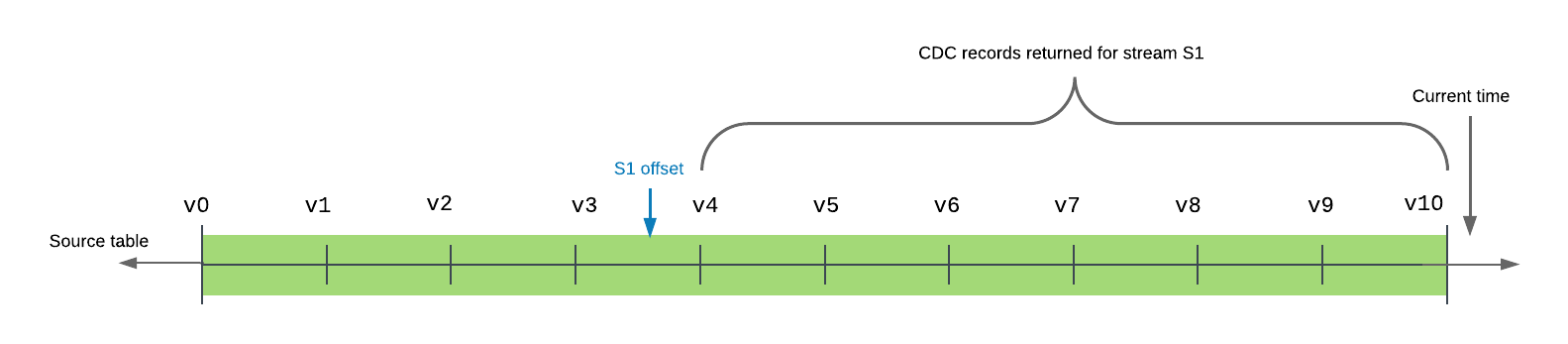
Stream Offset Lifecycle
A stream is created at T0. Changes accumulate. A DML read at T1 consumes the delta and advances the offset. New changes accumulate from T1 onwards.
3. Stream Types
Snowflake offers three stream types, each suited to different source objects and workloads.
Stream Types Comparison
Insert-Only Streams are a third type, used exclusively on External Tables. Because external files can only be added (not modified via Snowflake DML), the insert-only stream captures newly loaded files registered by Snowpipe or directory listing refresh.
1-- Standard stream (default) — tracks INSERT, UPDATE, DELETE2CREATE OR REPLACE STREAM orders_stream3ON TABLE orders;45-- Append-only stream — tracks INSERT only (efficient for logs)6CREATE OR REPLACE STREAM events_stream7ON TABLE web_events8APPEND_ONLY = TRUE;910-- Insert-only stream — for external tables only11CREATE OR REPLACE STREAM ext_stream12ON EXTERNAL TABLE ext_orders13INSERT_ONLY = TRUE;1415-- Verify stream properties16SHOW STREAMS LIKE 'orders_stream';17-- Key columns: name, type, stale, stale_after, source_name1819-- Describe a specific stream20DESCRIBE STREAM orders_stream;4. Stream Metadata Columns
Every row returned by a stream query includes three system-generated metadata columns that are critical for the exam:
| Column | Type | Values | Purpose |
|---|---|---|---|
METADATA$ACTION | VARCHAR | 'INSERT' or 'DELETE' | The type of change |
METADATA$ISUPDATE | BOOLEAN | TRUE or FALSE | Whether a DELETE is part of an UPDATE pair |
METADATA$ROW_ID | VARCHAR | Unique hash | Stable row identifier across stream reads |
How to read UPDATE rows: An UPDATE generates two rows in a standard stream:
- A DELETE row with the old column values —
METADATA$ISUPDATE = TRUE - An INSERT row with the new column values —
METADATA$ISUPDATE = TRUE
To isolate only net-new inserts that are not part of an update:
SELECT * FROM orders_stream
WHERE METADATA$ACTION = 'INSERT'
AND METADATA$ISUPDATE = FALSE;When processing a standard stream, never assume that every DELETE means a row was actually removed. Check METADATA$ISUPDATE = TRUE to identify DELETE rows that are part of an UPDATE pair. Filtering only on METADATA$ACTION = 'INSERT' without checking METADATA$ISUPDATE will include rows that replaced deleted values — which may not be what your pipeline expects.
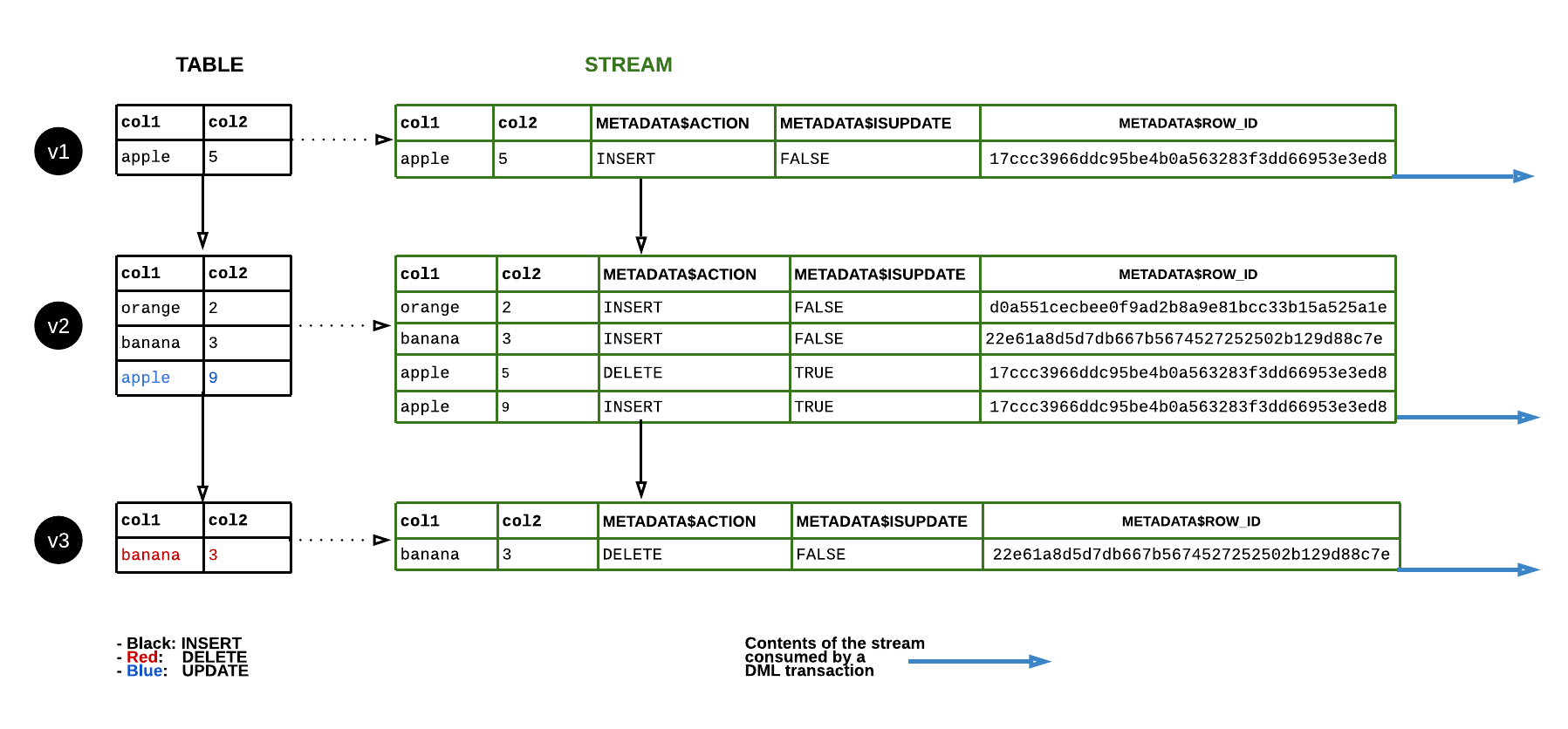
Metadata Columns for an UPDATE Operation
When a single row is updated in the source table, the standard stream produces two rows: a DELETE of the old value (METADATA$ISUPDATE=TRUE) and an INSERT of the new value (METADATA$ISUPDATE=TRUE). Plain INSERTs and DELETEs produce one row each with METADATA$ISUPDATE=FALSE.
5. Consuming a Stream
Consuming a stream means reading it inside a DML statement. This is the only way to advance the stream offset.
1-- Consume stream: insert new orders into a target table2INSERT INTO orders_processed3SELECT4 order_id,5 customer_id,6 amount,7 CURRENT_TIMESTAMP() AS processed_at8FROM orders_stream9WHERE METADATA$ACTION = 'INSERT'10AND METADATA$ISUPDATE = FALSE;1112-- MERGE pattern: handle inserts, updates, and deletes in one statement13MERGE INTO orders_target AS t14USING (15 SELECT *,16 METADATA$ACTION,17 METADATA$ISUPDATE18 FROM orders_stream19) AS s20ON t.order_id = s.order_id21WHEN MATCHED AND s.METADATA$ACTION = 'DELETE' AND s.METADATA$ISUPDATE = FALSE THEN22 DELETE23WHEN MATCHED AND s.METADATA$ACTION = 'INSERT' AND s.METADATA$ISUPDATE = TRUE THEN24 UPDATE SET t.amount = s.amount, t.status = s.status25WHEN NOT MATCHED AND s.METADATA$ACTION = 'INSERT' THEN26 INSERT (order_id, customer_id, amount, status)27 VALUES (s.order_id, s.customer_id, s.amount, s.status);You can run SELECT * FROM my_stream to inspect current changes without advancing the offset. Only an INSERT, MERGE, UPDATE, or DELETE statement that references the stream in its data source will advance the offset. Use this to debug and verify stream contents before committing a pipeline.
6. Stream Staleness
A stream becomes stale if it is not consumed within the source table’s Data Retention Period (default 1 day on Standard, up to 90 days on Enterprise). Snowflake cannot guarantee the accuracy of the delta once the underlying micro-partition data required to compute it has been cleaned up by Fail-Safe expiry.
SHOW STREAMSexposes theSTALE(boolean) andSTALE_AFTER(timestamp) columns.- A stale stream must be dropped and recreated — you cannot “un-stale” it.
- To avoid staleness, ensure your Tasks run more frequently than the retention window.
-- Check for stale streams
SHOW STREAMS;

-- Identify if a specific stream is stale
SELECT SYSTEM$STREAM_HAS_DATA('orders_stream');
-- Returns TRUE if unconsumed data exists; FALSE if empty (or stale)
7. Tasks — Scheduled Automation Inside Snowflake
A Task is a Snowflake object that executes a single SQL statement (or a call to a Stored Procedure / Snowpark function) on a user-defined schedule. Think of it as a cron job that lives inside your Snowflake account — no external scheduler, no Airflow connection required.
Every newly created task is in SUSPENDED state by default. It will not execute until you run ALTER TASK mytask RESUME. This is a common exam trap — you create the task and expect it to run, but it never fires because you forgot to resume it.
Task Schedule Options
Tasks support two schedule formats:
- Interval-based:
SCHEDULE = '5 MINUTE'— runs every N minutes (1 to 11,520 minutes / 8 days max). - Cron-based:
SCHEDULE = 'USING CRON 0 9 * * MON-FRI UTC'— full cron expression. The timezone identifier is mandatory (e.g.,UTC,Europe/London).
1-- Basic task: virtual warehouse, interval schedule2CREATE OR REPLACE TASK process_new_orders3WAREHOUSE = COMPUTE_WH4SCHEDULE = '5 MINUTE'5AS6INSERT INTO orders_processed7SELECT order_id, customer_id, amount8FROM orders_stream9WHERE METADATA$ACTION = 'INSERT';1011-- Task with cron schedule (weekdays at 09:00 UTC)12CREATE OR REPLACE TASK daily_report_task13WAREHOUSE = REPORTING_WH14SCHEDULE = 'USING CRON 0 9 * * MON-FRI UTC'15AS16CALL generate_daily_report();1718-- Serverless task (Snowflake manages compute)19CREATE OR REPLACE TASK serverless_ingest20USER_TASK_MANAGED_INITIAL_WAREHOUSE_SIZE = 'XSMALL'21SCHEDULE = '10 MINUTE'22AS23INSERT INTO target SELECT * FROM orders_stream WHERE METADATA$ACTION = 'INSERT';2425-- MUST resume the task before it runs26ALTER TASK process_new_orders RESUME;27ALTER TASK daily_report_task RESUME;28ALTER TASK serverless_ingest RESUME;2930-- Suspend a task31ALTER TASK process_new_orders SUSPEND;8. Task Trees — DAGs
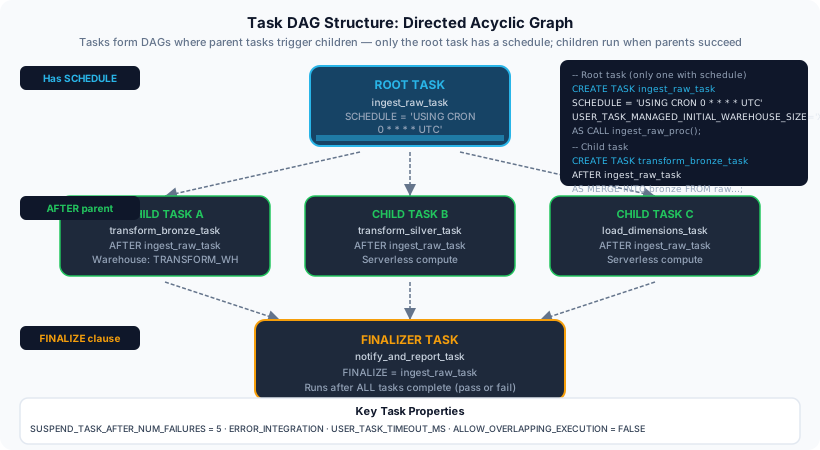
Snowflake tasks can be chained into a Directed Acyclic Graph (DAG). The root task carries the schedule; child tasks carry an AFTER clause naming their parent. No task can appear in a cycle.
Rules for task DAGs:
- Only the root task has a
SCHEDULE. - Child tasks use
AFTER parent_task_nameinstead of a schedule. - To enable the whole tree, resume child tasks first, then the root task — or use
SYSTEM$TASK_DEPENDENTS_ENABLE('root_task'). - A task tree can have up to 1,000 tasks in a single DAG.
Building a Task DAG — Step by Step
Create the root task with a schedule
The root task defines the trigger cadence. All downstream tasks inherit this schedule chain.
CREATE OR REPLACE TASK root_task
  WAREHOUSE = COMPUTE_WH
  SCHEDULE = '15 MINUTE'
AS
INSERT INTO stage_raw SELECT * FROM orders_stream WHERE METADATA$ACTION = 'INSERT';Create child task(s) with AFTER clause
Child tasks run after their named parent completes successfully. Do not specify SCHEDULE on child tasks.
CREATE OR REPLACE TASK child_task_1
  WAREHOUSE = COMPUTE_WH
  AFTER root_task
AS
INSERT INTO stage_clean SELECT * FROM stage_raw WHERE amount > 0;Create a grandchild task if needed
Chain as many levels as the pipeline requires, up to 1,000 tasks per DAG.
CREATE OR REPLACE TASK child_task_2
  WAREHOUSE = COMPUTE_WH
  AFTER child_task_1
AS
CALL aggregate_daily_totals();Enable the entire DAG
Resume all child tasks before the root, then resume the root. Or use the helper system function to enable all dependents at once.
-- Option A: resume individually (children first)
ALTER TASK child_task_2 RESUME;
ALTER TASK child_task_1 RESUME;
ALTER TASK root_task RESUME;

-- Option B: system function enables all children, then resume root
SELECT SYSTEM$TASK_DEPENDENTS_ENABLE('root_task');
ALTER TASK root_task RESUME;Monitor task execution
Query task history views to check run status, errors, and execution duration.
-- Session-level history
SELECT *
FROM TABLE(INFORMATION_SCHEMA.TASK_HISTORY(
    SCHEDULED_TIME_RANGE_START => DATEADD('hour', -1, CURRENT_TIMESTAMP()),
    TASK_NAME => 'root_task'
))
ORDER BY SCHEDULED_TIME DESC;

-- Account-level (90-day retention)
SELECT name, state, error_message, scheduled_time, completed_time
FROM SNOWFLAKE.ACCOUNT_USAGE.TASK_HISTORY
WHERE SCHEDULED_TIME > DATEADD('day', -7, CURRENT_TIMESTAMP())
ORDER BY SCHEDULED_TIME DESC;
Task DAG Structure
The root task runs every 15 minutes on a WAREHOUSE schedule. On success, child_task_1 runs immediately after. On success of child_task_1, child_task_2 runs. Each task uses the AFTER clause to express the dependency. The DAG terminates if any task fails — subsequent dependents do not run.
9. Serverless Tasks vs. Warehouse Tasks
Serverless Tasks vs. Warehouse-Based Tasks
A serverless task omits the WAREHOUSE clause entirely and instead specifies USER_TASK_MANAGED_INITIAL_WAREHOUSE_SIZE = 'XSMALL'. The initial size is a hint — Snowflake adjusts compute up or down based on the actual workload. Providing a WAREHOUSE name with this parameter simultaneously will cause an error.
10. Stream + Task Pipeline Pattern
The canonical Snowflake incremental pipeline combines a stream and a task:
- Source table receives new data (via Snowpipe, COPY, application INSERT).
- Stream records the delta.
- Task fires on schedule, reads the stream inside a DML statement, writes to target.
- Stream offset advances; the next task run sees only the next batch of changes.
-- Full stream + task pipeline example
-- Step 1: Stream on source
CREATE OR REPLACE STREAM raw_orders_stream ON TABLE raw.orders;

-- Step 2: Task to process stream every 5 minutes
CREATE OR REPLACE TASK process_orders_task
  USER_TASK_MANAGED_INITIAL_WAREHOUSE_SIZE = 'SMALL'
  SCHEDULE = '5 MINUTE'
WHEN
  SYSTEM$STREAM_HAS_DATA('raw_orders_stream')
AS
INSERT INTO curated.orders (order_id, customer_id, amount, inserted_at)
SELECT
    order_id,
    customer_id,
    amount,
    CURRENT_TIMESTAMP()
FROM raw_orders_stream
WHERE METADATA$ACTION = 'INSERT'
  AND METADATA$ISUPDATE = FALSE;

-- Step 3: Resume the task
ALTER TASK process_orders_task RESUME;
Note the WHEN SYSTEM$STREAM_HAS_DATA(...) clause — this is a precondition. The task only executes if the stream has unconsumed data, saving compute credits when there is nothing to process.
The optional WHEN clause on a task accepts a boolean expression. The most common use is SYSTEM$STREAM_HAS_DATA('stream_name') — this prevents the task from running (and burning compute) when the stream is empty. The task is still triggered on schedule; it simply skips execution if the condition evaluates to FALSE.
11. Monitoring & Troubleshooting
-- List all streams and their staleness status
SHOW STREAMS;

-- Check if stream has unconsumed data
SELECT SYSTEM$STREAM_HAS_DATA('orders_stream');

-- Task history (session context — last 7 days by default)
SELECT *
FROM TABLE(INFORMATION_SCHEMA.TASK_HISTORY())
ORDER BY SCHEDULED_TIME DESC
LIMIT 20;

-- Account Usage task history (90-day retention, may have latency)
SELECT
    name,
    state,
    error_message,
    scheduled_time,
    completed_time,
    DATEDIFF('second', scheduled_time, completed_time) AS duration_seconds
FROM SNOWFLAKE.ACCOUNT_USAGE.TASK_HISTORY
WHERE state = 'FAILED'
ORDER BY scheduled_time DESC;
CheatSheet
Streams & Tasks — Exam Cheat Sheet
Stream Types
StandardAppend-OnlyInsert-OnlyMetadata Columns
METADATA$ACTIONMETADATA$ISUPDATEMETADATA$ROW_IDStream Rules
StoresAdvances onStalenessCheck stalenessTask Rules
Default stateInterval maxCron requiresDAG root onlyServerless keyKey Functions
SYSTEM$STREAM_HAS_DATA()SYSTEM$TASK_DEPENDENTS_ENABLE()INFORMATION_SCHEMA.TASK_HISTORY()SNOWFLAKE.ACCOUNT_USAGE.TASK_HISTORYQuizzes
A standard stream records an UPDATE to a row in the source table. How does this UPDATE appear when you query the stream?
You create a new task with CREATE TASK and expect it to run in 5 minutes. After 30 minutes nothing has executed. What is the most likely cause?
Which of the following accurately describes a serverless task in Snowflake?
Flashcards
What does a Snowflake Stream store — data or an offset?
A stream stores only an offset (a pointer to the last consumed transaction). It does not copy or duplicate data. The delta is computed dynamically by comparing the offset to the current state of the source table.
Which operation advances a stream's offset: SELECT or INSERT...SELECT FROM stream?
Only a DML statement that reads the stream (INSERT, MERGE, UPDATE, DELETE) advances the stream offset. A plain SELECT from the stream reads the current delta without advancing the offset.
What happens to a stream that is not consumed within the table's Data Retention Period?
The stream becomes STALE. A stale stream cannot be used — it must be dropped and recreated. The SHOW STREAMS command exposes STALE (boolean) and STALE_AFTER (timestamp) columns to monitor staleness.
What is the default state of a newly created Snowflake Task?
SUSPENDED. A task will not execute until explicitly resumed with ALTER TASK task_name RESUME. This applies to both warehouse-based and serverless tasks.
How do you enable an entire task DAG tree at once?
Use SYSTEM$TASK_DEPENDENTS_ENABLE('root_task_name') to resume all child tasks in the DAG, then manually run ALTER TASK root_task RESUME to activate the root task. Child tasks must be resumed before the root.
Reinforce what you just read
Study the All flashcards with spaced repetition to lock it in.